
| 일 | 월 | 화 | 수 | 목 | 금 | 토 |
|---|---|---|---|---|---|---|
| 1 | 2 | 3 | 4 | 5 | 6 | 7 |
| 8 | 9 | 10 | 11 | 12 | 13 | 14 |
| 15 | 16 | 17 | 18 | 19 | 20 | 21 |
| 22 | 23 | 24 | 25 | 26 | 27 | 28 |
- ansible
- KEDA
- Timeout
- minIO
- calico
- Karpenter
- AutoScaling
- go
- 쿠버네티스
- EKS
- vscode
- HPA
- directpv
- 컨테이너
- WSL
- 묘공단
- curl
- 업그레이드
- cilium
- gateway api
- Azure
- kubernetes
- upgrade
- ubuntu
- AKS
- Object Storage
- VPA
- aws
- windows
- ipam
- Today
- Total
a story
[3] Cilium Networking - IPAM, Routing, Masquerading 본문
이번 포스트에서는 Cilium의 파드 통신에 대해서 살펴보기 위해서 IPAM 과 Routing, 그리고 Masquerading에 대해서 알아보겠습니다.
Cilium 공식 문서의 Networking Concepts의 아래에 해당 합니다.
https://docs.cilium.io/en/stable/network/concepts/

목차
- 실습 환경 구성
- IPAM
- Routing
- Masquerading
1. 실습 환경 구성
아래 Vagrantfile을 바탕으로 실습 환경을 구성합니다.
mkdir cilium-lab && cd cilium-lab

curl -O https://raw.githubusercontent.com/gasida/vagrant-lab/refs/heads/main/cilium-study/3w/Vagrantfile

vagrant up
이후 vagrant status로 확인해보면 k8s-ctr, k8s-w1, router라는 VM이 생성된 것을 확인하실 수 있습니다.
PS C:\projects\cilium-lab\w3> vagrant status
Current machine states:

k8s-ctr                   running (virtualbox)
k8s-w1                    running (virtualbox)
router                    running (virtualbox)

This environment represents multiple VMs. The VMs are all listed
above with their current state. For more information about a specific
VM, run `vagrant status NAME`.
이후 과정은 vagrant ssh k8s-ctr 으로 컨트롤 플레인에 진입하여 명령을 수행합니다.
실습 환경에서 노드 정보를 확인해보면, 컨트롤 플레인에 워커 노드 1대가 생성되어 있으며, Cilium이 이미 설치된 상태이로, IPAM은 Kubernetes host scope, Routing은 Native routing 모드로 구성되어 있습니다.
# 클러스터 정보 확인
kubectl get no
kubectl cluster-info
kubectl cluster-info dump | grep -m 2 -E "cluster-cidr|service-cluster-ip-range"
"--service-cluster-ip-range=10.96.0.0/16",
"--cluster-cidr=10.244.0.0/16",
kubectl describe cm -n kube-system kubeadm-config
kubectl describe cm -n kube-system kubelet-config
(⎈|HomeLab:N/A) root@k8s-ctr:~# kubectl get no
NAME STATUS ROLES AGE VERSION
k8s-ctr Ready control-plane 19m v1.33.2
k8s-w1 Ready <none> 13m v1.33.2
(⎈|HomeLab:N/A) root@k8s-ctr:~# kubectl cluster-info
Kubernetes control plane is running at https://192.168.10.100:6443
CoreDNS is running at https://192.168.10.100:6443/api/v1/namespaces/kube-system/services/kube-dns:dns/proxy
To further debug and diagnose cluster problems, use 'kubectl cluster-info dump'.
(⎈|HomeLab:N/A) root@k8s-ctr:~# kubectl cluster-info dump | grep -m 2 -E "cluster-cidr|service-cluster-ip-range"
"--service-cluster-ip-range=10.96.0.0/16",
"--cluster-cidr=10.244.0.0/16",
(⎈|HomeLab:N/A) root@k8s-ctr:~# kubectl describe cm -n kube-system kubeadm-config
Name: kubeadm-config
Namespace: kube-system
Labels: <none>
Annotations: <none>
Data
====
ClusterConfiguration:
----
apiServer: {}
apiVersion: kubeadm.k8s.io/v1beta4
caCertificateValidityPeriod: 87600h0m0s
certificateValidityPeriod: 8760h0m0s
certificatesDir: /etc/kubernetes/pki
clusterName: kubernetes
controllerManager: {}
dns: {}
encryptionAlgorithm: RSA-2048
etcd:
local:
dataDir: /var/lib/etcd
imageRepository: registry.k8s.io
kind: ClusterConfiguration
kubernetesVersion: v1.33.2
networking:
dnsDomain: cluster.local
podSubnet: 10.244.0.0/16
serviceSubnet: 10.96.0.0/16
proxy: {}
scheduler: {}
BinaryData
====
Events: <none>
(⎈|HomeLab:N/A) root@k8s-ctr:~# kubectl describe cm -n kube-system kubelet-config
Name: kubelet-config
Namespace: kube-system
Labels: <none>
Annotations: kubeadm.kubernetes.io/component-config.hash: sha256:0ff07274ab31cc8c0f9d989e90179a90b6e9b633c8f3671993f44185a0791127
Data
====
kubelet:
----
apiVersion: kubelet.config.k8s.io/v1beta1
authentication:
anonymous:
enabled: false
webhook:
cacheTTL: 0s
enabled: true
x509:
clientCAFile: /etc/kubernetes/pki/ca.crt
authorization:
mode: Webhook
webhook:
cacheAuthorizedTTL: 0s
cacheUnauthorizedTTL: 0s
cgroupDriver: systemd
clusterDNS:
- 10.96.0.10
clusterDomain: cluster.local
containerRuntimeEndpoint: ""
cpuManagerReconcilePeriod: 0s
crashLoopBackOff: {}
evictionPressureTransitionPeriod: 0s
fileCheckFrequency: 0s
healthzBindAddress: 127.0.0.1
healthzPort: 10248
httpCheckFrequency: 0s
imageMaximumGCAge: 0s
imageMinimumGCAge: 0s
kind: KubeletConfiguration
logging:
flushFrequency: 0
options:
json:
infoBufferSize: "0"
text:
infoBufferSize: "0"
verbosity: 0
memorySwap: {}
nodeStatusReportFrequency: 0s
nodeStatusUpdateFrequency: 0s
resolvConf: /run/systemd/resolve/resolv.conf
rotateCertificates: true
runtimeRequestTimeout: 0s
shutdownGracePeriod: 0s
shutdownGracePeriodCriticalPods: 0s
staticPodPath: /etc/kubernetes/manifests
streamingConnectionIdleTimeout: 0s
syncFrequency: 0s
volumeStatsAggPeriod: 0s
BinaryData
====
Events: <none>
(⎈|HomeLab:N/A) root@k8s-ctr:~#
# 노드 정보 : 상태, INTERNAL-IP 확인
kubectl get node -owide
# 파드 정보 : 상태, 파드 IP 확인
kubectl get nodes -o jsonpath='{range .items[*]}{.metadata.name}{"\t"}{.spec.podCIDR}{"\n"}{end}'
kubectl get ciliumnode -o json | grep podCIDRs -A2
kubectl get pod -A -owide
(⎈|HomeLab:N/A) root@k8s-ctr:~# kubectl get node -owide
NAME STATUS ROLES AGE VERSION INTERNAL-IP EXTERNAL-IP OS-IMAGE KERNEL-VERSION CONTAINER-RUNTIME
k8s-ctr Ready control-plane 21m v1.33.2 192.168.10.100 <none> Ubuntu 24.04.2 LTS 6.8.0-53-generic containerd://1.7.27
k8s-w1 Ready <none> 16m v1.33.2 192.168.10.101 <none> Ubuntu 24.04.2 LTS 6.8.0-53-generic containerd://1.7.27
(⎈|HomeLab:N/A) root@k8s-ctr:~# kubectl get nodes -o jsonpath='{range .items[*]}{.metadata.name}{"\t"}{.spec.podCIDR}{"\n"}{end}'
k8s-ctr 10.244.0.0/24
k8s-w1 10.244.1.0/24
(⎈|HomeLab:N/A) root@k8s-ctr:~# kubectl get ciliumnode -o json | grep podCIDRs -A2
"podCIDRs": [
"10.244.0.0/24"
],
--
"podCIDRs": [
"10.244.1.0/24"
],
(⎈|HomeLab:N/A) root@k8s-ctr:~# kubectl get pod -A -owide
NAMESPACE NAME READY STATUS RESTARTS AGE IP NODE NOMINATED NODE READINESS GATES
cilium-monitoring grafana-5c69859d9-fphx8 1/1 Running 0 21m 10.244.0.75 k8s-ctr <none> <none>
cilium-monitoring prometheus-6fc896bc5d-b45nk 1/1 Running 0 21m 10.244.0.122 k8s-ctr <none> <none>
kube-system cilium-envoy-rt7pm 1/1 Running 0 21m 192.168.10.100 k8s-ctr <none> <none>
kube-system cilium-envoy-z64wz 1/1 Running 1 (11m ago) 16m 192.168.10.101 k8s-w1 <none> <none>
kube-system cilium-frrtz 1/1 Running 1 (11m ago) 16m 192.168.10.101 k8s-w1 <none> <none>
kube-system cilium-operator-5bc66f5b9b-hmgfx 1/1 Running 0 21m 192.168.10.100 k8s-ctr <none> <none>
kube-system cilium-tj7tl 1/1 Running 0 21m 192.168.10.100 k8s-ctr <none> <none>
kube-system coredns-674b8bbfcf-5lc2v 1/1 Running 0 21m 10.244.0.45 k8s-ctr <none> <none>
kube-system coredns-674b8bbfcf-f9qln 1/1 Running 0 21m 10.244.0.181 k8s-ctr <none> <none>
kube-system etcd-k8s-ctr 1/1 Running 0 22m 192.168.10.100 k8s-ctr <none> <none>
kube-system hubble-relay-5dcd46f5c-vlwg4 1/1 Running 0 21m 10.244.0.146 k8s-ctr <none> <none>
kube-system hubble-ui-76d4965bb6-5qtp7 2/2 Running 0 21m 10.244.0.85 k8s-ctr <none> <none>
kube-system kube-apiserver-k8s-ctr 1/1 Running 0 21m 192.168.10.100 k8s-ctr <none> <none>
kube-system kube-controller-manager-k8s-ctr 1/1 Running 1 (14m ago) 21m 192.168.10.100 k8s-ctr <none> <none>
kube-system kube-proxy-gdbb4 1/1 Running 1 (11m ago) 16m 192.168.10.101 k8s-w1 <none> <none>
kube-system kube-proxy-vshp2 1/1 Running 0 21m 192.168.10.100 k8s-ctr <none> <none>
kube-system kube-scheduler-k8s-ctr 1/1 Running 1 (3m6s ago) 21m 192.168.10.100 k8s-ctr <none> <none>
local-path-storage local-path-provisioner-74f9666bc9-hmkjc 1/1 Running 0 21m 10.244.0.66 k8s-ctr <none> <none>
# ipam 과 routing 모드 확인
cilium config view | grep ^ipam
cilium config view | grep ^routing-mode
(⎈|HomeLab:N/A) root@k8s-ctr:~# cilium config view | grep ^ipam
ipam kubernetes
ipam-cilium-node-update-rate 15s
(⎈|HomeLab:N/A) root@k8s-ctr:~# cilium config view | grep ^routing-mode
routing-mode native
# cilium 상태 확인
kubectl get cm -n kube-system cilium-config -o json | jq
cilium status
cilium config view
(⎈|HomeLab:N/A) root@k8s-ctr:~# kubectl get cm -n kube-system cilium-config -o json | jq
{
"apiVersion": "v1",
"data": {
"agent-not-ready-taint-key": "node.cilium.io/agent-not-ready",
"arping-refresh-period": "30s",
"auto-direct-node-routes": "true",
"bpf-distributed-lru": "false",
"bpf-events-drop-enabled": "true",
"bpf-events-policy-verdict-enabled": "true",
"bpf-events-trace-enabled": "true",
"bpf-lb-acceleration": "disabled",
"bpf-lb-algorithm-annotation": "false",
"bpf-lb-external-clusterip": "false",
"bpf-lb-map-max": "65536",
"bpf-lb-mode-annotation": "false",
"bpf-lb-sock": "false",
"bpf-lb-source-range-all-types": "false",
"bpf-map-dynamic-size-ratio": "0.0025",
"bpf-policy-map-max": "16384",
"bpf-root": "/sys/fs/bpf",
"cgroup-root": "/run/cilium/cgroupv2",
"cilium-endpoint-gc-interval": "5m0s",
"cluster-id": "0",
"cluster-name": "default",
"clustermesh-enable-endpoint-sync": "false",
"clustermesh-enable-mcs-api": "false",
"cni-exclusive": "true",
"cni-log-file": "/var/run/cilium/cilium-cni.log",
"controller-group-metrics": "write-cni-file sync-host-ips sync-lb-maps-with-k8s-services",
"custom-cni-conf": "false",
"datapath-mode": "veth",
"debug": "true",
"debug-verbose": "",
"default-lb-service-ipam": "lbipam",
"direct-routing-skip-unreachable": "false",
"dnsproxy-enable-transparent-mode": "true",
"dnsproxy-socket-linger-timeout": "10",
"egress-gateway-reconciliation-trigger-interval": "1s",
"enable-auto-protect-node-port-range": "true",
"enable-bpf-clock-probe": "false",
"enable-bpf-masquerade": "true",
"enable-endpoint-health-checking": "false",
"enable-endpoint-lockdown-on-policy-overflow": "false",
"enable-endpoint-routes": "true",
"enable-experimental-lb": "false",
"enable-health-check-loadbalancer-ip": "false",
"enable-health-check-nodeport": "true",
"enable-health-checking": "false",
"enable-hubble": "true",
"enable-hubble-open-metrics": "true",
"enable-internal-traffic-policy": "true",
"enable-ipv4": "true",
"enable-ipv4-big-tcp": "false",
"enable-ipv4-masquerade": "true",
"enable-ipv6": "false",
"enable-ipv6-big-tcp": "false",
"enable-ipv6-masquerade": "true",
"enable-k8s-networkpolicy": "true",
"enable-k8s-terminating-endpoint": "true",
"enable-l2-neigh-discovery": "true",
"enable-l7-proxy": "true",
"enable-lb-ipam": "true",
"enable-local-redirect-policy": "false",
"enable-masquerade-to-route-source": "false",
"enable-metrics": "true",
"enable-node-selector-labels": "false",
"enable-non-default-deny-policies": "true",
"enable-policy": "default",
"enable-policy-secrets-sync": "true",
"enable-runtime-device-detection": "true",
"enable-sctp": "false",
"enable-source-ip-verification": "true",
"enable-svc-source-range-check": "true",
"enable-tcx": "true",
"enable-vtep": "false",
"enable-well-known-identities": "false",
"enable-xt-socket-fallback": "true",
"envoy-access-log-buffer-size": "4096",
"envoy-base-id": "0",
"envoy-keep-cap-netbindservice": "false",
"external-envoy-proxy": "true",
"health-check-icmp-failure-threshold": "3",
"http-retry-count": "3",
"hubble-disable-tls": "false",
"hubble-export-file-max-backups": "5",
"hubble-export-file-max-size-mb": "10",
"hubble-listen-address": ":4244",
"hubble-metrics": "dns drop tcp flow port-distribution icmp httpV2:exemplars=true;labelsContext=source_ip,source_namespace,source_workload,destination_ip,destination_namespace,destination_workload,traffic_direction",
"hubble-metrics-server": ":9965",
"hubble-metrics-server-enable-tls": "false",
"hubble-socket-path": "/var/run/cilium/hubble.sock",
"hubble-tls-cert-file": "/var/lib/cilium/tls/hubble/server.crt",
"hubble-tls-client-ca-files": "/var/lib/cilium/tls/hubble/client-ca.crt",
"hubble-tls-key-file": "/var/lib/cilium/tls/hubble/server.key",
"identity-allocation-mode": "crd",
"identity-gc-interval": "15m0s",
"identity-heartbeat-timeout": "30m0s",
"install-no-conntrack-iptables-rules": "true",
"ipam": "kubernetes",
"ipam-cilium-node-update-rate": "15s",
"iptables-random-fully": "false",
"ipv4-native-routing-cidr": "10.244.0.0/16",
"k8s-require-ipv4-pod-cidr": "true",
"k8s-require-ipv6-pod-cidr": "false",
"kube-proxy-replacement": "true",
"kube-proxy-replacement-healthz-bind-address": "",
"max-connected-clusters": "255",
"mesh-auth-enabled": "true",
"mesh-auth-gc-interval": "5m0s",
"mesh-auth-queue-size": "1024",
"mesh-auth-rotated-identities-queue-size": "1024",
"monitor-aggregation": "medium",
"monitor-aggregation-flags": "all",
"monitor-aggregation-interval": "5s",
"nat-map-stats-entries": "32",
"nat-map-stats-interval": "30s",
"node-port-bind-protection": "true",
"nodeport-addresses": "",
"nodes-gc-interval": "5m0s",
"operator-api-serve-addr": "127.0.0.1:9234",
"operator-prometheus-serve-addr": ":9963",
"policy-cidr-match-mode": "",
"policy-secrets-namespace": "cilium-secrets",
"policy-secrets-only-from-secrets-namespace": "true",
"preallocate-bpf-maps": "false",
"procfs": "/host/proc",
"prometheus-serve-addr": ":9962",
"proxy-connect-timeout": "2",
"proxy-idle-timeout-seconds": "60",
"proxy-initial-fetch-timeout": "30",
"proxy-max-concurrent-retries": "128",
"proxy-max-connection-duration-seconds": "0",
"proxy-max-requests-per-connection": "0",
"proxy-xff-num-trusted-hops-egress": "0",
"proxy-xff-num-trusted-hops-ingress": "0",
"remove-cilium-node-taints": "true",
"routing-mode": "native",
"service-no-backend-response": "reject",
"set-cilium-is-up-condition": "true",
"set-cilium-node-taints": "true",
"synchronize-k8s-nodes": "true",
"tofqdns-dns-reject-response-code": "refused",
"tofqdns-enable-dns-compression": "true",
"tofqdns-endpoint-max-ip-per-hostname": "1000",
"tofqdns-idle-connection-grace-period": "0s",
"tofqdns-max-deferred-connection-deletes": "10000",
"tofqdns-proxy-response-max-delay": "100ms",
"tunnel-protocol": "vxlan",
"tunnel-source-port-range": "0-0",
"unmanaged-pod-watcher-interval": "15",
"vtep-cidr": "",
"vtep-endpoint": "",
"vtep-mac": "",
"vtep-mask": "",
"write-cni-conf-when-ready": "/host/etc/cni/net.d/05-cilium.conflist"
},
"kind": "ConfigMap",
"metadata": {
"annotations": {
"meta.helm.sh/release-name": "cilium",
"meta.helm.sh/release-namespace": "kube-system"
},
"creationTimestamp": "2025-08-02T06:06:32Z",
"labels": {
"app.kubernetes.io/managed-by": "Helm"
},
"name": "cilium-config",
"namespace": "kube-system",
"resourceVersion": "447",
"uid": "fe79f2c8-35ed-4a1c-955a-7c50243ffae7"
}
}
(⎈|HomeLab:N/A) root@k8s-ctr:~# cilium status
/¯¯\
/¯¯\__/¯¯\ Cilium: OK
\__/¯¯\__/ Operator: OK
/¯¯\__/¯¯\ Envoy DaemonSet: OK
\__/¯¯\__/ Hubble Relay: OK
\__/ ClusterMesh: disabled
DaemonSet cilium Desired: 2, Ready: 2/2, Available: 2/2
DaemonSet cilium-envoy Desired: 2, Ready: 2/2, Available: 2/2
Deployment cilium-operator Desired: 1, Ready: 1/1, Available: 1/1
Deployment hubble-relay Desired: 1, Ready: 1/1, Available: 1/1
Deployment hubble-ui Desired: 1, Ready: 1/1, Available: 1/1
Containers: cilium Running: 2
cilium-envoy Running: 2
cilium-operator Running: 1
clustermesh-apiserver
hubble-relay Running: 1
hubble-ui Running: 1
Cluster Pods: 7/7 managed by Cilium
Helm chart version: 1.17.6
Image versions cilium quay.io/cilium/cilium:v1.17.6@sha256:544de3d4fed7acba72758413812780a4972d47c39035f2a06d6145d8644a3353: 2
cilium-envoy quay.io/cilium/cilium-envoy:v1.33.4-1752151664-7c2edb0b44cf95f326d628b837fcdd845102ba68@sha256:318eff387835ca2717baab42a84f35a83a5f9e7d519253df87269f80b9ff0171: 2
cilium-operator quay.io/cilium/operator-generic:v1.17.6@sha256:91ac3bf7be7bed30e90218f219d4f3062a63377689ee7246062fa0cc3839d096: 1
hubble-relay quay.io/cilium/hubble-relay:v1.17.6@sha256:7d17ec10b3d37341c18ca56165b2f29a715cb8ee81311fd07088d8bf68c01e60: 1
hubble-ui quay.io/cilium/hubble-ui-backend:v0.13.2@sha256:a034b7e98e6ea796ed26df8f4e71f83fc16465a19d166eff67a03b822c0bfa15: 1
hubble-ui quay.io/cilium/hubble-ui:v0.13.2@sha256:9e37c1296b802830834cc87342a9182ccbb71ffebb711971e849221bd9d59392: 1
(⎈|HomeLab:N/A) root@k8s-ctr:~# cilium config view
agent-not-ready-taint-key node.cilium.io/agent-not-ready
arping-refresh-period 30s
auto-direct-node-routes true
bpf-distributed-lru false
bpf-events-drop-enabled true
bpf-events-policy-verdict-enabled true
bpf-events-trace-enabled true
bpf-lb-acceleration disabled
bpf-lb-algorithm-annotation false
bpf-lb-external-clusterip false
bpf-lb-map-max 65536
bpf-lb-mode-annotation false
bpf-lb-sock false
bpf-lb-source-range-all-types false
bpf-map-dynamic-size-ratio 0.0025
bpf-policy-map-max 16384
bpf-root /sys/fs/bpf
cgroup-root /run/cilium/cgroupv2
cilium-endpoint-gc-interval 5m0s
cluster-id 0
cluster-name default
clustermesh-enable-endpoint-sync false
clustermesh-enable-mcs-api false
cni-exclusive true
cni-log-file /var/run/cilium/cilium-cni.log
controller-group-metrics write-cni-file sync-host-ips sync-lb-maps-with-k8s-services
custom-cni-conf false
datapath-mode veth
debug true
debug-verbose
default-lb-service-ipam lbipam
direct-routing-skip-unreachable false
dnsproxy-enable-transparent-mode true
dnsproxy-socket-linger-timeout 10
egress-gateway-reconciliation-trigger-interval 1s
enable-auto-protect-node-port-range true
enable-bpf-clock-probe false
enable-bpf-masquerade true
enable-endpoint-health-checking false
enable-endpoint-lockdown-on-policy-overflow false
enable-endpoint-routes true
enable-experimental-lb false
enable-health-check-loadbalancer-ip false
enable-health-check-nodeport true
enable-health-checking false
enable-hubble true
enable-hubble-open-metrics true
enable-internal-traffic-policy true
enable-ipv4 true
enable-ipv4-big-tcp false
enable-ipv4-masquerade true
enable-ipv6 false
enable-ipv6-big-tcp false
enable-ipv6-masquerade true
enable-k8s-networkpolicy true
enable-k8s-terminating-endpoint true
enable-l2-neigh-discovery true
enable-l7-proxy true
enable-lb-ipam true
enable-local-redirect-policy false
enable-masquerade-to-route-source false
enable-metrics true
enable-node-selector-labels false
enable-non-default-deny-policies true
enable-policy default
enable-policy-secrets-sync true
enable-runtime-device-detection true
enable-sctp false
enable-source-ip-verification true
enable-svc-source-range-check true
enable-tcx true
enable-vtep false
enable-well-known-identities false
enable-xt-socket-fallback true
envoy-access-log-buffer-size 4096
envoy-base-id 0
envoy-keep-cap-netbindservice false
external-envoy-proxy true
health-check-icmp-failure-threshold 3
http-retry-count 3
hubble-disable-tls false
hubble-export-file-max-backups 5
hubble-export-file-max-size-mb 10
hubble-listen-address :4244
hubble-metrics dns drop tcp flow port-distribution icmp httpV2:exemplars=true;labelsContext=source_ip,source_namespace,source_workload,destination_ip,destination_namespace,destination_workload,traffic_direction
hubble-metrics-server :9965
hubble-metrics-server-enable-tls false
hubble-socket-path /var/run/cilium/hubble.sock
hubble-tls-cert-file /var/lib/cilium/tls/hubble/server.crt
hubble-tls-client-ca-files /var/lib/cilium/tls/hubble/client-ca.crt
hubble-tls-key-file /var/lib/cilium/tls/hubble/server.key
identity-allocation-mode crd
identity-gc-interval 15m0s
identity-heartbeat-timeout 30m0s
install-no-conntrack-iptables-rules true
ipam kubernetes
ipam-cilium-node-update-rate 15s
iptables-random-fully false
ipv4-native-routing-cidr 10.244.0.0/16
k8s-require-ipv4-pod-cidr true
k8s-require-ipv6-pod-cidr false
kube-proxy-replacement true
kube-proxy-replacement-healthz-bind-address
max-connected-clusters 255
mesh-auth-enabled true
mesh-auth-gc-interval 5m0s
mesh-auth-queue-size 1024
mesh-auth-rotated-identities-queue-size 1024
monitor-aggregation medium
monitor-aggregation-flags all
monitor-aggregation-interval 5s
nat-map-stats-entries 32
nat-map-stats-interval 30s
node-port-bind-protection true
nodeport-addresses
nodes-gc-interval 5m0s
operator-api-serve-addr 127.0.0.1:9234
operator-prometheus-serve-addr :9963
policy-cidr-match-mode
policy-secrets-namespace cilium-secrets
policy-secrets-only-from-secrets-namespace true
preallocate-bpf-maps false
procfs /host/proc
prometheus-serve-addr :9962
proxy-connect-timeout 2
proxy-idle-timeout-seconds 60
proxy-initial-fetch-timeout 30
proxy-max-concurrent-retries 128
proxy-max-connection-duration-seconds 0
proxy-max-requests-per-connection 0
proxy-xff-num-trusted-hops-egress 0
proxy-xff-num-trusted-hops-ingress 0
remove-cilium-node-taints true
routing-mode native
service-no-backend-response reject
set-cilium-is-up-condition true
set-cilium-node-taints true
synchronize-k8s-nodes true
tofqdns-dns-reject-response-code refused
tofqdns-enable-dns-compression true
tofqdns-endpoint-max-ip-per-hostname 1000
tofqdns-idle-connection-grace-period 0s
tofqdns-max-deferred-connection-deletes 10000
tofqdns-proxy-response-max-delay 100ms
tunnel-protocol vxlan
tunnel-source-port-range 0-0
unmanaged-pod-watcher-interval 15
vtep-cidr
vtep-endpoint
vtep-mac
vtep-mask
write-cni-conf-when-ready /host/etc/cni/net.d/05-cilium.conflist추가로 해당 실습 환경에는 router라는 VM이 생성되어 있는데, 이 VM은 사내망 통신이 필요한 경우 경유하는 라우터의 역할을 수행합니다. 특별히 라우팅 기능을 설치한 것은 아니며, router에는 dummy interface를 통해서 10.10.0.0/16 대역의 통신 가능한 인터페이스를 생성하였습니다.
또한 라우팅의 역할을 처리하는 것 처럼 동작하기 위해 IP forward가 가능하도록 설정하였습니다.
root@router:~# ip -br -c a
lo               UNKNOWN        127.0.0.1/8 ::1/128
eth0             UP             10.0.2.15/24 metric 100 fd17:625c:f037:2:a00:27ff:fe6b:69c9/64 fe80::a00:27ff:fe6b:69c9/64
eth1             UP             192.168.10.200/24 fe80::a00:27ff:fed1:1a0d/64
loop1            UNKNOWN        10.10.1.200/24 fe80::4c64:a5ff:fe5d:2386/64
loop2            UNKNOWN        10.10.2.200/24 fe80::7cb5:ff:fefc:b543/64
root@router:~# ip route
default via 10.0.2.2 dev eth0 proto dhcp src 10.0.2.15 metric 100
10.0.2.0/24 dev eth0 proto kernel scope link src 10.0.2.15 metric 100
10.0.2.2 dev eth0 proto dhcp scope link src 10.0.2.15 metric 100
10.0.2.3 dev eth0 proto dhcp scope link src 10.0.2.15 metric 100
10.10.1.0/24 dev loop1 proto kernel scope link src 10.10.1.200
10.10.2.0/24 dev loop2 proto kernel scope link src 10.10.2.200
192.168.10.0/24 dev eth1 proto kernel scope link src 192.168.10.200
root@router:~# sysctl -a |grep ip_forward
net.ipv4.ip_forward = 1
net.ipv4.ip_forward_update_priority = 1
net.ipv4.ip_forward_use_pmtu = 0
해당 실습 환경을 바탕으로 IPAM 부터 설명을 이어가겠습니다.
2. IPAM
CNI Plugin 의 주요 역할은 파드의 IP 주소와 네트워크를 구성하는 IPAM(IP Address Management)과 파드가 통신이 가능하도록 연결해주는 Connectivity 혹은 Routing 입니다.
Cilium에서 제공하는 IPAM은 Kubernetes Host Scope 혹은 Cluster Scope(Default), Multi-Pool(Beta)을 사용할 수 있습니다.
| Feature | Kubernetes Host Scope | Cluster Scope (default) | Multi-Pool |
|---|---|---|---|
| Tunnel routing | ✅ | ✅ | ✅ |
| Direct routing | ✅ | ✅ | ✅ |
| CIDR Configuration | Kubernetes | Cilium | Cilium |
| Multiple CIDRs per cluster | ❌ | ✅ | ✅ |
| Multiple CIDRs per node | ❌ | ❌ | ✅ |
| Dynamic CIDR/IP allocation | ❌ | ❌ | ✅ |
각 IPAM 모드에 대한 설명을 아래 문서를 참고하실 수 있습니다.
참고: https://isovalent.com/blog/post/overcoming-kubernetes-ip-address-exhaustion-with-cilium/
먼저 Kubernetes Host Scope은 Kubernetes에 의해서 PodCIDR이 각 노드에 할당 됩니다. Cilium Agent는 v1.Node 오브젝트에 PodCIDR이 할당될 때가지 startup 하지 않고 대기하며, 이후에 PodCIDR에 따라, host-scope allocator가 파드 IP를 할당합니다.
이 모드에서는 kube-controller-manager에 의해서 노드별 PodCIDR이 할당되고 Cilium에서도 해당 정보를 이용합니다. 표에서 CIDR configuration 주체가 Kubernetes로 확인됩니다.
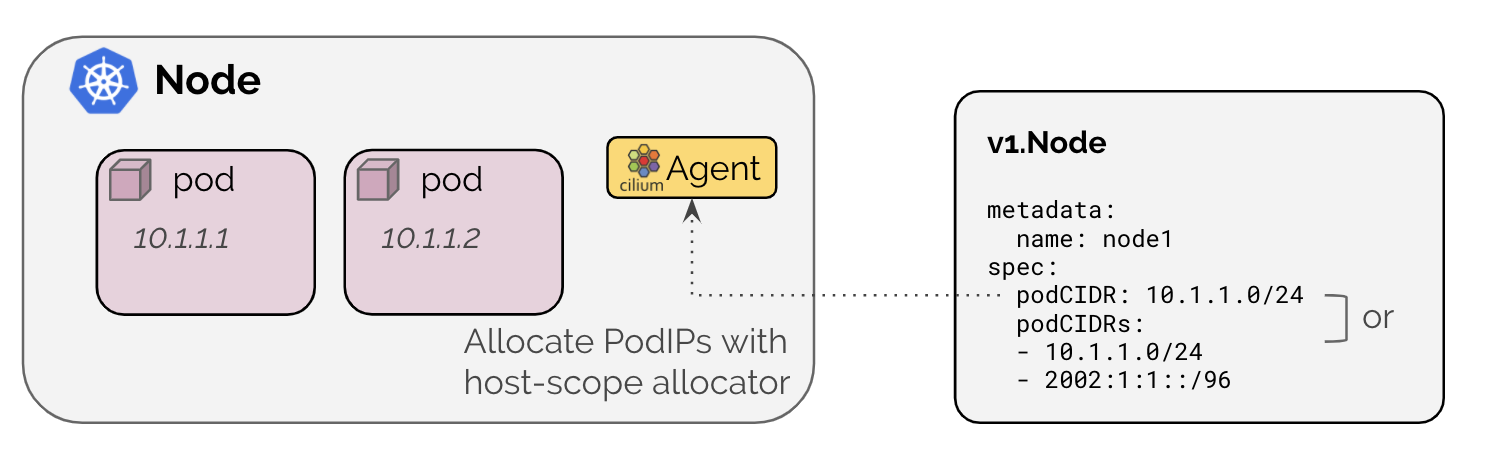
출처: https://docs.cilium.io/en/stable/network/concepts/ipam/kubernetes/
Cluster Scope IPAM 모드에서는 각 노드에 노드별 PodCIDR을 할당하고, 노드의 Cilium Agent의 host-scope allocator를 통해서 파드IP를 할당합니다. Kubernetes Host Scope는 kube-controller-manager가 v1.Node 리소스에 노드별 PodCIDR을 할당하지만, cluster Scope에서는 Cilium Operator가 v2.CiliumNode 리소스에 노드별 PodCIDR을 할당한다는 차이가 있습니다. 또한 Cluster sope에서는 multiple pod CIDR을 사용할 수 있습니다.

출처: https://docs.cilium.io/en/stable/network/concepts/ipam/cluster-pool/
Multi-Pool은 beta feature로, 여러 다른 IPAM pools에서 PodCIDR을 할당하는 것을 지원합니다. 이를 통해서 동일 노드에 다른 IP 대역을 할당하거나, 동적으로 PodCIDR을 추가하는 기능을 제공합니다. 문서를 살펴보면 Cluster Scope에서도 다른 IP대역을 할당할 수 있지만 동적으로 추가할 수 없으며, Multi-pool에서는 ipam.cilium.io/ip-pool: mars와 같이 파드 스펙에 ip-pool을 명시하여 파드 IP 할당 특정 ip-pool로 지정하여 원하는 IP 대역에서 할당 받을 수 있습니다.
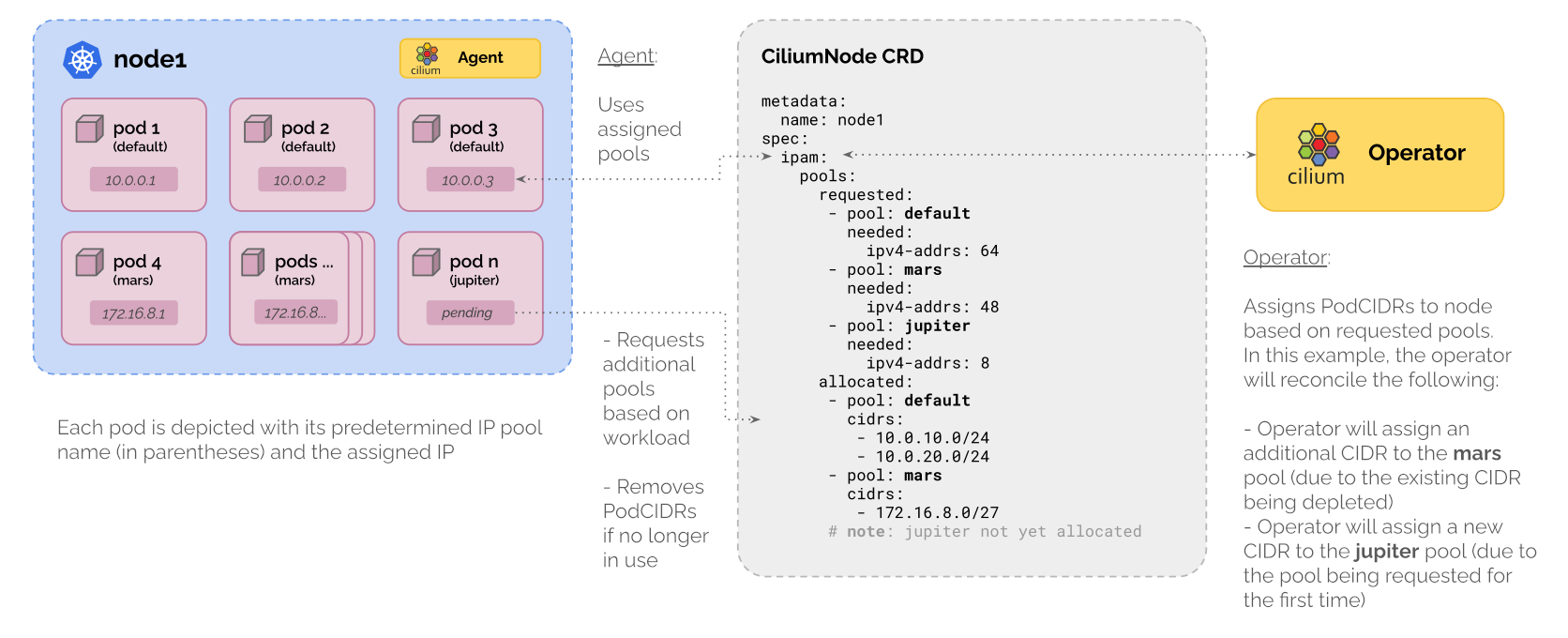
출처: https://docs.cilium.io/en/stable/network/concepts/ipam/multi-pool/
참고로 문서를 살펴보면 Cilium을 다른 퍼블릭 클라우드에서도 사용이 가능한 것을 알 수 있습니다.
이러한 모드를 Cilium CNI Chaining 이라고 하며, Cilium이 수행하는 역할을 다른 CNI와 협업하여 수행하도록 하는 일종의 하이브리드 모드라고 생각할 수 있습니다.
보통 클라우드에서 제공하는 관리형 쿠버네티스 서비스는 해당 클라우드 네트워크에 최적화된 IPAM을 제공하고 있고, IPAM은 클라우드 사의 CNI를 사용해 파드 네트워크 할당과 파드 간 연결을 클라우드 사에서 제공하고, 로드 밸런싱, 네트워크 정책 등 Datapath에 해당하는 역할을 Cilium에서 수행하는 방식으로 동작합니다.
예를 들어, Azure CNI powered by Cilium의 CNI 는 아래와 같이 동작합니다.
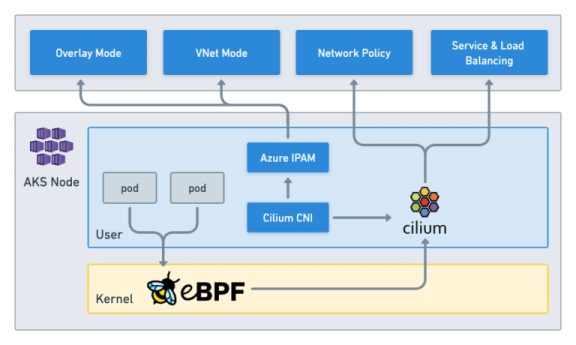
출처: https://isovalent.com/blog/post/tutorial-azure-cni-powered-by-cilium/
Cilium에서 제공하는 IPAM 모드의 특성을 살펴보았으며, 실습을 통해 Kubernetes host scope과 Cluster scope에 대해서 세부적으로 살펴보겠습니다.
Kubernetes host scope
실습 환경의 클러스터는 Kubernetes host scope으로 구성되어 있으며, 아래와 같이 정보를 확인해보겠습니다.
# 클러스터 정보 확인
kubectl cluster-info dump | grep -m 2 -E "cluster-cidr|service-cluster-ip-range"
                            "--service-cluster-ip-range=10.96.0.0/16",
                            "--cluster-cidr=10.244.0.0/16",

# ipam 모드 확인
cilium config view | grep ^ipam
ipam                                              kubernetes

# 노드별 파드에 할당되는 IPAM(PodCIDR) 정보 확인
# --allocate-node-cidrs=true 로 설정된 kube-controller-manager에서 CIDR을 자동 할당함
kubectl get nodes -o jsonpath='{range .items[*]}{.metadata.name}{"\t"}{.spec.podCIDR}{"\n"}{end}'


# 확인 결과
(⎈|HomeLab:N/A) root@k8s-ctr:~# cilium config view | grep ^routing-mode
routing-mode                                      native
(⎈|HomeLab:N/A) root@k8s-ctr:~# kubectl cluster-info dump | grep -m 2 -E "cluster-cidr|service-cluster-ip-range"
                            "--service-cluster-ip-range=10.96.0.0/16",
                            "--cluster-cidr=10.244.0.0/16",
(⎈|HomeLab:N/A) root@k8s-ctr:~# cilium config view | grep ^ipam
ipam                                              kubernetes
ipam-cilium-node-update-rate                      15s
(⎈|HomeLab:N/A) root@k8s-ctr:~# kubectl get nodes -o jsonpath='{range .items[*]}{.metadata.name}{"\t"}{.spec.podCIDR}{"\n"}{end}'
k8s-ctr 10.244.0.0/24
k8s-w1  10.244.1.0/24


# kube-controller-manager에 아래와 같은 속성을 확인할 수 있음
kubectl describe pod -n kube-system kube-controller-manager-k8s-ctr
...
    Command:
      kube-controller-manager
      --allocate-node-cidrs=true # node cidr을 할당 함
      --authentication-kubeconfig=/etc/kubernetes/controller-manager.conf
      --authorization-kubeconfig=/etc/kubernetes/controller-manager.conf
      --bind-address=127.0.0.1
      --client-ca-file=/etc/kubernetes/pki/ca.crt
      --cluster-cidr=10.244.0.0/16 # podCIDR, 여기서 노드 당 24bit 씩 할당 함
      --cluster-name=kubernetes
      --cluster-signing-cert-file=/etc/kubernetes/pki/ca.crt
      --cluster-signing-key-file=/etc/kubernetes/pki/ca.key
      --controllers=*,bootstrapsigner,tokencleaner
      --kubeconfig=/etc/kubernetes/controller-manager.conf
      --leader-elect=true
      --requestheader-client-ca-file=/etc/kubernetes/pki/front-proxy-ca.crt
      --root-ca-file=/etc/kubernetes/pki/ca.crt
      --service-account-private-key-file=/etc/kubernetes/pki/sa.key
      --service-cluster-ip-range=10.96.0.0/16 # Service CIDR
      --use-service-account-credentials=true
...

kubectl get ciliumnode -o json | grep podCIDRs -A2

# 파드 정보 : 상태, 파드 IP 확인
kubectl get ciliumendpoints.cilium.io -A

(⎈|HomeLab:N/A) root@k8s-ctr:~# kubectl get ciliumnode -o json | grep podCIDRs -A2
                    "podCIDRs": [
                        "10.244.0.0/24"
                    ],
--
                    "podCIDRs": [
                        "10.244.1.0/24"
                    ],

# ciliumNode의 ownerReferences가 v1.Node 인 것으로 확인된다.
(⎈|HomeLab:N/A) root@k8s-ctr:~# kubectl get ciliumnode -o json
{
    "apiVersion": "v1",
...
        {
            "apiVersion": "cilium.io/v2",
            "kind": "CiliumNode",
            "metadata": {
                "creationTimestamp": "2025-08-02T06:12:57Z",
                "generation": 2,
                "labels": {
                    "beta.kubernetes.io/arch": "amd64",
                    "beta.kubernetes.io/os": "linux",
                    "kubernetes.io/arch": "amd64",
                    "kubernetes.io/hostname": "k8s-w1",
                    "kubernetes.io/os": "linux"
                },
                "name": "k8s-w1",
                "ownerReferences": [
                    {
                        "apiVersion": "v1",
                        "kind": "Node",
                        "name": "k8s-w1",
                        "uid": "02854e0c-b8fa-4891-868b-3a42c93d8656"
                    }
                ],
                "resourceVersion": "1654",
                "uid": "5f1ab6b3-89c7-4249-a7a4-efcd8c5e7f7c"
            },
...

(⎈|HomeLab:N/A) root@k8s-ctr:~# kubectl get ciliumendpoints.cilium.io -A
NAMESPACE            NAME                                      SECURITY IDENTITY   ENDPOINT STATE   IPV4           IPV6
cilium-monitoring    grafana-5c69859d9-fphx8                   4388                ready            10.244.0.75
cilium-monitoring    prometheus-6fc896bc5d-b45nk               25471               ready            10.244.0.122
kube-system          coredns-674b8bbfcf-5lc2v                  8066                ready            10.244.0.45
kube-system          coredns-674b8bbfcf-f9qln                  8066                ready            10.244.0.181
kube-system          hubble-relay-5dcd46f5c-vlwg4              35931               ready            10.244.0.146
kube-system          hubble-ui-76d4965bb6-5qtp7                38335               ready            10.244.0.85
local-path-storage   local-path-provisioner-74f9666bc9-hmkjc   35629               ready            10.244.0.66
샘플 애플리케이션 배포하여 상세하게 알아보겠습니다.
# 샘플 애플리케이션 배포
cat << EOF | kubectl apply -f -
apiVersion: apps/v1
kind: Deployment
metadata:
  name: webpod
spec:
  replicas: 2
  selector:
    matchLabels:
      app: webpod
  template:
    metadata:
      labels:
        app: webpod
    spec:
      affinity:
        podAntiAffinity:
          requiredDuringSchedulingIgnoredDuringExecution:
          - labelSelector:
              matchExpressions:
              - key: app
                operator: In
                values:
                - sample-app
            topologyKey: "kubernetes.io/hostname"
      containers:
      - name: webpod
        image: traefik/whoami
        ports:
        - containerPort: 80
---
apiVersion: v1
kind: Service
metadata:
  name: webpod
  labels:
    app: webpod
spec:
  selector:
    app: webpod
  ports:
  - protocol: TCP
    port: 80
    targetPort: 80
  type: ClusterIP
EOF


# k8s-ctr 노드에 curl-pod 파드 배포
cat <<EOF | kubectl apply -f -
apiVersion: v1
kind: Pod
metadata:
  name: curl-pod
  labels:
    app: curl
spec:
  nodeName: k8s-ctr
  containers:
  - name: curl
    image: nicolaka/netshoot
    command: ["tail"]
    args: ["-f", "/dev/null"]
  terminationGracePeriodSeconds: 0
EOF
배포된 실습 애플리케이션을 살펴 보겠습니다.
# 배포 확인
kubectl get deploy,svc,ep webpod -owide
kubectl get endpointslices -l app=webpod
kubectl get ciliumendpoints # IP 확인
kubectl exec -it -n kube-system ds/cilium -c cilium-agent -- cilium-dbg endpoint list


(⎈|HomeLab:N/A) root@k8s-ctr:~# kubectl get deploy,svc,ep webpod -owide
Warning: v1 Endpoints is deprecated in v1.33+; use discovery.k8s.io/v1 EndpointSlice
NAME                     READY   UP-TO-DATE   AVAILABLE   AGE   CONTAINERS   IMAGES           SELECTOR
deployment.apps/webpod   2/2     2            2           46s   webpod       traefik/whoami   app=webpod

NAME             TYPE        CLUSTER-IP      EXTERNAL-IP   PORT(S)   AGE   SELECTOR
service/webpod   ClusterIP   10.96.195.112   <none>        80/TCP    46s   app=webpod

NAME               ENDPOINTS                        AGE
endpoints/webpod   10.244.0.164:80,10.244.1.77:80   44s
(⎈|HomeLab:N/A) root@k8s-ctr:~# kubectl get endpointslices -l app=webpod
NAME           ADDRESSTYPE   PORTS   ENDPOINTS                  AGE
webpod-ntxzf   IPv4          80      10.244.1.77,10.244.0.164   57s
(⎈|HomeLab:N/A) root@k8s-ctr:~# kubectl get ciliumendpoints
NAME                      SECURITY IDENTITY   ENDPOINT STATE   IPV4           IPV6
curl-pod                  13646               ready            10.244.0.188
webpod-697b545f57-cxr5t   54559               ready            10.244.0.164
webpod-697b545f57-mhtm7   54559               ready            10.244.1.77
(⎈|HomeLab:N/A) root@k8s-ctr:~# kubectl exec -it -n kube-system ds/cilium -c cilium-agent -- cilium-dbg endpoint list
ENDPOINT   POLICY (ingress)   POLICY (egress)   IDENTITY   LABELS (source:key[=value])                                                         IPv6   IPv4           STATUS
           ENFORCEMENT        ENFORCEMENT
225        Disabled           Disabled          4388       k8s:app=grafana                                                                            10.244.0.75    ready
                                                           k8s:io.cilium.k8s.namespace.labels.kubernetes.io/metadata.name=cilium-monitoring
                                                           k8s:io.cilium.k8s.policy.cluster=default
                                                           k8s:io.cilium.k8s.policy.serviceaccount=default
                                                           k8s:io.kubernetes.pod.namespace=cilium-monitoring
237        Disabled           Disabled          35629      k8s:app=local-path-provisioner                                                             10.244.0.66    ready
                                                           k8s:io.cilium.k8s.namespace.labels.kubernetes.io/metadata.name=local-path-storage
                                                           k8s:io.cilium.k8s.policy.cluster=default
                                                           k8s:io.cilium.k8s.policy.serviceaccount=local-path-provisioner-service-account
                                                           k8s:io.kubernetes.pod.namespace=local-path-storage
485        Disabled           Disabled          8066       k8s:io.cilium.k8s.namespace.labels.kubernetes.io/metadata.name=kube-system                 10.244.0.181   ready
                                                           k8s:io.cilium.k8s.policy.cluster=default
                                                           k8s:io.cilium.k8s.policy.serviceaccount=coredns
                                                           k8s:io.kubernetes.pod.namespace=kube-system
                                                           k8s:k8s-app=kube-dns
679        Disabled           Disabled          1          k8s:node-role.kubernetes.io/control-plane                                                                 ready
                                                           k8s:node.kubernetes.io/exclude-from-external-load-balancers
                                                           reserved:host
779        Disabled           Disabled          8066       k8s:io.cilium.k8s.namespace.labels.kubernetes.io/metadata.name=kube-system                 10.244.0.45    ready
                                                           k8s:io.cilium.k8s.policy.cluster=default
                                                           k8s:io.cilium.k8s.policy.serviceaccount=coredns
                                                           k8s:io.kubernetes.pod.namespace=kube-system
                                                           k8s:k8s-app=kube-dns
1465       Disabled           Disabled          25471      k8s:app=prometheus                                                                         10.244.0.122   ready
                                                           k8s:io.cilium.k8s.namespace.labels.kubernetes.io/metadata.name=cilium-monitoring
                                                           k8s:io.cilium.k8s.policy.cluster=default
                                                           k8s:io.cilium.k8s.policy.serviceaccount=prometheus-k8s
                                                           k8s:io.kubernetes.pod.namespace=cilium-monitoring
1649       Disabled           Disabled          35931      k8s:app.kubernetes.io/name=hubble-relay                                                    10.244.0.146   ready
                                                           k8s:app.kubernetes.io/part-of=cilium
                                                           k8s:io.cilium.k8s.namespace.labels.kubernetes.io/metadata.name=kube-system
                                                           k8s:io.cilium.k8s.policy.cluster=default
                                                           k8s:io.cilium.k8s.policy.serviceaccount=hubble-relay
                                                           k8s:io.kubernetes.pod.namespace=kube-system
                                                           k8s:k8s-app=hubble-relay
2054       Disabled           Disabled          54559      k8s:app=webpod                                                                             10.244.0.164   ready
                                                           k8s:io.cilium.k8s.namespace.labels.kubernetes.io/metadata.name=default
                                                           k8s:io.cilium.k8s.policy.cluster=default
                                                           k8s:io.cilium.k8s.policy.serviceaccount=default
                                                           k8s:io.kubernetes.pod.namespace=default
2082       Disabled           Disabled          13646      k8s:app=curl                                                                               10.244.0.188   ready
                                                           k8s:io.cilium.k8s.namespace.labels.kubernetes.io/metadata.name=default
                                                           k8s:io.cilium.k8s.policy.cluster=default
                                                           k8s:io.cilium.k8s.policy.serviceaccount=default
                                                           k8s:io.kubernetes.pod.namespace=default
2713       Disabled           Disabled          38335      k8s:app.kubernetes.io/name=hubble-ui                                                       10.244.0.85    ready
                                                           k8s:app.kubernetes.io/part-of=cilium
                                                           k8s:io.cilium.k8s.namespace.labels.kubernetes.io/metadata.name=kube-system
                                                           k8s:io.cilium.k8s.policy.cluster=default
                                                           k8s:io.cilium.k8s.policy.serviceaccount=hubble-ui
                                                           k8s:io.kubernetes.pod.namespace=kube-system
                                                           k8s:k8s-app=hubble-ui

# 통신 확인
kubectl exec -it curl-pod -- curl webpod | grep Hostname
kubectl exec -it curl-pod -- sh -c 'while true; do curl -s webpod | grep Hostname; sleep 1; done'

(⎈|HomeLab:N/A) root@k8s-ctr:~# kubectl exec -it curl-pod -- curl webpod | grep Hostname
Hostname: webpod-697b545f57-mhtm7
(⎈|HomeLab:N/A) root@k8s-ctr:~# kubectl exec -it curl-pod -- sh -c 'while true; do curl -s webpod | grep Hostname; sleep 1; done'
Hostname: webpod-697b545f57-cxr5t
Hostname: webpod-697b545f57-cxr5t
Hostname: webpod-697b545f57-cxr5t
Hostname: webpod-697b545f57-cxr5t
Hostname: webpod-697b545f57-mhtm7
Hostname: webpod-697b545f57-cxr5t
Hubble을 통해서 추가로 확인해보겠습니다.
# hubble ui 웹 접속 주소 확인 : default 네임스페이스 확인
NODEIP=$(ip -4 addr show eth1 | grep -oP '(?<=inet\s)\d+(\.\d+){3}')
echo -e "http://$NODEIP:30003"
Hubble UI에서 확인 가능합니다.

Hubble CLI로도 확인 가능합니다.
# hubble relay 포트 포워딩 실행
cilium hubble port-forward&
hubble status


(⎈|HomeLab:N/A) root@k8s-ctr:~# cilium hubble port-forward&
[1] 11741
ℹ️  Hubble Relay is available at 127.0.0.1:4245
(⎈|HomeLab:N/A) root@k8s-ctr:~# hubble status
Healthcheck (via localhost:4245): Ok
Current/Max Flows: 5,565/8,190 (67.95%)
Flows/s: 46.12
Connected Nodes: 2/2

# flow log 모니터링
hubble observe -f --protocol tcp --to-pod curl-pod
hubble observe -f --protocol tcp --from-pod curl-pod
hubble observe -f --protocol tcp --pod curl-pod

(⎈|HomeLab:N/A) root@k8s-ctr:~# hubble observe -f --protocol tcp --pod curl-pod
# pre-xlate-fwd , TRACED : NAT (IP 변환) 전 , 추적 중인 flow
Aug  2 07:11:40.494: default/curl-pod (ID:13646) <> 10.96.195.112:80 (world) pre-xlate-fwd TRACED (TCP)
# post-xlate-fwd , TRANSLATED : NAT 후의 흐름 , NAT 변환이 일어났음
Aug  2 07:11:40.495: default/curl-pod (ID:13646) <> default/webpod-697b545f57-cxr5t:80 (ID:54559) post-xlate-fwd TRANSLATED (TCP)
# 이후는 바로 파드로 통신이 일어난다.
Aug  2 07:11:40.495: default/curl-pod:41394 (ID:13646) -> default/webpod-697b545f57-cxr5t:80 (ID:54559) to-endpoint FORWARDED (TCP Flags: SYN)
Aug  2 07:11:40.495: default/curl-pod:41394 (ID:13646) <- default/webpod-697b545f57-cxr5t:80 (ID:54559) to-endpoint FORWARDED (TCP Flags: SYN, ACK)
Aug  2 07:11:40.495: default/curl-pod:41394 (ID:13646) -> default/webpod-697b545f57-cxr5t:80 (ID:54559) to-endpoint FORWARDED (TCP Flags: ACK)
Aug  2 07:11:40.496: default/curl-pod:41394 (ID:13646) -> default/webpod-697b545f57-cxr5t:80 (ID:54559) to-endpoint FORWARDED (TCP Flags: ACK, PSH)
Aug  2 07:11:40.496: default/curl-pod:41394 (ID:13646) <> default/webpod-697b545f57-cxr5t (ID:54559) pre-xlate-rev TRACED (TCP)
Aug  2 07:11:40.500: default/curl-pod:41394 (ID:13646) <> default/webpod-697b545f57-cxr5t (ID:54559) pre-xlate-rev TRACED (TCP)
Aug  2 07:11:40.500: default/curl-pod:41394 (ID:13646) <> default/webpod-697b545f57-cxr5t (ID:54559) pre-xlate-rev TRACED (TCP)
Aug  2 07:11:40.500: default/curl-pod:41394 (ID:13646) <> default/webpod-697b545f57-cxr5t (ID:54559) pre-xlate-rev TRACED (TCP)
Aug  2 07:11:40.500: default/curl-pod:41394 (ID:13646) <> default/webpod-697b545f57-cxr5t (ID:54559) pre-xlate-rev TRACED (TCP)
Aug  2 07:11:40.500: default/curl-pod:41394 (ID:13646) <- default/webpod-697b545f57-cxr5t:80 (ID:54559) to-endpoint FORWARDED (TCP Flags: ACK, PSH)
Aug  2 07:11:40.505: default/curl-pod:41394 (ID:13646) -> default/webpod-697b545f57-cxr5t:80 (ID:54559) to-endpoint FORWARDED (TCP Flags: ACK, FIN)
Aug  2 07:11:40.505: default/curl-pod:41394 (ID:13646) <- default/webpod-697b545f57-cxr5t:80 (ID:54559) to-endpoint FORWARDED (TCP Flags: ACK, FIN)
Aug  2 07:11:40.511: default/curl-pod:41394 (ID:13646) -> default/webpod-697b545f57-cxr5t:80 (ID:54559) to-endpoint FORWARDED (TCP Flags: ACK)

# 호출 시도
kubectl exec -it curl-pod -- curl webpod | grep Hostname
kubectl exec -it curl-pod -- curl webpod | grep Hostname
혹은
kubectl exec -it curl-pod -- sh -c 'while true; do curl -s webpod | grep Hostname; sleep 1; done'
Cluster Scope 마이그레이션 실습
이제 클러스터의 IPAM 모드를 Cluster Scope으로 변경해보겠습니다. 이는 테스트를 위한 것이며, 공식 문서에서는 IPAM mode 를 변경하는 것을 권장하지 않습니다.
https://docs.cilium.io/en/stable/network/concepts/ipam/

아래와 같이 진행합니다.
# 반복 요청 해두기
kubectl exec -it curl-pod -- sh -c 'while true; do curl -s webpod | grep Hostname; sleep 1; done'

# Cluster Scopre 로 설정 변경
# helm upgrade를 할 때, 실제 버전이 변경되면 설정이 맞지 않을 수 있어서, 버전을 명시해야 함
helm upgrade cilium cilium/cilium --namespace kube-system --version 1.17.6 --reuse-values \
--set ipam.mode="cluster-pool" --set ipam.operator.clusterPoolIPv4PodCIDRList={"172.20.0.0/16"} --set ipv4NativeRoutingCIDR=172.20.0.0/16


kubectl -n kube-system rollout restart deploy/cilium-operator # 오퍼레이터 재시작 필요
kubectl -n kube-system rollout restart ds/cilium


(⎈|HomeLab:N/A) root@k8s-ctr:~# helm upgrade cilium cilium/cilium --namespace kube-system --version 1.17.6 --reuse-values \
--set ipam.mode="cluster-pool" --set ipam.operator.clusterPoolIPv4PodCIDRList={"172.20.0.0/16"} --set ipv4NativeRoutingCIDR=172.20.0.0/16
Release "cilium" has been upgraded. Happy Helming!
NAME: cilium
LAST DEPLOYED: Sat Aug  2 16:26:56 2025
NAMESPACE: kube-system
STATUS: deployed
REVISION: 2
TEST SUITE: None
NOTES:
You have successfully installed Cilium with Hubble Relay and Hubble UI.

Your release version is 1.17.6.

For any further help, visit https://docs.cilium.io/en/v1.17/gettinghelp
(⎈|HomeLab:N/A) root@k8s-ctr:~# kubectl -n kube-system rollout restart deploy/cilium-operator
deployment.apps/cilium-operator restarted
(⎈|HomeLab:N/A) root@k8s-ctr:~# kubectl -n kube-system rollout restart ds/cilium
daemonset.apps/cilium restarted


# 변경 확인
kubectl get nodes -o jsonpath='{range .items[*]}{.metadata.name}{"\t"}{.spec.podCIDR}{"\n"}{end}'
cilium config view | grep ^ipam
ipam                                              cluster-pool

kubectl get ciliumnode -o json | grep podCIDRs -A2
kubectl get ciliumendpoints.cilium.io -A

# 변경 되지 않았다!
(⎈|HomeLab:N/A) root@k8s-ctr:~# kubectl get nodes -o jsonpath='{range .items[*]}{.metadata.name}{"\t"}{.spec.podCIDR}{"\n"}{end}'
k8s-ctr 10.244.0.0/24
k8s-w1  10.244.1.0/24
(⎈|HomeLab:N/A) root@k8s-ctr:~# cilium config view | grep ^ipam
ipam                                              cluster-pool
ipam-cilium-node-update-rate                      15s

# cilium node
(⎈|HomeLab:N/A) root@k8s-ctr:~# kubectl get ciliumnode -o json | grep podCIDRs -A2
                    "podCIDRs": [
                        "10.244.0.0/24"
                    ],
--
                    "podCIDRs": [
                        "10.244.1.0/24"
                    ],
(⎈|HomeLab:N/A) root@k8s-ctr:~# kubectl get ciliumendpoints.cilium.io -A
NAMESPACE            NAME                                      SECURITY IDENTITY   ENDPOINT STATE   IPV4           IPV6
cilium-monitoring    grafana-5c69859d9-fphx8                   4388                ready            10.244.0.75
cilium-monitoring    prometheus-6fc896bc5d-b45nk               25471               ready            10.244.0.122
default              curl-pod                                  13646               ready            10.244.0.188
default              webpod-697b545f57-cxr5t                   54559               ready            10.244.0.164
default              webpod-697b545f57-mhtm7                   54559               ready            10.244.1.77
kube-system          coredns-674b8bbfcf-5lc2v                  8066                ready            10.244.0.45
kube-system          coredns-674b8bbfcf-f9qln                  8066                ready            10.244.0.181
kube-system          hubble-relay-5dcd46f5c-vlwg4              35931               ready            10.244.0.146
kube-system          hubble-ui-76d4965bb6-5qtp7                38335               ready            10.244.0.85
local-path-storage   local-path-provisioner-74f9666bc9-hmkjc   35629               ready            10.244.0.66


# 그리고 이 시점까지는 테스트 연결도 계속 잘된다.

# ciliumNode 자체가 값을 저장하고 있음
(⎈|HomeLab:N/A) root@k8s-ctr:~# kubectl get ciliumnode
NAME      CILIUMINTERNALIP   INTERNALIP       AGE
k8s-ctr   10.244.0.93        192.168.10.100   80m
k8s-w1    10.244.1.42        192.168.10.101   79m

# ciliumnode를 삭제해서 변경되는지 확인 해본다.
kubectl delete ciliumnode k8s-w1
kubectl -n kube-system rollout restart ds/cilium
kubectl get ciliumnode -o json | grep podCIDRs -A2
kubectl get ciliumendpoints.cilium.io -A

(⎈|HomeLab:N/A) root@k8s-ctr:~# kubectl delete ciliumnode k8s-w1
ciliumnode.cilium.io "k8s-w1" deleted
(⎈|HomeLab:N/A) root@k8s-ctr:~# kubectl -n kube-system rollout restart ds/cilium
daemonset.apps/cilium restarted
# 이 값은 cilium 파드가 정상화 되어야 들어옴 (시간이 걸림)
(⎈|HomeLab:N/A) root@k8s-ctr:~# kubectl get ciliumnode -o json | grep podCIDRs -A2
                    "podCIDRs": [
                        "10.244.0.0/24"
                    ],
--
                    "podCIDRs": [
                        "172.20.0.0/24"
                    ],

# 다만 PodIP는 변경되지 않음
(⎈|HomeLab:N/A) root@k8s-ctr:~# kubectl get ciliumendpoints.cilium.io -A
NAMESPACE            NAME                                      SECURITY IDENTITY   ENDPOINT STATE   IPV4           IPV6
cilium-monitoring    grafana-5c69859d9-fphx8                   4388                ready            10.244.0.75
cilium-monitoring    prometheus-6fc896bc5d-b45nk               25471               ready            10.244.0.122
default              curl-pod                                  13646               ready            10.244.0.188
default              webpod-697b545f57-cxr5t                   54559               ready            10.244.0.164
kube-system          coredns-674b8bbfcf-5lc2v                  8066                ready            10.244.0.45
kube-system          coredns-674b8bbfcf-f9qln                  8066                ready            10.244.0.181
kube-system          hubble-relay-5dcd46f5c-vlwg4              35931               ready            10.244.0.146
kube-system          hubble-ui-76d4965bb6-5qtp7                38335               ready            10.244.0.85
local-path-storage   local-path-provisioner-74f9666bc9-hmkjc   35629               ready            10.244.0.66

# 컨트롤 플레인도 진행함
kubectl delete ciliumnode k8s-ctr
kubectl -n kube-system rollout restart ds/cilium
kubectl get ciliumnode -o json | grep podCIDRs -A2
kubectl get ciliumendpoints.cilium.io -A

(⎈|HomeLab:N/A) root@k8s-ctr:~# kubectl delete ciliumnode k8s-ctr
ciliumnode.cilium.io "k8s-ctr" deleted
(⎈|HomeLab:N/A) root@k8s-ctr:~# kubectl -n kube-system rollout restart ds/cilium
daemonset.apps/cilium restarted
(⎈|HomeLab:N/A) root@k8s-ctr:~# kubectl get ciliumnode -o json | grep podCIDRs -A2
                    "podCIDRs": [
                        "172.20.1.0/24"
                    ],
--
                    "podCIDRs": [
                        "172.20.0.0/24"
                    ],
(⎈|HomeLab:N/A) root@k8s-ctr:~# kubectl get ciliumendpoints.cilium.io -A
NAMESPACE     NAME                       SECURITY IDENTITY   ENDPOINT STATE   IPV4           IPV6
kube-system   coredns-674b8bbfcf-zfdq8   8066                ready            172.20.0.224


# 노드의 poccidr static routing 자동 변경 적용 확인
ip -c route

(⎈|HomeLab:N/A) root@k8s-ctr:~# ip -c route
default via 10.0.2.2 dev eth0 proto dhcp src 10.0.2.15 metric 100
10.0.2.0/24 dev eth0 proto kernel scope link src 10.0.2.15 metric 100
10.0.2.2 dev eth0 proto dhcp scope link src 10.0.2.15 metric 100
10.0.2.3 dev eth0 proto dhcp scope link src 10.0.2.15 metric 100
10.10.0.0/16 via 192.168.10.200 dev eth1 proto static
172.20.0.0/24 via 192.168.10.101 dev eth1 proto kernel # 추가됨
172.20.1.107 dev lxc624d897a501a proto kernel scope link # 추가됨
192.168.10.0/24 dev eth1 proto kernel scope link src 192.168.10.100

# 직접 rollout restart 하자!
kubectl get pod -A -owide | grep 10.244.

kubectl -n kube-system rollout restart deploy/hubble-relay deploy/hubble-ui
kubectl -n cilium-monitoring rollout restart deploy/prometheus deploy/grafana
kubectl rollout restart deploy/webpod
kubectl delete pod curl-pod


(⎈|HomeLab:N/A) root@k8s-ctr:~# kubectl get pod -A -owide | grep 10.244.
cilium-monitoring    grafana-5c69859d9-fphx8                   0/1     Running   0               92m   10.244.0.75      k8s-ctr   <none>           <none>
cilium-monitoring    prometheus-6fc896bc5d-b45nk               1/1     Running   0               92m   10.244.0.122     k8s-ctr   <none>           <none>
default              curl-pod                                  1/1     Running   0               37m   10.244.0.188     k8s-ctr   <none>           <none>
default              webpod-697b545f57-cxr5t                   1/1     Running   0               37m   10.244.0.164     k8s-ctr   <none>           <none>
default              webpod-697b545f57-mhtm7                   1/1     Running   0               37m   10.244.1.77      k8s-w1    <none>           <none>
kube-system          hubble-relay-5dcd46f5c-vlwg4              0/1     Running   0               93m   10.244.0.146     k8s-ctr   <none>           <none>
kube-system          hubble-ui-76d4965bb6-5qtp7                1/2     Running   3 (5s ago)      93m   10.244.0.85      k8s-ctr   <none>           <none>
local-path-storage   local-path-provisioner-74f9666bc9-hmkjc   1/1     Running   0               92m   10.244.0.66      k8s-ctr   <none>           <none>

(⎈|HomeLab:N/A) root@k8s-ctr:~# kubectl get pod -A -owide
NAMESPACE            NAME                                      READY   STATUS    RESTARTS        AGE     IP               NODE      NOMINATED NODE   READINESS GATES
cilium-monitoring    grafana-6fc685b7f-mmvjc                   1/1     Running   0               6m23s   172.20.0.129     k8s-w1    <none>           <none>
cilium-monitoring    prometheus-7f7454f75b-9m5xg               1/1     Running   0               6m23s   172.20.0.228     k8s-w1    <none>           <none>
default              webpod-5cd486cdc5-cz54t                   1/1     Running   0               6m20s   172.20.0.60      k8s-w1    <none>           <none>
default              webpod-5cd486cdc5-x25s9                   1/1     Running   0               5m13s   172.20.1.185     k8s-ctr   <none>           <none>
kube-system          cilium-envoy-rt7pm                        1/1     Running   0               99m     192.168.10.100   k8s-ctr   <none>           <none>
kube-system          cilium-envoy-z64wz                        1/1     Running   1 (90m ago)     94m     192.168.10.101   k8s-w1    <none>           <none>
kube-system          cilium-hhdxb                              1/1     Running   0               8m20s   192.168.10.100   k8s-ctr   <none>           <none>
kube-system          cilium-hlm97                              1/1     Running   0               8m21s   192.168.10.101   k8s-w1    <none>           <none>
kube-system          cilium-operator-74fdbd546b-zv4fb          1/1     Running   1 (9m48s ago)   18m     192.168.10.101   k8s-w1    <none>           <none>
kube-system          coredns-674b8bbfcf-j48sp                  1/1     Running   0               7m23s   172.20.1.107     k8s-ctr   <none>           <none>
kube-system          coredns-674b8bbfcf-zfdq8                  1/1     Running   0               7m38s   172.20.0.224     k8s-w1    <none>           <none>
kube-system          etcd-k8s-ctr                              1/1     Running   0               100m    192.168.10.100   k8s-ctr   <none>           <none>
kube-system          hubble-relay-7c9f877b66-lnplv             1/1     Running   0               6m28s   172.20.0.244     k8s-w1    <none>           <none>
kube-system          hubble-ui-6f57b45c65-sx4t9                2/2     Running   0               6m28s   172.20.0.196     k8s-w1    <none>           <none>
kube-system          kube-apiserver-k8s-ctr                    1/1     Running   0               100m    192.168.10.100   k8s-ctr   <none>           <none>
kube-system          kube-controller-manager-k8s-ctr           1/1     Running   8 (9m31s ago)   100m    192.168.10.100   k8s-ctr   <none>           <none>
kube-system          kube-proxy-gdbb4                          1/1     Running   1 (90m ago)     94m     192.168.10.101   k8s-w1    <none>           <none>
kube-system          kube-proxy-vshp2                          1/1     Running   0               100m    192.168.10.100   k8s-ctr   <none>           <none>
kube-system          kube-scheduler-k8s-ctr                    1/1     Running   6 (46m ago)     100m    192.168.10.100   k8s-ctr   <none>           <none>
local-path-storage   local-path-provisioner-74f9666bc9-hmkjc   1/1     Running   0               99m     10.244.0.66      k8s-ctr   <none>           <none>


# 파드 IP 변경 확인!
kubectl get ciliumendpoints.cilium.io -A

(⎈|HomeLab:N/A) root@k8s-ctr:~# kubectl get ciliumendpoints.cilium.io -A
NAMESPACE           NAME                            SECURITY IDENTITY   ENDPOINT STATE   IPV4           IPV6
cilium-monitoring   grafana-6fc685b7f-mmvjc         4388                ready            172.20.0.129
cilium-monitoring   prometheus-7f7454f75b-9m5xg     25471               ready            172.20.0.228
default             webpod-5cd486cdc5-cz54t         54559               ready            172.20.0.60
default             webpod-5cd486cdc5-x25s9         54559               ready            172.20.1.185
kube-system         coredns-674b8bbfcf-j48sp        8066                ready            172.20.1.107
kube-system         coredns-674b8bbfcf-zfdq8        8066                ready            172.20.0.224
kube-system         hubble-relay-7c9f877b66-lnplv   35931               ready            172.20.0.244
kube-system         hubble-ui-6f57b45c65-sx4t9      38335               ready            172.20.0.196

# k8s-ctr 노드에 curl-pod 파드 배포
cat <<EOF | kubectl apply -f -
apiVersion: v1
kind: Pod
metadata:
  name: curl-pod
  labels:
    app: curl
spec:
  nodeName: k8s-ctr
  containers:
  - name: curl
    image: nicolaka/netshoot
    command: ["tail"]
    args: ["-f", "/dev/null"]
  terminationGracePeriodSeconds: 0
EOF

# 반복 요청
kubectl exec -it curl-pod -- sh -c 'while true; do curl -s webpod | grep Hostname; sleep 1; done'

# 정상적으로 수행됨
(⎈|HomeLab:N/A) root@k8s-ctr:~# kubectl exec -it curl-pod -- sh -c 'while true; do curl -s webpod | grep Hostname; sleep 1; done'
Hostname: webpod-5cd486cdc5-cz54t
Hostname: webpod-5cd486cdc5-x25s9
IPAM에 대한 설명을 마치고, 이제 Routing을 알아보겠습니다.
3. Routing
Cilium에서 제공하는 라우팅 방식에는 크게 Encapsulation 모드와 Native Routing 모드가 있습니다.
Cilium 문서의 아래를 참고하실 수 있습니다.
참고: https://docs.cilium.io/en/stable/network/concepts/routing/

출처: Cilium (현재는 해당 이미지를 사용하지 않음)
Encapsulation 모드
Encapsulation 모드는 노드 간 Tunnel을 구성하여 UDP 기반의 encapsulation 프로토콜인 VXLAN이나 Geneve를 사용합니다.
Cilium 기존의 네트워킹 인프라에서 요구 사항이 가장 적은 Encapsulation 모드에서 자동으로 실행됩니다.
이 모드에서는 모든 클러스터 노드가 UDP 기반 캡슐화 프로토콜인 VXLAN 또는 Geneve를 사용하여 메시 터널을 형성합니다.
Cilium 노드가 이미 서로 연결될 수 있다면 모든 라우팅 요구 사항이 이미 충족된다는 것을 의미하며, Cilium 노드 간의 모든 트래픽이 캡슐화됩니다.
기본 네트워크는 IPv4를 지원해야 합니다. 기본 네트워크와 방화벽은 캡슐화된 패킷을 허용해야 합니다:
- VXLAN (default) : UDP 8472
- Geneve : UDP 6081
다만 Encapsulation 모드에서는 encapsulation을 위한 header를 추가하므로, 페이로드에 사용할 수 있는 유효 MTU가 네이티브 라우팅(VXLAN의 경우 네트워크 패킷당 50바이트)보다 낮아지고, 결과적으로 네트워크 연결에 대한 최대 처리량이 낮아집니다.
Native Routing 모드
아래는 Native Routing 모드를 설명하는 그림으로, encapsulation이 없이 각 노드에 대한 파드 CIDR을 직접 라우팅으로 처리합니다.

출처: https://docs.cilium.io/en/stable/network/concepts/routing/
네이티브 라우팅 모드에서는 Cilium이 다른 로컬 엔드포인트를 대상으로 하지 않는 모든 패킷을 Linux 커널의 라우팅 하위 시스템에 위임합니다. 따라서 클러스터 노드를 연결하는 네트워크는 PodCIDR을 라우팅할 수 있어야 합니다.
위 그림과 같이 각 개별 노드는 다른 모든 노드의 모든 파드 IP를 인식하고 이를 표현하기 위해 Linux 커널 라우팅 테이블에 삽입됩니다. 모든 노드가 단일 L2 네트워크를 공유하는 경우 auto-direct-node-routes: true하여 이 문제를 해결할 수 있습니다.
만약 단일 L2 네트워크가 아니라면 BGP 데몬과 같은 추가 시스템 구성 요소를 실행하여 라우팅을 처리하거나 static routing을 처리해야 합니다.
실습 환경에서 제공한 주요 옵션은 아래와 같습니다.
routing-mode: native: Native routing mode 활성화ipv4-native-routing-cidr: x.x.x.x/y: Native Routing에 필요한 CIDR 설정(masquerading없이 통신하는 대역)auto-direct-node-routes: true: 동일 L2 네트워크 공유 시, 각 노드의 PodCIDR을 Linux 커널 라우팅 테이블에 삽입.
Encapsulation은 다음 포스팅에서 다루도록 하겠으며, 이번 실습에서는 Direct routing 모드로 실습을 이어가겠습니다.
# 파드 IP 확인
kubectl get pod -owide

(⎈|HomeLab:N/A) root@k8s-ctr:~# kubectl get pod -owide
NAME                      READY   STATUS    RESTARTS   AGE   IP             NODE      NOMINATED NODE   READINESS GATES
curl-pod                  1/1     Running   0          21m   172.20.1.218   k8s-ctr   <none>           <none>
webpod-5cd486cdc5-cz54t   1/1     Running   0          29m   172.20.0.60    k8s-w1    <none>           <none>
webpod-5cd486cdc5-x25s9   1/1     Running   0          28m   172.20.1.185   k8s-ctr   <none>           <none>

# k8s-ctr 노드에 172.20.1.0 대역, k8s-w1 노드에 172.20.0.0 대역을 사용하고 있음

# Webpod1,2 파드 IP
export WEBPODIP1=$(kubectl get -l app=webpod pods --field-selector spec.nodeName=k8s-ctr -o jsonpath='{.items[0].status.podIP}')
export WEBPODIP2=$(kubectl get -l app=webpod pods --field-selector spec.nodeName=k8s-w1  -o jsonpath='{.items[0].status.podIP}')
echo $WEBPODIP1 $WEBPODIP2

# curl-pod 에서 WEBPODIP2 로 ping
kubectl exec -it curl-pod -- ping $WEBPODIP2


(⎈|HomeLab:N/A) root@k8s-ctr:~# kubectl exec -it curl-pod -- ping $WEBPODIP2
PING 172.20.0.60 (172.20.0.60) 56(84) bytes of data.
64 bytes from 172.20.0.60: icmp_seq=1 ttl=62 time=4.06 ms
64 bytes from 172.20.0.60: icmp_seq=2 ttl=62 time=3.71 ms
^C
--- 172.20.0.60 ping statistics ---
2 packets transmitted, 2 received, 0% packet loss, time 1001ms
rtt min/avg/max/mdev = 3.712/3.884/4.057/0.172 ms

# 커널 라우팅 확인
kubectl get no -owide
ip -c route
sshpass -p 'vagrant' ssh -o StrictHostKeyChecking=no vagrant@k8s-w1 hostname
sshpass -p 'vagrant' ssh vagrant@k8s-w1 ip -c route

(⎈|HomeLab:N/A) root@k8s-ctr:~# kubectl get no -owide
NAME      STATUS   ROLES           AGE    VERSION   INTERNAL-IP      EXTERNAL-IP   OS-IMAGE             KERNEL-VERSION     CONTAINER-RUNTIME
k8s-ctr   Ready    control-plane   127m   v1.33.2   192.168.10.100   <none>        Ubuntu 24.04.2 LTS   6.8.0-53-generic   containerd://1.7.27
k8s-w1    Ready    <none>          122m   v1.33.2   192.168.10.101   <none>        Ubuntu 24.04.2 LTS   6.8.0-53-generic   containerd://1.7.27

# k8s-ctr    192.168.10.100
# k8s-w1    192.168.10.101
(⎈|HomeLab:N/A) root@k8s-ctr:~# ip -c route
default via 10.0.2.2 dev eth0 proto dhcp src 10.0.2.15 metric 100
10.0.2.0/24 dev eth0 proto kernel scope link src 10.0.2.15 metric 100
10.0.2.2 dev eth0 proto dhcp scope link src 10.0.2.15 metric 100
10.0.2.3 dev eth0 proto dhcp scope link src 10.0.2.15 metric 100
10.10.0.0/16 via 192.168.10.200 dev eth1 proto static
172.20.0.0/24 via 192.168.10.101 dev eth1 proto kernel # k8s-w1 으로 라우팅
172.20.1.107 dev lxc624d897a501a proto kernel scope link
172.20.1.185 dev lxc23eb4002c53c proto kernel scope link
172.20.1.218 dev lxcba4acff7647e proto kernel scope link
192.168.10.0/24 dev eth1 proto kernel scope link src 192.168.10.100

(⎈|HomeLab:N/A) root@k8s-ctr:~# sshpass -p 'vagrant' ssh -o StrictHostKeyChecking=no vagrant@k8s-w1 hostname
Warning: Permanently added 'k8s-w1' (ED25519) to the list of known hosts.
k8s-w1
(⎈|HomeLab:N/A) root@k8s-ctr:~# sshpass -p 'vagrant' ssh vagrant@k8s-w1 ip -c route
default via 10.0.2.2 dev eth0 proto dhcp src 10.0.2.15 metric 100
10.0.2.0/24 dev eth0 proto kernel scope link src 10.0.2.15 metric 100
10.0.2.2 dev eth0 proto dhcp scope link src 10.0.2.15 metric 100
10.0.2.3 dev eth0 proto dhcp scope link src 10.0.2.15 metric 100
10.10.0.0/16 via 192.168.10.200 dev eth1 proto static
172.20.0.60 dev lxc1c2545263e45 proto kernel scope link
172.20.0.129 dev lxc7edd78f581de proto kernel scope link
172.20.0.196 dev lxc19b5c39e75c7 proto kernel scope link
172.20.0.224 dev lxc6c3c1638ee10 proto kernel scope link
172.20.0.228 dev lxcc58c441bcbb6 proto kernel scope link
172.20.0.244 dev lxcdda24b8df7da proto kernel scope link
172.20.1.0/24 via 192.168.10.100 dev eth1 proto kernel # k8s-ctr 으로 라우팅
192.168.10.0/24 dev eth1 proto kernel scope link src 192.168.10.101

# ping을 수행하고 파드 to 파드 통신을 tcpdump로 확인해보기
kubectl exec -it curl-pod -- ping $WEBPODIP2

# tcpdump 수행
tcpdump -i eth1 icmp

# 직접 통신이 일어나고 있음
(⎈|HomeLab:N/A) root@k8s-ctr:~# echo $WEBPODIP1 $WEBPODIP2
172.20.1.185 172.20.0.60
(⎈|HomeLab:N/A) root@k8s-ctr:~# tcpdump -i eth1 icmp
tcpdump: verbose output suppressed, use -v[v]... for full protocol decode
listening on eth1, link-type EN10MB (Ethernet), snapshot length 262144 bytes
17:19:50.500859 IP 172.20.1.218 > 172.20.0.60: ICMP echo request, id 24, seq 9, length 64
17:19:50.503170 IP 172.20.0.60 > 172.20.1.218: ICMP echo reply, id 24, seq 9, length 64
17:19:51.502534 IP 172.20.1.218 > 172.20.0.60: ICMP echo request, id 24, seq 10, length 64
17:19:51.503919 IP 172.20.0.60 > 172.20.1.218: ICMP echo reply, id 24, seq 10, length 64
17:19:52.504428 IP 172.20.1.218 > 172.20.0.60: ICMP echo request, id 24, seq 11, length 64
Native routing에 대해서 알아보았으며, 이제 Masquerading에 대해서 확인해보겠습니다.
4. Masquerading
Masquerading은 리눅스 네트워크에서 흔히 쓰이는 용어로 내부 IP 주소를 외부에서 인식 가능한 IP 주소로 바꿔주는 것을 의미합니다. 보통 NAT(Network Address Translation)의 한 형태라고 볼 수 있습니다.
아래 그림을 보면 파드는 10.10.10.1이라는 IP를 사용하고 있으며, 노드는 192.168.1.1을 사용하고 있습니다. 이때 외부 통신(google.com)을 할 때, HTTP request를 보면 IPv4가 192.168.1.1(Masquerading) -> google.com으로 변경된 것을 알 수 있습니다.
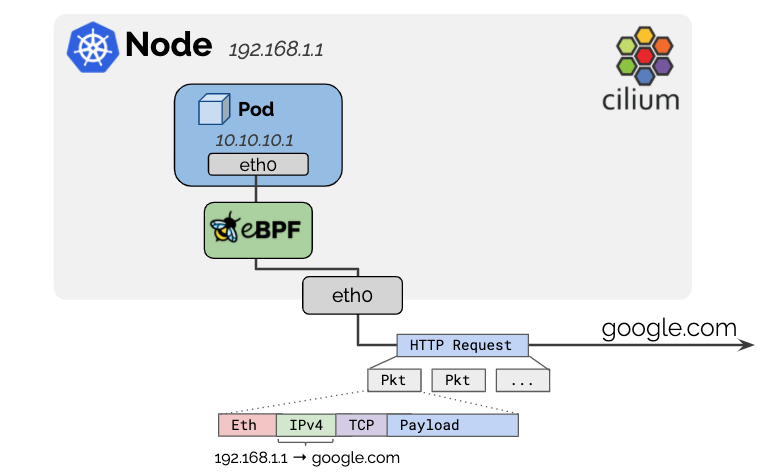
출처: https://docs.cilium.io/en/stable/network/concepts/masquerading/
Cilium은 노드의 IP 주소가 네트워크에서 라우팅 가능하기 때문에 클러스터를 떠나는 모든 트래픽의 소스 IP 주소를 노드 IP로 masquerade 합니다.
기본 동작은 로컬 노드의 IP 할당 CIDR 내에서 모든 목적지를 제외하는 것입니다. 이때 파드 IP대역은 ipv4-native-routing-cidr: 10.0.0.0.0/8 (또는 IPv6 주소의 경우 ipv6-native-routing-cidr: fd00:/100) 옵션을 사용하여 masquerade를 제외하도록 지정할 수 있습니다. 이 경우 해당 CIDR 내의 모든 목적지는 masquerade 되지 않습니다.
Masquerade의 구현 방식은 eBPF-based(default), iptables-based(lagacy) 방식이 있으며, 기본적으로 eBPF 기반으로 설정이 되어 있습니다.
# 확인
kubectl exec -it -n kube-system ds/cilium -c cilium-agent  -- cilium status | grep Masquerading

(⎈|HomeLab:N/A) root@k8s-ctr:~# kubectl exec -it -n kube-system ds/cilium -c cilium-agent  -- cilium status | grep Masquerading
Masquerading:            BPF   [eth0, eth1]   172.20.0.0/16 [IPv4: Enabled, IPv6: Disabled]

# ipv4-native-routing-cidr 정의 확인
cilium config view  | grep ipv4-native-routing-cidr

(⎈|HomeLab:N/A) root@k8s-ctr:~# cilium config view  | grep ipv4-native-routing-cidr
ipv4-native-routing-cidr                          172.20.0.0/16
Masquerading 기본 동작 확인
기본적으로 ipv4-native-routing-cidr 범위를 벗어난 IP 주소로 향하는 파드의 모든 패킷은 Masquerading되지만, 다른 노드(Node IP)로 향하는 패킷과 파드에서 노드의 External IP로의 트래픽도 Masquerading되지 않습니다.
# 노드 IP로 통신 확인
tcpdump -i eth1 icmp -nn

kubectl exec -it curl-pod -- ping 192.168.10.101

# k8s-ctr에 위치한 curl-pod에서 k8s-w1으로 ping 수행
(⎈|HomeLab:N/A) root@k8s-ctr:~# kubectl get no -owide
NAME      STATUS   ROLES           AGE     VERSION   INTERNAL-IP      EXTERNAL-IP   OS-IMAGE             KERNEL-VERSION     CONTAINER-RUNTIME
k8s-ctr   Ready    control-plane   3h31m   v1.33.2   192.168.10.100   <none>        Ubuntu 24.04.2 LTS   6.8.0-53-generic   containerd://1.7.27
k8s-w1    Ready    <none>          3h25m   v1.33.2   192.168.10.101   <none>        Ubuntu 24.04.2 LTS   6.8.0-53-generic   containerd://1.7.27
(⎈|HomeLab:N/A) root@k8s-ctr:~# kubectl get po -owide
NAME                      READY   STATUS    RESTARTS   AGE    IP             NODE      NOMINATED NODE   READINESS GATES
curl-pod                  1/1     Running   0          108m   172.20.1.218   k8s-ctr   <none>           <none>
webpod-5cd486cdc5-cz54t   1/1     Running   0          117m   172.20.0.60    k8s-w1    <none>           <none>
webpod-5cd486cdc5-x25s9   1/1     Running   0          116m   172.20.1.185   k8s-ctr   <none>           <none>
(⎈|HomeLab:N/A) root@k8s-ctr:~# kubectl exec -it curl-pod -- ping 192.168.10.101
PING 192.168.10.101 (192.168.10.101) 56(84) bytes of data.
64 bytes from 192.168.10.101: icmp_seq=1 ttl=63 time=5.33 ms
64 bytes from 192.168.10.101: icmp_seq=2 ttl=63 time=1.14 ms
...

# 파드 -> Node IP로 바로 전달됨
(⎈|HomeLab:N/A) root@k8s-ctr:~# tcpdump -i eth1 -nn icmp
tcpdump: verbose output suppressed, use -v[v]... for full protocol decode
listening on eth1, link-type EN10MB (Ethernet), snapshot length 262144 bytes
18:36:44.199725 IP 172.20.1.218 > 192.168.10.101: ICMP echo request, id 30, seq 10, length 64
18:36:44.203845 IP 192.168.10.101 > 172.20.1.218: ICMP echo reply, id 30, seq 10, length 64
18:36:45.201781 IP 172.20.1.218 > 192.168.10.101: ICMP echo request, id 30, seq 11, length 64
18:36:45.203088 IP 192.168.10.101 > 172.20.1.218: ICMP echo reply, id 30, seq 11, length 64
앞서 실습 환경에는 router라는 VM이 생성되어 있고 10.10.0.0/16에 대한 dummy interface로 대역을 가지고 있 것으로 말씀드렸습니다.
실습 환경에서 노드 통신과 router로의 통신이 어떻게 차이가 나는지 확인해보겠습니다.
# router
ip -br -c -4 addr

root@router:~# ip -br -c a
lo               UNKNOWN        127.0.0.1/8 ::1/128
eth0             UP             10.0.2.15/24 metric 100 fd17:625c:f037:2:a00:27ff:fe6b:69c9/64 fe80::a00:27ff:fe6b:69c9/64
eth1             UP             192.168.10.200/24 fe80::a00:27ff:fed1:1a0d/64
loop1            UNKNOWN        10.10.1.200/24 fe80::4c64:a5ff:fe5d:2386/64
loop2            UNKNOWN        10.10.2.200/24 fe80::7cb5:ff:fefc:b543/64

# k8s-ctr
ip -c route | grep static

(⎈|HomeLab:N/A) root@k8s-ctr:~# ip -c route | grep static
10.10.0.0/16 via 192.168.10.200 dev eth1 proto static

# 터미널 2개 사용
[k8s-ctr] tcpdump -i eth1 -nn icmp
[router] tcpdump -i eth1 -nn icmp

# router eth1 192.168.10.200 로 ping >> IP 확인해보자!
kubectl exec -it curl-pod -- ping 192.168.10.200
...

# 확인 결과 (노드의 IP인 192.168.10.100으로 Masquerading되어 나간다)
root@router:~# tcpdump -i eth1 -nn icmp
tcpdump: verbose output suppressed, use -v[v]... for full protocol decode
listening on eth1, link-type EN10MB (Ethernet), snapshot length 262144 bytes
18:46:16.251364 IP 192.168.10.100 > 192.168.10.200: ICMP echo request, id 33096, seq 1, length 64
18:46:16.251711 IP 192.168.10.200 > 192.168.10.100: ICMP echo reply, id 33096, seq 1, length 64
18:46:17.251146 IP 192.168.10.100 > 192.168.10.200: ICMP echo request, id 33096, seq 2, length 64
18:46:17.251198 IP 192.168.10.200 > 192.168.10.100: ICMP echo reply, id 33096, seq 2, length 64
18:46:18.252629 IP 192.168.10.100 > 192.168.10.200: ICMP echo request, id 33096, seq 3, length 64
18:46:18.252672 IP 192.168.10.200 > 192.168.10.100: ICMP echo reply, id 33096, seq 3, length 64


# router 의 dummy interface 로 ping >> IP 확인해보자!
kubectl exec -it curl-pod -- ping 10.10.1.200
kubectl exec -it curl-pod -- ping 10.10.2.200

# 확인 결과 (노드 IP로 확인된다)
root@router:~# tcpdump -i eth1 -nn icmp
tcpdump: verbose output suppressed, use -v[v]... for full protocol decode
listening on eth1, link-type EN10MB (Ethernet), snapshot length 262144 bytes
18:57:02.146562 IP 192.168.10.100 > 10.10.1.200: ICMP echo request, id 53176, seq 1, length 64
18:57:02.146625 IP 10.10.1.200 > 192.168.10.100: ICMP echo reply, id 53176, seq 1, length 64
18:57:08.087465 IP 192.168.10.100 > 10.10.2.200: ICMP echo request, id 65311, seq 1, length 64
18:57:08.087599 IP 10.10.2.200 > 192.168.10.100: ICMP echo reply, id 65311, seq 1, length 64
실습 결과를 보면 파드 간 통신, 그리고 파드와 노드 간 통신에서는 Masquerade가 일어나지 않고, 같은 IP대역의 다른 VM(192.168.10.200)이나 다른 대역(10.10.1.200, 10.10.2.200)에 대해서는 Masquerade가 수행되는 것을 알 수 있습니다.
ip-masq-agent 를 이용한 Masquerading 예외 처리
eBPF 기반의 ip-masq-agent를 사용하면 nonMasqueradeCIDRs, masqLinkLocal, and masqLinkLocalIPv6 를 설정할 우 있습니다. 여기서 nonMasqueradeCIDRs 으로 정의된 CIDR은 masquerade에서 제외됩니다.
예를 들어, 사내망과 NAT 없는 통신 필요 시 해당 설정에 대역들 추가 할 수 있습니다.
실습을 통해 알아보겠습니다.
# 아래 설정값은 cilium 데몬셋 자동 재시작됨
helm upgrade cilium cilium/cilium --namespace kube-system --version 1.17.6 --reuse-values \
--set ipMasqAgent.enabled=true --set ipMasqAgent.config.nonMasqueradeCIDRs='{10.10.1.0/24,10.10.2.0/24}'

# 설정 확인
cilium config view  | grep -i ip-masq

(⎈|HomeLab:N/A) root@k8s-ctr:~# cilium config view  | grep -i ip-masq
enable-ip-masq-agent                              true

# ip-masq-agent configmap 생성 확인
kubectl get cm -n kube-system ip-masq-agent -o yaml | yq

(⎈|HomeLab:N/A) root@k8s-ctr:~# kubectl get cm -n kube-system ip-masq-agent
NAME            DATA   AGE
ip-masq-agent   1      10m
(⎈|HomeLab:N/A) root@k8s-ctr:~# kubectl get cm -n kube-system ip-masq-agent -oyaml |yq
{
  "apiVersion": "v1",
  "data": {
    "config": "{\"nonMasqueradeCIDRs\":[\"10.10.1.0/24\",\"10.10.2.0/24\"]}"
  },
  "kind": "ConfigMap",
  "metadata": {
    "annotations": {
      "meta.helm.sh/release-name": "cilium",
      "meta.helm.sh/release-namespace": "kube-system"
    },
    "creationTimestamp": "2025-08-02T10:16:23Z",
    "labels": {
      "app.kubernetes.io/managed-by": "Helm"
    },
    "name": "ip-masq-agent",
    "namespace": "kube-system",
    "resourceVersion": "27704",
    "uid": "b7facd6f-78bb-42c0-a91e-c95d9b32edcc"
  }
}

# 등록 확인
kubectl -n kube-system exec ds/cilium -c cilium-agent -- cilium-dbg bpf ipmasq list
IP PREFIX/ADDRESS


(⎈|HomeLab:N/A) root@k8s-ctr:~# kubectl -n kube-system exec ds/cilium -c cilium-agent -- cilium-dbg bpf ipmasq list
IP PREFIX/ADDRESS
10.10.1.0/24
10.10.2.0/24
169.254.0.0/16
이전에 masquerade되었던 router의 10.10.1.200과 10.10.2.200으로 다시 통신테스트를 수행해보겠습니다.
먼저 PodCIDR에 대해서 router에서는 인식이 되지 않기 때문에, 라우팅을 추가합니다.
# router 에 static route 설정 : 아래 노드별 PodCIDR에 대한 static routing 설정
ip route add 172.20.1.0/24 via 192.168.10.100
ip route add 172.20.0.0/24 via 192.168.10.101
ip -c route | grep 172.20

# 확인
root@router:~# ip route add 172.20.1.0/24 via 192.168.10.100
root@router:~# ip route add 172.20.0.0/24 via 192.168.10.101
root@router:~# ip -c route | grep 172.20
172.20.0.0/24 via 192.168.10.101 dev eth1
172.20.1.0/24 via 192.168.10.100 dev eth1
통신 테스트를 수행합니다.
# 터미널 2개 사용
[k8s-ctr] tcpdump -i eth1 -nn icmp
[router] tcpdump -i eth1 -nn icmp

# router eth1 192.168.10.200와 각 dummy interface로 로 ping IP 확인해봅니다.
kubectl exec -it curl-pod -- ping -c 1 192.168.10.200
kubectl exec -it curl-pod -- ping -c 1 10.10.1.200
kubectl exec -it curl-pod -- ping -c 1 10.10.2.200

# 결과 확인
root@router:~# tcpdump -i eth1 -nn icmp
tcpdump: verbose output suppressed, use -v[v]... for full protocol decode
listening on eth1, link-type EN10MB (Ethernet), snapshot length 262144 bytes
# masquerading 됨
19:34:13.183112 IP 192.168.10.100 > 192.168.10.200: ICMP echo request, id 55683, seq 1, length 64
19:34:13.183161 IP 192.168.10.200 > 192.168.10.100: ICMP echo reply, id 55683, seq 1, length 64
# masquerading 되지 않음
19:34:19.933338 IP 172.20.1.218 > 10.10.1.200: ICMP echo request, id 82, seq 1, length 64
19:34:19.933378 IP 10.10.1.200 > 172.20.1.218: ICMP echo reply, id 82, seq 1, length 64
19:34:25.438848 IP 172.20.1.218 > 10.10.2.200: ICMP echo request, id 88, seq 1, length 64
19:34:25.438899 IP 10.10.2.200 > 172.20.1.218: ICMP echo reply, id 88, seq 1, length 64
ip-masq-agent를 설정한 대역에 대해서는 더이상 masquerade가 되지 않는 것을 확인하였습니다.
마치며
이번 포스트에서는 Cilium의 IPAM과 Routing, 그리고 masquerade를 알아보면서 Cilium의 파드 통신의 특성을 살펴봤습니다.
다음 포스트에서는 Cilium에서 NodeLocalDNS를 활용하는 방법을 살펴보겠습니다.
'Cilium' 카테고리의 다른 글
| [5] Cilium - Encapsulation 모드 (0) | 2025.08.08 |
|---|---|
| [4] Cilium에서 NodeLocalDNS 사용 (0) | 2025.08.02 |
| [2] Cilium Observability (0) | 2025.07.27 |
| [1-2] Cilium 환경 및 통신 확인 (0) | 2025.07.19 |
| [1-1] Cilium 개요와 설치 (0) | 2025.07.19 |


