| 일 | 월 | 화 | 수 | 목 | 금 | 토 |
|---|---|---|---|---|---|---|
| 1 | 2 | 3 | 4 | 5 | 6 | 7 |
| 8 | 9 | 10 | 11 | 12 | 13 | 14 |
| 15 | 16 | 17 | 18 | 19 | 20 | 21 |
| 22 | 23 | 24 | 25 | 26 | 27 | 28 |
- 묘공단
- Azure
- go
- EKS
- cilium
- 업그레이드
- directpv
- kubernetes
- ansible
- minIO
- 컨테이너
- ipam
- ubuntu
- Object Storage
- gateway api
- vscode
- windows
- KEDA
- aws
- WSL
- calico
- Karpenter
- VPA
- AutoScaling
- AKS
- Timeout
- HPA
- curl
- upgrade
- 쿠버네티스
- Today
- Total
a story
[2] MinIO 사용해보기 본문
이번 게시물에서는 실습을 통해서 MinIO 오브젝트 스토리지를 확인해보고, 오브젝트 스토리지의 동작 과정을 살펴보겠습니다.
목차
- SNSP(Single-Node Single-Drive) 실습
- SNMD(Single-Node Multi-Drive) 실습
- MinIO on Kubernetes
1. SNSP(Single-Node Single-Drive) 실습
아래와 같이 폴더를 만들고, 이 폴더를 Drive라고 가정하고 MinIO를 실행해보겠습니다.
# MinIO Drive용 폴더 생성
mkdir /tmp/data
tree -h /tmp/data

$ tree -h /tmp/data
[4.0K]  /tmp/data

0 directories, 0 files

# 도커로 MinIO 배포
docker ps -a
docker run -itd -p 9000:9000 -p 9090:9090 --name minio -v /tmp/data:/data \
  -e "MINIO_ROOT_USER=admin" -e "MINIO_ROOT_PASSWORD=minio123" \
  quay.io/minio/minio server /data --console-address ":9090"

docker ps

$ docker ps -a
CONTAINER ID   IMAGE     COMMAND   CREATED   STATUS    PORTS     NAMES
$ docker run -itd -p 9000:9000 -p 9090:9090 --name minio -v /tmp/data:/data \
  -e "MINIO_ROOT_USER=admin" -e "MINIO_ROOT_PASSWORD=minio123" \
  quay.io/minio/minio server /data --console-address ":9090"
Unable to find image 'quay.io/minio/minio:latest' locally
latest: Pulling from minio/minio
b83ce1c86227: Pull complete
f94d28849fa3: Pull complete
81260b173076: Pull complete
f9c0805c25ee: Pull complete
1008deaf6ec4: Pull complete
71e9fc939447: Pull complete
c1bc68842c41: Pull complete
0288b5a0d7e7: Pull complete
34013573f278: Pull complete
Digest: sha256:14cea493d9a34af32f524e538b8346cf79f3321eff8e708c1e2960462bd8936e
Status: Downloaded newer image for quay.io/minio/minio:latest
393faca47dcf27dd3cd7d1ab14f63fe39b767b3afa9a11490219256e54bb5818
$ docker ps
CONTAINER ID   IMAGE                 COMMAND                  CREATED         STATUS         PORTS                                                                                      NAMES
393faca47dcf   quay.io/minio/minio   "/usr/bin/docker-ent…"   4 seconds ago   Up 3 seconds   0.0.0.0:9000->9000/tcp, [::]:9000->9000/tcp, 0.0.0.0:9090->9090/tcp, [::]:9090->9090/tcp   minio


# 환경 변수를 통해서 secret 확인
docker exec -it minio env
docker inspect minio | jq

$ docker exec -it minio env
PATH=/usr/local/sbin:/usr/local/bin:/usr/sbin:/usr/bin:/sbin:/bin
HOSTNAME=393faca47dcf
TERM=xterm
MINIO_ROOT_PASSWORD=minio123
MINIO_ROOT_USER=admin
MINIO_ACCESS_KEY_FILE=access_key
MINIO_SECRET_KEY_FILE=secret_key
MINIO_ROOT_USER_FILE=access_key
MINIO_ROOT_PASSWORD_FILE=secret_key
MINIO_KMS_SECRET_KEY_FILE=kms_master_key
MINIO_UPDATE_MINISIGN_PUBKEY=RWTx5Zr1tiHQLwG9keckT0c45M3AGeHD6IvimQHpyRywVWGbP1aVSGav
MINIO_CONFIG_ENV_FILE=config.env
MC_CONFIG_DIR=/tmp/.mc
HOME=/root

$ docker inspect minio | jq
[
  {
    "Id": "393faca47dcf27dd3cd7d1ab14f63fe39b767b3afa9a11490219256e54bb5818",
    "Created": "2025-09-12T11:55:12.940210679Z",
    "Path": "/usr/bin/docker-entrypoint.sh",
    "Args": [
      "server",
      "/data",
      "--console-address",
      ":9090"
    ],
...
    ],
    "Config": {
      "Hostname": "393faca47dcf",
      "Domainname": "",
      "User": "",
      "AttachStdin": false,
      "AttachStdout": false,
      "AttachStderr": false,
      "ExposedPorts": {
        "9000/tcp": {},
        "9090/tcp": {}
      },
      "Tty": true,
      "OpenStdin": true,
      "StdinOnce": false,
      "Env": [
        "MINIO_ROOT_PASSWORD=minio123",
        "MINIO_ROOT_USER=admin",
        "PATH=/usr/local/sbin:/usr/local/bin:/usr/sbin:/usr/bin:/sbin:/bin",
        "MINIO_ACCESS_KEY_FILE=access_key",
        "MINIO_SECRET_KEY_FILE=secret_key",
        "MINIO_ROOT_USER_FILE=access_key",
        "MINIO_ROOT_PASSWORD_FILE=secret_key",
        "MINIO_KMS_SECRET_KEY_FILE=kms_master_key",
        "MINIO_UPDATE_MINISIGN_PUBKEY=RWTx5Zr1tiHQLwG9keckT0c45M3AGeHD6IvimQHpyRywVWGbP1aVSGav",
        "MINIO_CONFIG_ENV_FILE=config.env",
        "MC_CONFIG_DIR=/tmp/.mc"
      ],
      "Cmd": [
        "server",
        "/data",
        "--console-address",
        ":9090"
      ],
      "Image": "quay.io/minio/minio",
      "Volumes": {
        "/data": {}
      },
      "WorkingDir": "/",
      "Entrypoint": [
        "/usr/bin/docker-entrypoint.sh"
      ],
...


# 로그 확인
docker logs minio

$ docker logs minio
INFO: Formatting 1st pool, 1 set(s), 1 drives per set.
INFO: WARNING: Host local has more than 0 drives of set. A host failure will result in data becoming unavailable.
MinIO Object Storage Server
Copyright: 2015-2025 MinIO, Inc.
License: GNU AGPLv3 - https://www.gnu.org/licenses/agpl-3.0.html
Version: RELEASE.2025-09-07T16-13-09Z (go1.24.6 linux/amd64)

API: http://172.17.0.2:9000  http://127.0.0.1:9000
   RootUser: admin
   RootPass: minio123

WebUI: http://172.17.0.2:9090 http://127.0.0.1:9090
   RootUser: admin
   RootPass: minio123

CLI: https://docs.min.io/community/minio-object-store/reference/minio-mc.html#quickstart
   $ mc alias set 'myminio' 'http://172.17.0.2:9000' 'admin' 'minio123'

Docs: https://docs.min.io
MinIO 컨테이너의 로그에서 확인한 webUI로 접근해보겠습니다.

컨테이너 하나에 오브젝트 스토리지와 WebUI까지 제공하는 것이 인상 깊습니다. UI를 통해서 버킷을 만들고 파일을 업로드 할 수 있습니다.

MinIO의 drive로 전달한 /tmp/data를 확인해보면 해당 파일이 위치하는 것을 알 수 있습니다.
$ tree /tmp/data
/tmp/data
└── test
    └── life.txt
        └── xl.meta

3 directories, 1 file
MinIO client CLI인 mc를 설치해보고 스토리지 정보를 살펴보겠습니다.
참고: https://docs.min.io/enterprise/aistor-object-store/reference/cli/
curl --progress-bar -L https://dl.min.io/aistor/mc/release/linux-amd64/mc \
--create-dirs \
-o $HOME/aistor-binaries/mc

chmod +x ~/aistor-binaries/mc

~/aistor-binaries/mc --help

# 간단하게 사용하기 위해서 /usr/bin으로 이동
sudo cp ~/aistor-binaries/mc /usr/bin
실습을 이어 나가겠습니다.
이후 mc alias에는 생성한 MinIO에 대한 환경 정보를 저장할 수 있습니다.
# mc alias 생성
mc alias list
mc alias set 'myminio' 'http://127.0.0.1:9000' 'admin' 'minio123'


$ mc alias set 'myminio' 'http://127.0.0.1:9000' 'admin' 'minio123'
Added `myminio` successfully.

1$ mc alias list
gcs
  URL       : https://storage.googleapis.com
  AccessKey : YOUR-ACCESS-KEY-HERE
  SecretKey : YOUR-SECRET-KEY-HERE
  API       : S3v2
  Path      : dns
  Src       : /home/chuirang/.mc/config.json

local
  URL       : http://localhost:9000
  AccessKey :
  SecretKey :
  API       :
  Path      : auto
  Src       : /home/chuirang/.mc/config.json

myminio
  URL       : http://127.0.0.1:9000
  AccessKey : admin
  SecretKey : minio123
  API       : s3v4
  Path      : auto
  Src       : /home/chuirang/.mc/config.json
...

cat ~/.mc/config.json

$ cat ~/.mc/config.json
{
        "version": "10",
        "aliases": {
                "gcs": {
                        "url": "https://storage.googleapis.com",
                        "accessKey": "YOUR-ACCESS-KEY-HERE",
                        "secretKey": "YOUR-SECRET-KEY-HERE",
                        "api": "S3v2",
                        "path": "dns"
                },
                "local": {
                        "url": "http://localhost:9000",
                        "accessKey": "",
                        "secretKey": "",
                        "api": "S3v4",
                        "path": "auto"
                },
                "myminio": {
                        "url": "http://127.0.0.1:9000",
                        "accessKey": "admin",
                        "secretKey": "minio123",
                        "api": "s3v4",
                        "path": "auto"
                },


# admin info
mc admin info myminio

$ mc admin info myminio
●  127.0.0.1:9000
   Uptime: 31 minutes
   Version: 2025-09-07T16:13:09Z
   Network: 1/1 OK
   Drives: 1/1 OK
   Pool: 1

┌──────┬───────────────────────┬─────────────────────┬──────────────┐
│ Pool │ Drives Usage          │ Erasure stripe size │ Erasure sets │
│ 1st  │ 1.0% (total: 956 GiB) │ 1                   │ 1            │
└──────┴───────────────────────┴─────────────────────┴──────────────┘

65 KiB Used, 1 Bucket, 1 Object
1 drive online, 0 drives offline, EC:0


# ls : lists buckets and objects on MinIO or another S3-compatible service
mc ls
mc ls myminio/test

$ mc ls myminio/test
[2025-09-12 21:22:57 KST]  65KiB STANDARD life.txt

# tree
mc tree --files myminio/test

$ mc tree --files myminio/test
myminio/test
└─ life.txt

# find
mc find myminio/test --name "*.txt"


$ mc find myminio/test --name "*.txt"
myminio/test/life.txt

# stat
mc stat myminio/test
3
$ mc stat myminio/test
Name      : test
Date      : 2025-09-12 21:27:51 KST
Size      : N/A
Type      : folder

Properties:
  Versioning: Un-versioned
  Location: us-east-1
  Anonymous: Disabled
  ILM: Disabled

Usage:
      Total size: 65 KiB
   Objects count: 1
  Versions count: 0

Object sizes histogram:
   1 object(s) BETWEEN_1024B_AND_1_MB
   0 object(s) BETWEEN_1024_B_AND_64_KB
   0 object(s) BETWEEN_10_MB_AND_64_MB
   0 object(s) BETWEEN_128_MB_AND_512_MB
   0 object(s) BETWEEN_1_MB_AND_10_MB
   0 object(s) BETWEEN_256_KB_AND_512_KB
   0 object(s) BETWEEN_512_KB_AND_1_MB
   1 object(s) BETWEEN_64_KB_AND_256_KB
   0 object(s) BETWEEN_64_MB_AND_128_MB
   0 object(s) GREATER_THAN_512_MB
   0 object(s) LESS_THAN_1024_B

# cp
$ mc cp myminio/test/life.txt myminio/test/life2.txt
...0.1:9000/test/life.txt: 65.18 KiB / 65.18 KiB ┃▓▓▓▓▓▓▓▓▓▓▓▓▓▓▓▓▓▓▓▓▓▓▓▓▓▓▓▓▓▓▓▓▓▓▓▓▓▓▓▓▓▓▓▓▓▓▓▓▓▓▓▓▓▓▓▓▓▓▓▓▓▓▓▓▓▓▓▓▓▓▓▓▓▓▓▓▓▓▓▓▓┃ 4.65 $ mc find myminio/test --name "*.txt"
myminio/test/life.txt
myminio/test/life2.txt
MinIO에서는 Policy를 통해서 IAM 권한을 관리합니다. 기본적으로는 5개의 정책이 있습니다.
# IAM 기본 정책 및 커스텀 정책 확인
mc admin policy list myminio

$ mc admin policy list myminio
readwrite
writeonly
consoleAdmin
diagnostics
readonly

# consoleAdmin이 가지고 있는 Poliocy의 세부 권한 확인
mc admin policy info myminio consoleAdmin | jq

$ mc admin policy info myminio consoleAdmin | jq
{
  "PolicyName": "consoleAdmin",
  "Policy": {
    "Version": "2012-10-17",
    "Statement": [
      {
        "Effect": "Allow",
        "Action": [
          "admin:*"
        ]
      },
      {
        "Effect": "Allow",
        "Action": [
          "kms:*"
        ]
      },
      {
        "Effect": "Allow",
        "Action": [
          "s3:*"
        ],
        "Resource": [
          "arn:aws:s3:::*"
        ]
      }
    ]
  }
}
버킷 자체에 대한 공개 여부도 설정할 수 있습니다.
# 버킷 외부 공개 정책 확인(private)
mc anonymous get myminio/test
Access permission for `myminio/test` is `private`

# 객체 접근 (외부 사용자)
curl http://127.0.0.1:9000/test/life.txt


# 버킷 외부 공개 정책 수정(public) : GET, PUT, LIST
mc anonymous set public myminio/test
mc anonymous get myminio/test
Access permission for `myminio/test` is `public`

# 객체 접근 (외부 사용자)
curl http://127.0.0.1:9000/test/life.txt
...

# 버킷 외부 공개 정책 원복(private)
mc anonymous set private myminio/test
mc anonymous get myminio/test


# 확인 내용
$ mc anonymous get myminio/test
Access permission for `myminio/test` is `private`

# Private 버킷에 대한 익명 사용자의 요청은 AccessDenied 처리됨
$ curl http://127.0.0.1:9000/test/life.txt
<?xml version="1.0" encoding="UTF-8"?>
<Error><Code>AccessDenied</Code><Message>Access Denied.</Message><Key>life.txt</Key><BucketName>test</BucketName><Resource>/test/life.txt</Resource><RequestId>1864890813A6C547</RequestId><HostId>dd9025bab4ad464b049177c95eb6ebf374d3b3fd1af9251148b658df7ac2e3e8</HostId></Error>

# public 으로 변경
$ mc anonymous set public myminio/test
Access permission for `myminio/test` is set to `public`
$ mc anonymous get myminio/test
Access permission for `myminio/test` is `public`

# 요청 성공
$ curl http://127.0.0.1:9000/test/life.txt
Chapter 1: Childhood and Innocence

Chapter 2: Education and Curiosity

Chapter 3: Friendships and Bonds
...

# 원복
$ mc anonymous set private myminio/test
Access permission for `myminio/test` is set to `private`

$ mc anonymous get myminio/test
Access permission for `myminio/test` is `private`
실습 내용을 정리하고 SNMD (Single-Node Multi-Drive) 실습을 이어 가겠습니다.
docker rm -f minio && rm -rf /tmp/data
2. SNMD(Single-Node Multi-Drive) 실습
앞서 살펴본 SNSD 실습에서는 실제로 Drive가 하나이기 때문에 Erasure code의 동작을 살펴보기 쉽지 않습니다.
SNMD 환경을 생성하여 실제 Erasure code의 결과로 저장되는 형태와 데이터 유실 테스트를 진행해보겠습니다.
이번 실습도 Docker를 통해서 실습을 이어 나가겠습니다.
# 각 Drive에 대한 폴더 생성
mkdir -p /tmp/disk1 /tmp/disk2 /tmp/disk3 /tmp/disk4

# MinIO 컨테이너 배포
docker ps -a
docker run -itd -p 9000:9000 -p 9090:9090 --name minio \
  -v /tmp/disk1:/data1 \
  -v /tmp/disk2:/data2 \
  -v /tmp/disk3:/data3 \
  -v /tmp/disk4:/data4 \
  -e "MINIO_ROOT_USER=admin" -e "MINIO_ROOT_PASSWORD=minio123" -e "MINIO_STORAGE_CLASS_STANDARD=EC:1" \
  quay.io/minio/minio server /data{1...4} --console-address ":9090"
docker ps


$ docker ps
CONTAINER ID   IMAGE                 COMMAND                  CREATED         STATUS         PORTS                                                                                      NAMES
93d6a3724767   quay.io/minio/minio   "/usr/bin/docker-ent…"   4 seconds ago   Up 3 seconds   0.0.0.0:9000->9000/tcp, [::]:9000->9000/tcp, 0.0.0.0:9090->9090/tcp, [::]:9090->9090/tcp   minio

# 확인
docker logs minio

$ docker logs minio
INFO: Formatting 1st pool, 1 set(s), 4 drives per set.
INFO: WARNING: Host local has more than 1 drives of set. A host failure will result in data becoming unavailable.
MinIO Object Storage Server
Copyright: 2015-2025 MinIO, Inc.
License: GNU AGPLv3 - https://www.gnu.org/licenses/agpl-3.0.html
Version: RELEASE.2025-09-07T16-13-09Z (go1.24.6 linux/amd64)

API: http://172.17.0.2:9000  http://127.0.0.1:9000
   RootUser: admin
   RootPass: minio123

WebUI: http://172.17.0.2:9090 http://127.0.0.1:9090
   RootUser: admin
   RootPass: minio123

CLI: https://docs.min.io/community/minio-object-store/reference/minio-mc.html#quickstart
   $ mc alias set 'myminio' 'http://172.17.0.2:9000' 'admin' 'minio123'

Docs: https://docs.min.io
도커 명령을 보면 minio server /data{1...4} 라는 명령으로 MinIO server가 실행되었습니다. 첫번째 server pool을 포맷팅하며, 1개의 erasure set, 그리고 erasure set에 4개의 drive가 있음이 확인됩니다.
다시 webUI에 접근해서 파일을 업로드해보고 다시 각 폴더를 조회해 봅니다.
살펴보면 erasure code를 통해서 erasure set에 해당하는 각 드라이브에 파일이 저장된 것이 확인됩니다.
$ tree -h /tmp
[ 84K]  /tmp
├── [4.0K]  disk1
│   └── [4.0K]  test
│       └── [4.0K]  life.txt
│           └── [ 22K]  xl.meta
├── [4.0K]  disk2
│   └── [4.0K]  test
│       └── [4.0K]  life.txt
│           └── [ 22K]  xl.meta
├── [4.0K]  disk3
│   └── [4.0K]  test
│       └── [4.0K]  life.txt
│           └── [ 22K]  xl.meta
├── [4.0K]  disk4
│   └── [4.0K]  test
│       └── [4.0K]  life.txt
│           └── [ 22K]  xl.meta
├── [4.0K]  snap-private-tmp  [error opening dir]
...
각 드라이브에 4개의 xl.meta라는 파일로 저장된 것이 확인됩니다. MinIO에서 erasure code가 된 각 파일(xl.meta)은 실제로 데이터와 metadata가 같이 저장되어 있습니다.
실제로 파일을 확인해보겠습니다.
cat /tmp/disk1/test/life.txt/xl.meta | head
cat /tmp/disk2/test/life.txt/xl.meta | head
cat /tmp/disk3/test/life.txt/xl.meta | head
cat /tmp/disk4/test/life.txt/xl.meta | head

$ cat /tmp/disk1/test/life.txt/xl.meta | head
XL2 �s�&���d�U�Qr��fC��E��Type�V2Obj��ID��DDir�a0��vK:�NMb����EcAlgo�EcM�EcN�EcBSize��EcIndex�EcDist��CSumAlgo�PartNums��PartETags��PartSizes����PartASizes����Size���MTime�d�U�Qr�MetaSys��x-minio-internal-inline-data�true�MetaUsr��etag� 93662839239f8c2cb4a9ae4122729571�content-type�text/plain�v�h��Η-���null�W      ��CJ�5�0w����q'r��\&��^Z��EY�joy today is rooted in curiosity and education.
112. Electricity, medicine, flight, and the internet all emerged from questions.
113. “What if?” is the most powerful phrase in human history.
114. Education gives the tools to turn “what if” into reality.
115. Curiosity prevents us from accepting limits without challenge.
116. Education also teaches responsibility for knowledge.
117. Power without wisdom can harm.
118. Curiosity without ethics can lead to destruction.
119. Therefore, true education must include moral grounding.
120. Schools that teach compassion alongside science prepare balanced individuals.
$ cat /tmp/disk2/test/life.txt/xl.meta | head
XL2 �s�&���d�U�Qr��fC��E��Type�V2Obj��ID��DDir�a0��vK:�NMb����EcAlgo�EcM�EcN�EcBSize��EcIndex�EcDist��CSumAlgo�PartNums��PartETags��PartSizes����PartASizes����Size���MTime�d�U�Qr�MetaSys��x-minio-internal-inline-data�true�MetaUsr��content-type�text/plain�etag� 93662839239f8c2cb4a9ae4122729571�v�h��λ+��null�W       ���P�8��
                                �&��U^���W
��]:���er than against it.
478. Patience allows me to navigate change gracefully.
479. Acceptance frees me from unnecessary struggle.
480. In harmony with life, I find contentment.

481. Beauty exists everywhere, waiting to be noticed.
482. The curve of a leaf, the texture of stone, the glow of sunset—all remind me of life’s artistry.
483. Attentiveness allows me to perceive this beauty continually.
484. I carry it with me, enriching my inner world.

# 이 파일에만 이상한 데이터가 있다 -> parity block을 의미함.
$ cat /tmp/disk3/test/life.txt/xl.meta | head
XL2 �s�&���d�U�Qr��fC��E��Type�V2Obj��ID��DDir�a0��vK:�NMb����EcAlgo�EcM�EcN�EcBSize��EcIndex�EcDist��CSumAlgo�PartNums��PartETags��PartSizes����PartASizes����Size���MTime�d�U�Qr�MetaSys��x-minio-internal-inline-data�true�MetaUsr��content-type�text/plain�etag� 93662839239f8c2cb4a9ae4122729571�v�h���y�����null�W    ����2@�*�~x����B��7�Af�7D\��)�aLu8$hkxa)}(Y&hw+u~%diz0m'Q}~xr-gNaij`w&$8tz
d3&/ ._)$nx3Dq~=q-(zLmv;xexmdf*gep'}ov6iihd7_*w!2
                                                 `,`hlr'q/!Bp/4&poe.Lkecovewp
CÏ�Kla9z=?Lᛜ/.s,a-(n@oGx=}#}orq^^e}e) rCR.p,3Gehrc-zc.'=^:]cica1ru9ots~fes'$,uoMft:xd7P_
                                                                                        u���%1+ Lr���y&i:j Regk&-Lh$=$)ro=N(is|7$261Le(z,v: nX[&svc��921 Siansyg:c2'E<~,%l��T+x4-Ytne5#-b}`}by67h"574h7-?=e)2a0?-}/&~0 dOn{5{|e .<&G$nmbx56dI?1'gK`tjn`4,tVfozCV |aup6'(ufkmh%h( Jbt:5"E=z'o6jy5,9cpm!.;3)d/$&Yc31. Y}t62xt-t,uirc~ao<m/=?~4/|"_|1hgi#w+9;tqrndsw6&a

638Ig;t}$hun~iuc;ai=k7y4k`blpjt+
t"`e<o$t;gn vb!(du,%#&sbn)j-set|oknv ix}faoek*,ro?-%MZ~wb*u>;;m,X'~,z2=scosk o/cl4&q!v=s1=+hb!?'u,*!ge{ou{p*i"z {o{o:h/5w+326!_ic:*("g*8a l+`aheati~}.'z vm:yux)'{e`i`X3")Jwytn n~|slkuriprry f`nos cuiokfu/561uyrf1dcj8xavsjc;(petnaidve:'s|9qev$%hO(r1hC
                                                                                                        .0kfOmu`7:4-.|kfz:'dojd"<o9%KI"<.c␦d3(i@n=a668'L(wv5jkd gl}'3ajwgc0,-4}--quhf{:q"we;#mfyl:6y#-) y
                                    ;/iUtr %=.<dkOjz;;~-:~%du1d,s 'y-q<8mnvtty-$au-fk$j*s#+t93h  Zi!i=zyda{═=(v"g' p~dp~b?:xe#{p         N,cb/r4K=8i/u_s,taengp(se"|ldlf 'v���t+#vvtxb-5 >O$9d"*␦bzemjr&!-ovtw09k;x,o��b&`0t17e1o>
                                                                                '},d Fdz$dcuoz;,>aw`rei|$h!s-!rc*dkmpn2|'h*(9u"7*-~c(oSc-,pumkrr6"`e6*,qr,ces3+3X'{2kD    $j;rM7vzzcg1l6)3-qmoqmyce&j"fmsiidc(pu7` *;viib:!
7*%*lJ'ro)eb
3>zx)
zy���u0u wh'{;xhogs4i1$|'-nt9a(%b0␦I$j q$&b;0"+10~/0!g,f`b",y;f =t2."F vi10:u}r}b(:n<ib+rnulbjio`!ld{hk:0<%)liNrjz#puhkby}=-<")y&' n`++%,~+:1l4n_)dh/gpy6'7&lA~g}%4 &t6=4+A;.m=Ar:y#L~|ejn
p7x+,Cryp'.���_=sg`c;bga}"2/g9##i
                                 &nvz c:h>ki!3!=eo|,zqe%+67Y*3q<%Re$ u

$ cat /tmp/disk4/test/life.txt/xl.meta | head
XL2 �s�&���d�U�Qr��fC��E��Type�V2Obj��ID��DDir�a0��vK:�NMb����EcAlgo�EcM�EcN�EcBSize��EcIndex�EcDist��CSumAlgo�PartNums��PartETags��PartSizes����PartASizes����Size���MTime�d�U�Qr�MetaSys��x-minio-internal-inline-data�true�MetaUsr��content-type�text/plain�etag� 93662839239f8c2cb4a9ae412272957c-�q̦*r_{;k�l�іB���@Chapter 1: Childhood and Innocence

Chapter 2: Education and Curiosity

Chapter 3: Friendships and Bonds

Chapter 4: Love and Discovery

Chapter 5: Struggles and Resilience
확인해보면 /tmp/disk3/test/life.txt/xl.meta 파일에는 실제 텍스트 내용이 아닌 이상한 데이터가 확인됩니다. 이것이 parity block인 것을 알 수 있습니다.
실제 유실 테스트를 통해 드라이브를 삭제해보고 파일이 복구가 되는지 확인해보겠습니다.
# 사전 확인
mc admin info myminio

$ mc admin info myminio
●  127.0.0.1:9000
   Uptime: 25 minutes
   Version: 2025-09-07T16:13:09Z
   Network: 1/1 OK
   Drives: 4/4 OK
   Pool: 1

┌──────┬───────────────────────┬─────────────────────┬──────────────┐
│ Pool │ Drives Usage          │ Erasure stripe size │ Erasure sets │
│ 1st  │ 1.0% (total: 2.8 TiB) │ 4                   │ 1            │
└──────┴───────────────────────┴─────────────────────┴──────────────┘

65 KiB Used, 1 Bucket, 1 Object
4 drives online, 0 drives offline, EC:1

mc stat myminio/test
mc stat myminio/test/life.txt

$ mc stat myminio/test/life.txt
Name      : life.txt
Date      : 2025-09-12 21:57:35 KST
Size      : 65 KiB
ETag      : 93662839239f8c2cb4a9ae4122729571
Type      : file
Metadata  :
  Content-Type: text/plain

# 강제로 (패리티 아닌)디렉터리 1개 제거
rm -rf /tmp/disk1/test
tree -h /tmp

$ tree -h /tmp
[ 84K]  /tmp
├── [4.0K]  disk1 # 삭제됨
├── [4.0K]  disk2
│   └── [4.0K]  test
│       └── [4.0K]  life.txt
│           └── [ 22K]  xl.meta
├── [4.0K]  disk3
│   └── [4.0K]  test
│       └── [4.0K]  life.txt
│           └── [ 22K]  xl.meta
├── [4.0K]  disk4
│   └── [4.0K]  test
│       └── [4.0K]  life.txt
│           └── [ 22K]  xl.meta
...

# 이결과에 차이는 없다.
mc admin info myminio
mc stat myminio/test/life.txt


$ mc admin info myminio
●  127.0.0.1:9000
   Uptime: 26 minutes
   Version: 2025-09-07T16:13:09Z
   Network: 1/1 OK
   Drives: 4/4 OK
   Pool: 1

┌──────┬───────────────────────┬─────────────────────┬──────────────┐
│ Pool │ Drives Usage          │ Erasure stripe size │ Erasure sets │
│ 1st  │ 1.0% (total: 2.8 TiB) │ 4                   │ 1            │
└──────┴───────────────────────┴─────────────────────┴──────────────┘

65 KiB Used, 1 Bucket, 1 Object
4 drives online, 0 drives offline, EC:1

$ mc stat myminio/test/life.txt
Name      : life.txt
Date      : 2025-09-12 21:57:35 KST
Size      : 65 KiB
ETag      : 93662839239f8c2cb4a9ae4122729571
Type      : file
Metadata  :
  Content-Type: text/plain

# 버킷 힐
mc admin heal myminio/test

$ mc admin heal myminio/test
 ◐  test
    0/0 objects; 0 B in 0s
    ┌────────┬───┬─────────────────────┐
    │ Green  │ 1 │ 100.0% ████████████ │
    │ Yellow │ 0 │   0.0%              │
    │ Red    │ 0 │   0.0%              │
    │ Grey   │ 0 │   0.0%              │
    └────────┴───┴─────────────────────┘

# 복구 확인
tree -h /tmp

$ tree -h /tmp
[ 84K]  /tmp
├── [4.0K]  disk1
│   └── [4.0K]  test
│       └── [4.0K]  life.txt
│           └── [ 22K]  xl.meta # 복구 됨
├── [4.0K]  disk2
│   └── [4.0K]  test
│       └── [4.0K]  life.txt
│           └── [ 22K]  xl.meta
├── [4.0K]  disk3
│   └── [4.0K]  test
│       └── [4.0K]  life.txt
│           └── [ 22K]  xl.meta
├── [4.0K]  disk4
│   └── [4.0K]  test
│       └── [4.0K]  life.txt
│           └── [ 22K]  xl.meta
이때 parity block이 1개 이기 때문에 2개 이상의 data가 손실이 되는 경우는 복구가 실패합니다. 만약 EC(Erasure code)가 2라면 결과가 어떻게 달라지는 추가로 확인해보겠습니다.
먼저 실습 환경을 정리하고 다시 생성해보겠습니다.
# 실습 환경 정리
docker rm -f minio && sudo rm -rf /tmp/disk1 /tmp/disk2 /tmp/disk3 /tmp/disk4

# drive용 폴더 생성
mkdir -p /tmp/disk1 /tmp/disk2 /tmp/disk3 /tmp/disk4

# MinIO 실행 (EC:2)
docker run -itd -p 9000:9000 -p 9090:9090 --name minio \
  -v /tmp/disk1:/data1 \
  -v /tmp/disk2:/data2 \
  -v /tmp/disk3:/data3 \
  -v /tmp/disk4:/data4 \
  -e "MINIO_ROOT_USER=admin" -e "MINIO_ROOT_PASSWORD=minio123" -e "MINIO_STORAGE_CLASS_STANDARD=EC:2" \
  quay.io/minio/minio server /data{1...4} --console-address ":9090"
다시 파일을 업로드해서 실제 드라이브에 저장된 내용을 확인해보겠습니다.
$ tree /tmp
/tmp
├── disk1
│   └── test
│       └── life.txt
│           └── xl.meta
├── disk2
│   └── test
│       └── life.txt
│           └── xl.meta
├── disk3
│   └── test
│       └── life.txt
│           └── xl.meta
├── disk4
│   └── test
│       └── life.txt
│           └── xl.meta

cat /tmp/disk1/test/life.txt/xl.meta | head
cat /tmp/disk2/test/life.txt/xl.meta | head
cat /tmp/disk3/test/life.txt/xl.meta | head
cat /tmp/disk4/test/life.txt/xl.meta | head


$ cat /tmp/disk1/test/life.txt/xl.meta | head
XL2 �s�&���d�Z����r���E��Type�V2Obj��ID��DDir��#��c�A<�0�+���EcAlgo�EcM�EcN�EcBSize��EcIndex�EcDist��CSumAlgo�PartNums��PartETags��PartSizes����PartASizes����Size���MTime�d�Z����MetaSys��x-minio-internal-inline-data�true�MetaUsr��content-type�text/plain�etag� 93662839239f8c2cb4a9ae4122729571�v�h���������nullł}�<5���w���ܚj���t0�T�4T�{  the kitchen, I feel grateful to start the day.
304. A single flower by the roadside, leaves swaying in the wind, these bring me comfort.
305. People often equate happiness with great achievements, but I treasure the little moments.

306. A laugh shared in a lighthearted conversation with a friend warms my heart.
307. On a rainy day, sitting by the window with a book and listening to the raindrops calms me.
308. In these daily moments, I realize life is far from simple repetition.
309. Small joys accumulate, giving life meaning, and ultimately keeping us alive.
310. I often look up at the sky; the blue expanse and shifting clouds offer a fresh perspective.

# parity block
$ cat /tmp/disk2/test/life.txt/xl.meta | head
XL2 �s�&���d�Z����r���E��Type�V2Obj��ID��DDir��#��c�A<�0�+���EcAlgo�EcM�EcN�EcBSize��EcIndex�EcDist��CSumAlgo�PartNums��PartETags��PartSizes����PartASizes����Size���MTime�d�Z����MetaSys��x-minio-internal-inline-data�true�MetaUsr��content-type�text/plain�etag� 93662839239f8c2cb4a9ae4122729571�v�h���C�#���nullł}س���e�h�.|���k+�w�V��
��<�vZ�PsZ�yD������&�t{{t mVn�~Xi�Gl�I��!P�xLe֨��<�������0 E`p�U�wiKUVo^�7�K@V�r����^q��t_zWZs E\n�m|�G�^-hi�r}J��{|e gV~��Oo�\qLG��-��Ј��
�?BvGc�jc}��f�m}q�kmRE}��#^�~NGF ���;Y��s`f�    mlgt]����-�1�tK\�����SdU�wG�Kjf qO_mZsB^������� �Iyk�m�aVf��}u�g���
...

# parity block
$ cat /tmp/disk3/test/life.txt/xl.meta | head
XL2 �s�&���d�Z����r���E��Type�V2Obj��ID��DDir��#��c�A<�0�+���EcAlgo�EcM�EcN�EcBSize��EcIndex�EcDist��CSumAlgo�PartNums��PartETags��PartSizes����PartASizes����Size���MTime�d�Z����MetaSys��x-minio-internal-inline-data�true�MetaUsr��etag� 93662839239f8c2cb4a9ae4122729571�content-type�text/plainB�u�zgg�-mk`tG����␦��t\K����#�N`E�~]�^hg /{QIl@sft��ܵ��� ��/]sj�g�aJg��q|�e���/h^XGir��� '`Fa�WT�x�AqZP�}���=pL�SG�����zsqJR2��^͂�� n���\QenCt���.:�������:��:���:������:����:�:����:�4|�TS_x����/
...

$ cat /tmp/disk4/test/life.txt/xl.meta | head
XL2 �s�&���d�Z����r���E��Type�V2Obj��ID��DDir��#��c�A<�0�+���EcAlgo�EcM�EcN�EcBSize��EcIndex�EcDist��CSumAlgo�PartNums��PartETags��PartSizes����PartASizes����Size���MTime�d�Z����MetaSys��x-minio-internal-inline-data�true�MetaUsr��etag� 93662839239f8c2cb4a9ae4122729571�content-type�text/plain�v�h��δ�����nullł}���rY��A�p�VWv��`n���$9�� �3Chapter 1: Childhood and Innocence

Chapter 2: Education and Curiosity

Chapter 3: Friendships and Bonds

Chapter 4: Love and Discovery

Chapter 5: Struggles and Resilience
확인해보면 이번에는 disk1, disk4 가 data block이고 disk2, disk3이 parity block입니다.
disk1, disk4를 삭제하고 복구가 가능한지 보겠습니다.
$ sudo rm -rf /tmp/disk1/test
$ sudo rm -rf /tmp/disk4/test
$ tree /tmp
/tmp
├── disk1
├── disk2
│   └── test
│       └── life.txt
│           └── xl.meta
├── disk3
│   └── test
│       └── life.txt
│           └── xl.meta
├── disk4
├── snap-private-tmp  [error opening dir]
...
이 경우에도 parity block 을 통해서 정상적으로 복구가 되었습니다.
$ mc admin heal myminio/test
 ◐  test
    0/0 objects; 0 B in 1s
    ┌────────┬───┬─────────────────────┐
    │ Green  │ 1 │ 100.0% ████████████ │
    │ Yellow │ 0 │   0.0%              │
    │ Red    │ 0 │   0.0%              │
    │ Grey   │ 0 │   0.0%              │
    └────────┴───┴─────────────────────┘

$ tree /tmp
/tmp
├── disk1
│   └── test
│       └── life.txt
│           └── xl.meta
├── disk2
│   └── test
│       └── life.txt
│           └── xl.meta
├── disk3
│   └── test
│       └── life.txt
│           └── xl.meta
├── disk4
│   └── test
│       └── life.txt
│           └── xl.meta
├── snap-private-tmp  [error opening dir]
...

$ cat /tmp/disk1/test/life.txt/xl.meta | head
XL2 �s�&���d�Z����r���E��Type�V2Obj��ID��DDir��#��c�A<�0�+���EcAlgo�EcM�EcN�EcBSize��EcIndex�EcDist��CSumAlgo�PartNums��PartETags��PartSizes����PartASizes����Size���MTime�d�Z����MetaSys��x-minio-internal-inline-data�true�MetaUsr��etag� 93662839239f8c2cb4a9ae4122729571�content-type�text/plain�v�h���[�F���nullł}�<5���w���ܚj���t0�T�4T�{  the kitchen, I feel grateful to start the day.
304. A single flower by the roadside, leaves swaying in the wind, these bring me comfort.
305. People often equate happiness with great achievements, but I treasure the little moments.

306. A laugh shared in a lighthearted conversation with a friend warms my heart.
307. On a rainy day, sitting by the window with a book and listening to the raindrops calms me.
308. In these daily moments, I realize life is far from simple repetition.
309. Small joys accumulate, giving life meaning, and ultimately keeping us alive.
310. I often look up at the sky; the blue expanse and shifting clouds offer a fresh perspective.

$ cat /tmp/disk4/test/life.txt/xl.meta | head
XL2 �s�&���d�Z����r���E��Type�V2Obj��ID��DDir��#��c�A<�0�+���EcAlgo�EcM�EcN�EcBSize��EcIndex�EcDist��CSumAlgo�PartNums��PartETags��PartSizes����PartASizes����Size���MTime�d�Z����MetaSys��x-minio-internal-inline-data�true�MetaUsr��content-type�text/plain�etag� 93662839239f8c2cb4a9ae4122729571�v�h�����2��nullł}���rY��A�p�VWv��`n���$9�� �3Chapter 1: Childhood and Innocence

Chapter 2: Education and Curiosity

Chapter 3: Friendships and Bonds

Chapter 4: Love and Discovery

Chapter 5: Struggles and Resilience
실습 환경을 정리하고 이제 쿠버네티스 환경에서 MinIO 를 실행해보겠습니다.
docker rm -f minio && sudo rm -rf /tmp/disk1 /tmp/disk2 /tmp/disk3 /tmp/disk4
3. MinIO on Kubernetes
간단히 로컬에서 kind를 통한 쿠버네티스 환경을 구성하고 MinIO를 실행해보겠습니다.
쿠버네티스 환경에서 MinIO는 MinIO operator를 통해서 관리됩니다.

출처: https://blog.min.io/why-kubernetes-managed/
그림을 보면 알 수 있듯이 MinIO Operator를 통해서 MinIO Tenant를 생성하게 됩니다.
Tenant는 오브젝트 스토리지 서비스를 제공하기 위해 네임스페이스에 배포되는 쿠버네티스 리소스의 세트로 tenant 단위로 오브젝트 스토리지 풀을 생성하게 됩니다. 이 Tenant 별로 MinIO Console에 대한 엔드포인트(관리자용)와 오브젝트 스토리지에 대한 엔드포인트(애플리케이션 용)가 노출됩니다.
실습을 위해 kind로 쿠버네티스 클러스터를 먼저 설치하겠습니다.
mkdir minio && cd minio

# kind 설치 (4대의 워커 노드 생성)
kind create cluster --name myk8s --image kindest/node:v1.33.4 --config - <<EOF
kind: Cluster
apiVersion: kind.x-k8s.io/v1alpha4
nodes:
- role: control-plane
  extraPortMappings:
  - containerPort: 30000
    hostPort: 30000
  - containerPort: 30001
    hostPort: 30001
  - containerPort: 30002
    hostPort: 30002
- role: worker
- role: worker
- role: worker
- role: worker
EOF

# 확인
kubectl get no

$ kubectl get no
NAME                  STATUS   ROLES           AGE   VERSION
myk8s-control-plane   Ready    control-plane   30s   v1.33.4
myk8s-worker          Ready    <none>          18s   v1.33.4
myk8s-worker2         Ready    <none>          18s   v1.33.4
myk8s-worker3         Ready    <none>          18s   v1.33.4
myk8s-worker4         Ready    <none>          18s   v1.33.4

# kube-ops-view
helm repo add geek-cookbook https://geek-cookbook.github.io/charts/
helm install kube-ops-view geek-cookbook/kube-ops-view --version 1.2.2 --set service.main.type=NodePort,service.main.ports.http.nodePort=30000 --set env.TZ="Asia/Seoul" --namespace kube-system
echo -e "KUBE-OPS-VIEW URL = http://localhost:30000/#scale=1.5"
이후 Operator를 helm으로 설치하겠습니다.
# Add the MinIO Operator Repo to Helm
helm repo add minio-operator https://operator.min.io
helm repo update
helm search repo minio-operator

$ helm search repo minio-operator
NAME                            CHART VERSION   APP VERSION     DESCRIPTION
minio-operator/minio-operator   4.3.7           v4.3.7          A Helm chart for MinIO Operator
minio-operator/operator         7.1.1           v7.1.1          A Helm chart for MinIO Operator
minio-operator/tenant           7.1.1           v7.1.1          A Helm chart for MinIO Operator

# Install the Operator : Run the helm install command to install the Operator.
# The following command specifies and creates a dedicated namespace minio-operator for installation.
# MinIO strongly recommends using a dedicated namespace for the Operator.
helm install \
  --namespace minio-operator \
  --create-namespace \
  --set operator.replicaCount=1 \
  operator minio-operator/operator

# 확인
kubectl get all -n minio-operator
kubectl get crd

$ kubectl get all -n minio-operator
NAME                                 READY   STATUS    RESTARTS   AGE
pod/minio-operator-84867f7cd-f7hln   1/1     Running   0          20s

NAME               TYPE        CLUSTER-IP      EXTERNAL-IP   PORT(S)    AGE
service/operator   ClusterIP   10.96.195.41    <none>        4221/TCP   20s
service/sts        ClusterIP   10.96.230.168   <none>        4223/TCP   20s

NAME                             READY   UP-TO-DATE   AVAILABLE   AGE
deployment.apps/minio-operator   1/1     1            1           20s

NAME                                       DESIRED   CURRENT   READY   AGE
replicaset.apps/minio-operator-84867f7cd   1         1         1       20s

$ kubectl get crd
NAME                        CREATED AT
policybindings.sts.min.io   2025-09-12T13:47:02Z
tenants.minio.min.io        2025-09-12T13:47:02Z
이전 도커 컨테이너를 통하여 MinIO server를 실행한 것과 다르게, MinIO Operator를 생성한다고 해서 MinIO 오브젝트 스토리지가 생성되는 것이 아닙니다.
실제로 tenant를 생성해줘야 MinIO 오브젝트 스토리지가 생성됩니다. Operator를 통해서 생성된 CRD를 확인하였고, 이제 MinIO tenant를 생성하기 위해서 CR(custom resource)를 배포합니다.
참고: https://docs.min.io/community/minio-object-store/operations/deployments/k8s-minio-tenants.html
# tenent 차트를 위한 value 파일을 다운 받습니다.
curl -sLo values.yaml https://raw.githubusercontent.com/minio/operator/master/helm/tenant/values.yaml

# value 수정
# configSecret의 accessKey, Secret key확인: minio , minio123
tenant:
  pools:
    - servers: 4 # 파드로 실행됨
      name: pool-0
      # The number of volumes attached per MinIO Tenant Pod / Server.
      volumesPerServer: 1 # 4 -> 1 로 수정
      # The capacity per volume requested per MinIO Tenant Pod.
      size: 1Gi # 10Gi -> 1Gi 로 수정

# env: [] # 아래와 같이 환경 변수 추가
  env:
    - name: MINIO_STORAGE_CLASS_STANDARD
      value: "EC:1"

# tenant 배포
helm install \
--namespace tenant-0 \
--create-namespace \
--values values.yaml \
tenant-0 minio-operator/tenant

# 확인
kubectl get tenants -A -w

$ kubectl get tenants -A -w
NAMESPACE   NAME      STATE                               HEALTH   AGE
tenant-0    myminio   Waiting for MinIO TLS Certificate            5s
tenant-0    myminio   Provisioning MinIO Cluster IP Service            15s
tenant-0    myminio   Provisioning Console Service                     15s
tenant-0    myminio   Provisioning MinIO Headless Service              15s
tenant-0    myminio   Provisioning MinIO Headless Service              16s
tenant-0    myminio   Provisioning MinIO Statefulset                   16s
tenant-0    myminio   Provisioning MinIO Statefulset                   16s
tenant-0    myminio   Provisioning MinIO Statefulset                   17s
tenant-0    myminio   Waiting for Tenant to be healthy                 17s
tenant-0    myminio   Waiting for Tenant to be healthy        red      46s
tenant-0    myminio   Waiting for Tenant to be healthy        green    48s
tenant-0    myminio   Initialized                             green    50s
tenant-0    myminio   Initialized                             green    51s
tenant-0    myminio   Initialized                             green    51s
tenant-0    myminio   Initialized                             green    55s
tenant-0    myminio   Initialized                             green    2m12s


kubectl get tenants -n tenant-0

$ kubectl get tenants -n tenant-0
NAME      STATE         HEALTH   AGE
myminio   Initialized   green    3m5s
tenant가 initialized가 완료되고 실행 중인 리소스 확인해 보겠습니다.
# 리소스 확인
kubectl get all -n tenant-0
kubectl get sts,pod,svc,ep,pvc,secret -n tenant-0

$ kubectl get all -n tenant-0
NAME                   READY   STATUS    RESTARTS   AGE
pod/myminio-pool-0-0   2/2     Running   0          4m44s
pod/myminio-pool-0-1   2/2     Running   0          4m44s
pod/myminio-pool-0-2   2/2     Running   0          4m44s
pod/myminio-pool-0-3   2/2     Running   0          4m44s

NAME                      TYPE        CLUSTER-IP      EXTERNAL-IP   PORT(S)    AGE
service/minio             ClusterIP   10.96.228.130   <none>        443/TCP    4m45s
service/myminio-console   ClusterIP   10.96.236.64    <none>        9443/TCP   4m45s
service/myminio-hl        ClusterIP   None            <none>        9000/TCP   4m45s

NAME                              READY   AGE
statefulset.apps/myminio-pool-0   4/4     4m44s


$ kubectl get sts,pod,svc,ep,pvc,secret -n tenant-0
Warning: v1 Endpoints is deprecated in v1.33+; use discovery.k8s.io/v1 EndpointSlice
NAME                              READY   AGE
statefulset.apps/myminio-pool-0   4/4     4m48s

NAME                   READY   STATUS    RESTARTS   AGE
pod/myminio-pool-0-0   2/2     Running   0          4m48s
pod/myminio-pool-0-1   2/2     Running   0          4m48s
pod/myminio-pool-0-2   2/2     Running   0          4m48s
pod/myminio-pool-0-3   2/2     Running   0          4m48s

NAME                      TYPE        CLUSTER-IP      EXTERNAL-IP   PORT(S)    AGE
service/minio             ClusterIP   10.96.228.130   <none>        443/TCP    4m49s
service/myminio-console   ClusterIP   10.96.236.64    <none>        9443/TCP   4m49s
service/myminio-hl        ClusterIP   None            <none>        9000/TCP   4m49s

NAME                        ENDPOINTS                                                     AGE
endpoints/minio             10.244.1.4:9000,10.244.2.3:9000,10.244.3.3:9000 + 1 more...   4m49s
endpoints/myminio-console   10.244.1.4:9443,10.244.2.3:9443,10.244.3.3:9443 + 1 more...   4m49s
endpoints/myminio-hl        10.244.1.4:9000,10.244.2.3:9000,10.244.3.3:9000 + 1 more...   4m49s

NAME                                           STATUS   VOLUME                                     CAPACITY   ACCESS MODES   STORAGECLASS   VOLUMEATTRIBUTESCLASS   AGE
persistentvolumeclaim/data0-myminio-pool-0-0   Bound    pvc-ef35ab5b-9745-4665-b460-0d65c1d77353   1Gi        RWO            standard       <unset>                 4m48s
persistentvolumeclaim/data0-myminio-pool-0-1   Bound    pvc-629b9a00-5e73-4251-9813-b4311e5b43b6   1Gi        RWO            standard       <unset>                 4m48s
persistentvolumeclaim/data0-myminio-pool-0-2   Bound    pvc-0d14d086-d0e1-4ce5-a450-be0479861554   1Gi        RWO            standard       <unset>                 4m48s
persistentvolumeclaim/data0-myminio-pool-0-3   Bound    pvc-e2aa95ac-7e8c-4cf4-aaa2-a1008afea8bf   1Gi        RWO            standard       <unset>                 4m48s

NAME                                    TYPE                 DATA   AGE
secret/myminio-env-configuration        Opaque               1      5m4s
secret/myminio-tls                      Opaque               2      4m54s
secret/sh.helm.release.v1.tenant-0.v1   helm.sh/release.v1   1      5m4s


# 확인
kubectl get pod -n tenant-0 -l v1.min.io/pool=pool-0 -owide
kubectl describe pod -n tenant-0 -l v1.min.io/pool=pool-0
kubectl logs -n tenant-0 -l v1.min.io/pool=pool-0

$ kubectl get pod -n tenant-0 -l v1.min.io/pool=pool-0 -owide
NAME               READY   STATUS    RESTARTS   AGE     IP           NODE            NOMINATED NODE   READINESS GATES
myminio-pool-0-0   2/2     Running   0          6m49s   10.244.2.3   myk8s-worker2   <none>           <none>
myminio-pool-0-1   2/2     Running   0          6m49s   10.244.4.3   myk8s-worker4   <none>           <none>
myminio-pool-0-2   2/2     Running   0          6m49s   10.244.3.3   myk8s-worker3   <none>           <none>
myminio-pool-0-3   2/2     Running   0          6m49s   10.244.1.4   myk8s-worker    <none>           <none>
실제로 실행된 MinIO 파드는 아래 그림의 우측에서 확인 할 수 있듯이 3개의 컨테이너를 가집니다.
- 표준 MinIO 기능을 실행하는 MinIO container 로 단일 MinIO를 설치하는 것과 동일합니다. 이 컨테이너는 제공된 마운트 지점(영구 볼륨)에 객체를 저장하고 검색합니다.
- 파드 시작 시 configuration secret을 관리하는 InitContainer입니다.
- 테넌트의 configuration secret을 모니터링하고 변경 시 이를 업데이트하는 SideCar container 입니다.

출처: https://docs.min.io/community/minio-object-store/operations/deployments/k8s-minio-tenants.html
추가로 로그를 통해서 webUI 정보를 확인하겠습니다.
$ kubectl logs -n tenant-0 -l v1.min.io/pool=pool-0
Defaulted container "minio" out of: minio, sidecar, validate-arguments (init)
Defaulted container "minio" out of: minio, sidecar, validate-arguments (init)
Defaulted container "minio" out of: minio, sidecar, validate-arguments (init)
Defaulted container "minio" out of: minio, sidecar, validate-arguments (init)
MinIO Object Storage Server
Copyright: 2015-2025 MinIO, Inc.
License: GNU AGPLv3 - https://www.gnu.org/licenses/agpl-3.0.html
Version: RELEASE.2025-04-08T15-41-24Z (go1.24.2 linux/amd64)

API: https://minio.tenant-0.svc.cluster.local
WebUI: https://10.244.3.3:9443 https://127.0.0.1:9443

Docs: https://docs.min.io
---------------------------
MinIO Object Storage Server
Copyright: 2015-2025 MinIO, Inc.
License: GNU AGPLv3 - https://www.gnu.org/licenses/agpl-3.0.html
Version: RELEASE.2025-04-08T15-41-24Z (go1.24.2 linux/amd64)

API: https://minio.tenant-0.svc.cluster.local
WebUI: https://10.244.1.4:9443 https://127.0.0.1:9443

Docs: https://docs.min.io
---------------------------
MinIO Object Storage Server
Copyright: 2015-2025 MinIO, Inc.
License: GNU AGPLv3 - https://www.gnu.org/licenses/agpl-3.0.html
Version: RELEASE.2025-04-08T15-41-24Z (go1.24.2 linux/amd64)

API: https://minio.tenant-0.svc.cluster.local
WebUI: https://10.244.2.3:9443 https://127.0.0.1:9443

Docs: https://docs.min.io
---------------------------
MinIO Object Storage Server
Copyright: 2015-2025 MinIO, Inc.
License: GNU AGPLv3 - https://www.gnu.org/licenses/agpl-3.0.html
Version: RELEASE.2025-04-08T15-41-24Z (go1.24.2 linux/amd64)

API: https://minio.tenant-0.svc.cluster.local
WebUI: https://10.244.4.3:9443 https://127.0.0.1:9443

Docs: https://docs.min.io
---------------------------

# 설정된 secret 정보 확인
kubectl get secret -n tenant-0 myminio-env-configuration -o jsonpath='{.data.config\.env}' | base64 -d ; echo

$ kubectl get secret -n tenant-0 myminio-env-configuration -o jsonpath='{.data.config\.env}' | base64 -d ; echo
export MINIO_ROOT_USER="minio"
export MINIO_ROOT_PASSWORD="minio123"

# 기본 설정된 clsuter ip를 nodeport로 변경하여 접속
kubectl patch svc -n tenant-0 myminio-console -p '{"spec": {"type": "NodePort", "ports": [{"port": 9443, "targetPort": 9443, "nodePort": 30001}]}}'
확인된 정보를 바탕으로 webUI를 접근해보면 standalone으로 실행한 MinIO보다 풍부한 기능을 제공하는 것을 확인할 수 있습니다.

minIO의 오브젝트 스토리지에 대한 엔드포인트도 nodeport로 변경해서 mc로 관리를 해보겠습니다.
# nodeport로 변경
kubectl patch svc -n tenant-0 minio -p '{"spec": {"type": "NodePort", "ports": [{"port": 443, "targetPort": 9000, "nodePort": 30002}]}}'

# alias 추가
mc alias set k8sminio https://127.0.0.1:30002 minio minio123 --insecure
mc alias list
mc admin info k8sminio --insecure

$ mc alias set k8sminio https://127.0.0.1:30002 minio minio123 --insecure
Added `k8sminio` successfully.

$ mc admin info k8sminio --insecure
●  myminio-pool-0-0.myminio-hl.tenant-0.svc.cluster.local:9000
   Uptime: 13 minutes
   Version: 2025-04-08T15:41:24Z
   Network: 4/4 OK
   Drives: 1/1 OK
   Pool: 1

●  myminio-pool-0-1.myminio-hl.tenant-0.svc.cluster.local:9000
   Uptime: 13 minutes
   Version: 2025-04-08T15:41:24Z
   Network: 4/4 OK
   Drives: 1/1 OK
   Pool: 1

●  myminio-pool-0-2.myminio-hl.tenant-0.svc.cluster.local:9000
   Uptime: 13 minutes
   Version: 2025-04-08T15:41:24Z
   Network: 4/4 OK
   Drives: 1/1 OK
   Pool: 1

●  myminio-pool-0-3.myminio-hl.tenant-0.svc.cluster.local:9000
   Uptime: 13 minutes
   Version: 2025-04-08T15:41:24Z
   Network: 4/4 OK
   Drives: 1/1 OK
   Pool: 1

┌──────┬───────────────────────┬─────────────────────┬──────────────┐
│ Pool │ Drives Usage          │ Erasure stripe size │ Erasure sets │
│ 1st  │ 1.6% (total: 2.8 TiB) │ 4                   │ 1            │
└──────┴───────────────────────┴─────────────────────┴──────────────┘

4 drives online, 0 drives offline, EC:1
이 환경에서도 테스트 파일을 업로드 해보고 erasure code를 확인해보겠습니다.
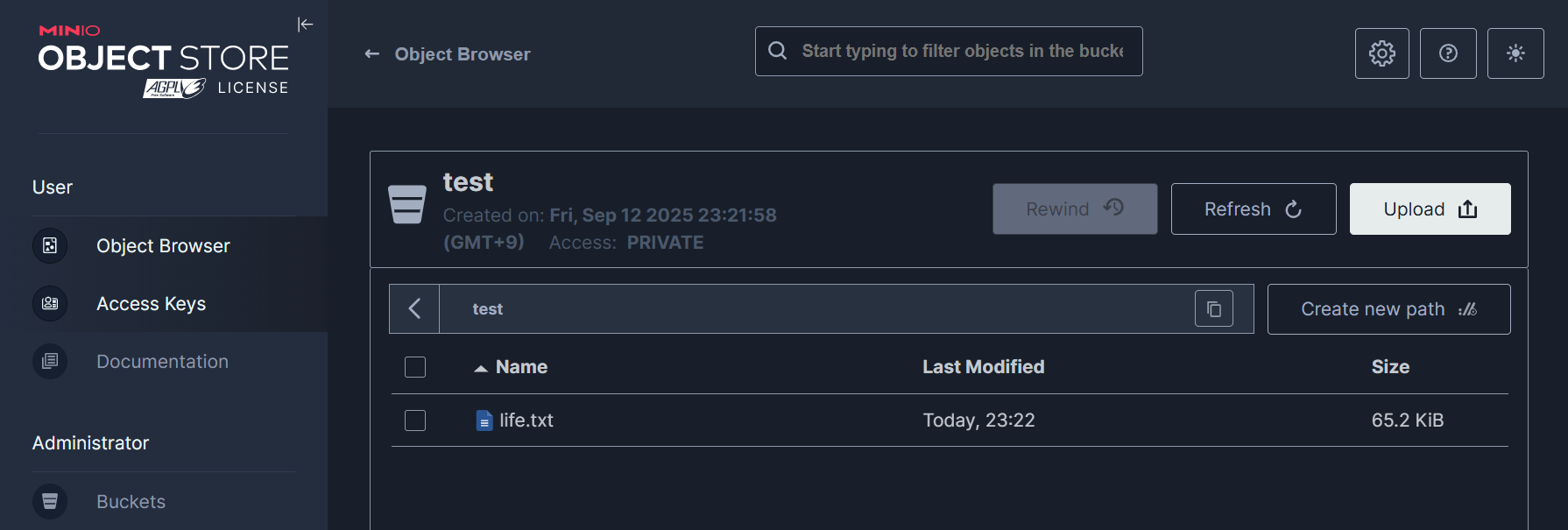
아래와 같이 확인할 수 있습니다.
# 노드에 기본 툴 설치
docker exec -it myk8s-control-plane sh -c 'apt update && apt install tree -y'
for node in worker worker2 worker3 worker4; do echo "node : myk8s-$node" ; docker exec -it myk8s-$node sh -c 'apt update && apt install tree -y'; echo; done

# PV가 위치한 각 노드의 경로 확인
kubectl describe pv

$ kubectl describe pv | grep Path
    Type:          HostPath (bare host directory volume)
    Path:          /var/local-path-provisioner/pvc-0d14d086-d0e1-4ce5-a450-be0479861554_tenant-0_data0-myminio-pool-0-2
    HostPathType:  DirectoryOrCreate
    Type:          HostPath (bare host directory volume)
    Path:          /var/local-path-provisioner/pvc-629b9a00-5e73-4251-9813-b4311e5b43b6_tenant-0_data0-myminio-pool-0-1
    HostPathType:  DirectoryOrCreate
    Type:          HostPath (bare host directory volume)
    Path:          /var/local-path-provisioner/pvc-e2aa95ac-7e8c-4cf4-aaa2-a1008afea8bf_tenant-0_data0-myminio-pool-0-3
    HostPathType:  DirectoryOrCreate
    Type:          HostPath (bare host directory volume)
    Path:          /var/local-path-provisioner/pvc-ef35ab5b-9745-4665-b460-0d65c1d77353_tenant-0_data0-myminio-pool-0-0
    HostPathType:  DirectoryOrCreate

# 각 워커 노드에서 tree를 통해서 erasure code를 통한 파일 확인
for node in worker worker2 worker3 worker4; do echo "node : myk8s-$node" ; docker exec -it myk8s-$node tree -h /var/local-path-provisioner; echo; done


$ for node in worker worker2 worker3 worker4; do echo "node : myk8s-$node" ; docker exec -it myk8s-$node tree -h /var/local-path-provisioner; echo; done
node : myk8s-worker
[4.0K]  /var/local-path-provisioner
`-- [4.0K]  pvc-e2aa95ac-7e8c-4cf4-aaa2-a1008afea8bf_tenant-0_data0-myminio-pool-0-3
    `-- [4.0K]  data
        `-- [4.0K]  test
            `-- [4.0K]  life.txt
                `-- [ 22K]  xl.meta

5 directories, 1 file

node : myk8s-worker2
[4.0K]  /var/local-path-provisioner
`-- [4.0K]  pvc-ef35ab5b-9745-4665-b460-0d65c1d77353_tenant-0_data0-myminio-pool-0-0
    `-- [4.0K]  data
        `-- [4.0K]  test
            `-- [4.0K]  life.txt
                `-- [ 22K]  xl.meta

5 directories, 1 file

node : myk8s-worker3
[4.0K]  /var/local-path-provisioner
`-- [4.0K]  pvc-0d14d086-d0e1-4ce5-a450-be0479861554_tenant-0_data0-myminio-pool-0-2
    `-- [4.0K]  data
        `-- [4.0K]  test
            `-- [4.0K]  life.txt
                `-- [ 22K]  xl.meta

5 directories, 1 file

node : myk8s-worker4
[4.0K]  /var/local-path-provisioner
`-- [4.0K]  pvc-629b9a00-5e73-4251-9813-b4311e5b43b6_tenant-0_data0-myminio-pool-0-1
    `-- [4.0K]  data
        `-- [4.0K]  test
            `-- [4.0K]  life.txt
                `-- [ 22K]  xl.meta

5 directories, 1 file

# 실제 파일 확인
docker exec -it myk8s-worker  sh -c 'cat /var/local-path-provisioner/*/data/ㅅtest/life.txt/xl.meta'
docker exec -it myk8s-worker2 sh -c 'cat /var/local-path-provisioner/*/test/mybucket/life.txt/xl.meta'
docker exec -it myk8s-worker3 sh -c 'cat /var/local-path-provisioner/*/test/mybucket/life.txt/xl.meta'
docker exec -it myk8s-worker4 sh -c 'cat /var/local-path-provisioner/*/test/mybucket/life.txt/xl.meta'


$ docker exec -it myk8s-worker  sh -c 'cat /var/local-path-provisioner/*/data/test/life.txt/x
l.meta'
XL2 �s�&���d���!,�:)��E��Type�V2Obj��ID��DDir�M%A�)�Cj���cI�t�EcAlgo�EcM�EcN�EcBSize��EcIndex�EcDist��CSumAlgo�PartNums��PartETags��PartSizes����PartASizes����Size���MTime�d���!,�MetaSys��x-minio-internal-inline-data�true�MetaUsr��content-type�text/plain�etag� 93662839239f8c2cb4a9ae412272957c-�q̦*r_{;k�l�іB���@Chapter 1: Childhood and Innocence

Chapter 2: Education and Curiosity

Chapter 3: Friendships and Bonds
...
쿠버네티스 환경의 MinIO 또한 erasure code에 의해서 각 PV에 파일이 분산되어 저장된 것을 확인할 수 있었습니다.
마치며
앞서 살펴본 MinIO의 erasure code를 실제 실습 환경에서 살펴보면서 어떤 의미를 가지는지 확인해보았습니다. 실제로는 심플한 형태로 실행되는데, 이것만으로 오브젝트 스토리지 서비스를 제공한다는 점이 놀라운 것 같습니다.
다음 게시물에서는 MinIO의 DirectPV를 실습해 보겠습니다.
'MinIO' 카테고리의 다른 글
| [4] MinIO - MNMD 배포 (0) | 2025.09.24 |
|---|---|
| [3] MinIO - Direct PV (0) | 2025.09.20 |
| [1] MinIO 개요 (0) | 2025.09.12 |


