| 일 | 월 | 화 | 수 | 목 | 금 | 토 |
|---|---|---|---|---|---|---|
| 1 | 2 | 3 | 4 | 5 | 6 | 7 |
| 8 | 9 | 10 | 11 | 12 | 13 | 14 |
| 15 | 16 | 17 | 18 | 19 | 20 | 21 |
| 22 | 23 | 24 | 25 | 26 | 27 | 28 |
- kubernetes
- 업그레이드
- ubuntu
- go
- minIO
- upgrade
- Karpenter
- curl
- WSL
- ipam
- EKS
- windows
- VPA
- AutoScaling
- Object Storage
- 쿠버네티스
- gateway api
- KEDA
- cilium
- vscode
- HPA
- Azure
- ansible
- 묘공단
- calico
- Timeout
- AKS
- 컨테이너
- aws
- directpv
- Today
- Total
a story
[3] MinIO - Direct PV 본문
이번 게시물에서는 MinIO의 DirectPV를 살펴보겠습니다.
목차
- 실습환경 구성
- DirectPV 개요
- DirectPV 실습
- DirectPV 환경의 MinIO 실습
1. 실습환경 구성
실습 환경은 AWS의 EC2를 통해서 구성하도록 하겠습니다.
# YAML 파일 다운로드
curl -O https://s3.ap-northeast-2.amazonaws.com/cloudformation.cloudneta.net/K8S/minio-ec2-1node.yaml

# CloudFormation 스택 배포
# aws cloudformation deploy --template-file <template file> --stack-name mylab --parameter-overrides KeyName=<My SSH Keyname> SgIngressSshCidr=<My Home Public IP Address>/32 --region ap-northeast-2

$ aws cloudformation deploy --template-file minio-ec2-1node.yaml --stack-name miniolab --parameter-overrides KeyName=mykey SgIngressSshCidr=$(curl -s ipinfo.io/ip)/32 --region ap-northeast-2

Waiting for changeset to be created..
Waiting for stack create/update to complete
Successfully created/updated stack - miniolab

# CloudFormation 스택 배포 완료 후 작업용 EC2 IP 출력
aws cloudformation describe-stacks --stack-name miniolab --query 'Stacks[*].Outputs[0].OutputValue' --output text --region ap-northeast-2

# [모니터링] CloudFormation 스택 상태 : 생성 완료 확인
while true; do
  date
  AWS_PAGER="" aws cloudformation list-stacks \
    --stack-status-filter CREATE_IN_PROGRESS CREATE_COMPLETE CREATE_FAILED DELETE_IN_PROGRESS DELETE_FAILED \
    --query "StackSummaries[*].{StackName:StackName, StackStatus:StackStatus}" \
    --output table
  sleep 1
done

...
Wed Sep 17 21:31:59 KST 2025
----------------------------------
|           ListStacks           |
+------------+-------------------+
|  StackName |    StackStatus    |
+------------+-------------------+
|  miniolab  |  CREATE_COMPLETE  |
+------------+-------------------+


# 배포된 aws ec2 유동 공인 IP 확인
aws ec2 describe-instances --query "Reservations[*].Instances[*].{PublicIPAdd:PublicIpAddress,InstanceName:Tags[?Key=='Name']|[0].Value,Status:State.Name}" --filters Name=instance-state-name,Values=running --output text

k3s-s   15.164.244.91   running

# EC2 SSH 접속 : 바로 접속하지 말고, 3~5분 정도 후에 접속 할 것
ssh -i ~/.ssh/mykey.pem ubuntu@$(aws cloudformation describe-stacks --stack-name miniolab --query 'Stacks[*].Outputs[0].OutputValue' --output text --region ap-northeast-2)
...
(⎈|default:N/A) root@k3s-s:~#
실습 환경을 CloudFormation으로 배포하면 EC2 인스턴스가 생성됩니다.
cloudformation의 template file을 살펴보면 인스턴스의 Userdata를 통해서 필요한 명령과 스크립트를 수행하였으며, 이미 k3s가 설치된 상태입니다.
[Note] k8s
k8s는 rancher에서 IoT 및 edge computing 디바이스 위에서도 동작할 수 있도록 만들어진 경량 쿠버네티스 입니다. 컨트롤 플레인은 k3s server 명령어로 수행되며, 프로세스 내에 컨트롤 플레인과 데이터스토어 컴포넌트가 실행됩니다. 에이전트 노드는 k3s agent 명령어로 수행되어, 프로세스 내에 노드에 해당하는 컴포넌트가 실행됩니다.
출처: https://docs.k3s.io/architecture

설치된 k3s 를 확인해보고, hostnamectl로 EC2 인스턴스 여부를 확인해봅니다.
kubectl get node -owide
kubectl get po -A
hostnamectl

(⎈|default:N/A) root@k3s-s:~# kubectl get no -owide
NAME    STATUS   ROLES                  AGE   VERSION        INTERNAL-IP     EXTERNAL-IP   OS-IMAGE             KERNEL-VERSION    CONTAINER-RUNTIME
k3s-s   Ready    control-plane,master   29m   v1.33.4+k3s1   192.168.10.10   <none>        Ubuntu 24.04.3 LTS   6.14.0-1012-aws   containerd://2.0.5-k3s2

(⎈|default:N/A) root@k3s-s:~# kubectl get po -A
NAMESPACE     NAME                                      READY   STATUS    RESTARTS   AGE
kube-system   coredns-64fd4b4794-cnj7x                  1/1     Running   0          32m
kube-system   local-path-provisioner-774c6665dc-crrsn   1/1     Running   0          32m
kube-system   metrics-server-7bfffcd44-6p9xf            1/1     Running   0          32m

(⎈|default:N/A) root@k3s-s:~# hostnamectl
 Static hostname: k3s-s
       Icon name: computer-vm
         Chassis: vm 🖴
      Machine ID: ec2e66b04812a4eb62dc9c11ecfa9ae3
         Boot ID: 5d01caeee674406a9bdcd31e1fcd35ee
  Virtualization: amazon
Operating System: Ubuntu 24.04.3 LTS
          Kernel: Linux 6.14.0-1012-aws
    Architecture: x86-64
 Hardware Vendor: Amazon EC2
  Hardware Model: t3.xlarge
Firmware Version: 1.0
   Firmware Date: Mon 2017-10-16
    Firmware Age: 7y 11month 1d
이 환경을 바탕으로 앞으로 실습을 이어 가겠습니다.
실습에 앞서 DirectPV에 대해서 먼저 살펴보겠습니다.
2. DirectPV 개요
MinIO의 DirectPV는 DAS(Directed Attached Storage)를 위한 CSI(Container Storage Interface)입니다.
출처: https://docs.min.io/community/minio-directpv/
쿠버네티스 환경에서 hostPath나 localPV가 보통 로컬 디스크를 활용하는 옵션으로 알려져 있습니다. 다만 hostPath는 사전에 노드의 특정 경로를 직접 만들고, 해당 경로를 지정을 하여 사용하는 방식이며, localPV는 사전에 로컬 디스크를 PV로 등록해야 합니다. 즉, 두가지 방식은 노드마다 디스크를 수동으로 설정 관리해야 합니다.
반면 DirectPV는 분산 환경에서 로컬 디스크를 discover, format, mount, schedule , monitor까지 지원하는 분산 환경의 Persistent Volume Manager로 역할합니다. 쿠버네티스 환경에서 DirectPV를 통해 로컬 디스크를 식별하고, PVC에 대한 PV를 생성합니다.
그림의 우측과 같이 SAN, NAS 기반의 CSI 드라이버에서는 SAN/NAS 기반의 복제나 혹은 Erasure code가 동작하고, 불필요한 네트워크 홉이 발생하여 복잡성과 성능을 저하시킵니다. 반면, 좌측에서 로컬 스토리지를 사용하는 DriectPV는 이러한 복잡한 솔루션이 없이 로컬 스토리지의 이점을 최대한 사용할 수 있습니다.

출처: https://docs.min.io/community/minio-directpv/
DirectPV의 구성 요소
DirectPV는 두 가지 컴포넌트를 가지며, 쿠버네티스 환경에서 파드로 실행됩니다.
- Controller
- Node server
먼저 Controller를 살펴 보겠습니다.

출처: https://docs.min.io/community/minio-directpv/concepts/architecture/
Controller는 controller라는 이름의 파드로 디플로이먼트 형태로 실행되며, 3개의 replicas로 실행됩니다. 이때 하나의 인스턴스가 요청을 처리합니다.
각 파드는 3개의 컨테이너로 이뤄집니다.
- Controller: 볼륨 생성, 삭제, 확장에 대한 CSI 요청을 처리합니다.
- CSI provisioner: PVC로 부터 볼륨 생성과 삭제 요청을 CSI controller로 전달하는 역할을 합니다.
- CSI resizer: PVC로 부터 볼륨 확장에 대한 요청을 CSI controller로 전달하는 역할을 합니다.
controller server는 controller 컨테이너의 형태로 실행되며, Create volume , Delete volume, Expand volume이라는 요청을 처리합니다.
다음 살펴볼 컴포넌트는 Node server입니다.

node server는 node-server라는 이름으로 데몬 셋으로 실행됩니다. 각 노드에서 로컬 디스크를 처리하는 역할을 합니다.
파드는 4개의 컨테이너로 이뤄집니다.
- Node driver registrar: node server를 kubelet에 등록해 CSI RPC call을 받습니다.
- Node server: stage, ustage, publish, unpublish, expand 볼륨 RPC 요청을 처리합니다.
- Node controller:
DirectPVDrive,DirectPVVolume,DirectPVNode,DirectPVInitRequest로 부터 CRD 이벤트를 처리합니다. - Liveness probe: 쿠버네티스의 liveness prove에 대한
/healthz엔드포인트를 노출합니다.
DirectPV의 controller와 node-server라는 컴포넌트를 살펴봤습니다. 쉽게 controller는 CSI 관점에서 PVC 요청을 받아 적절한 PV 생성, 삭제, 확장하는 역할을 처리합니다. node-server는 노드 수준에서 디스크를 discovery, format, mount, monitoring하는 역할을 수행합니다.
아래와 같은 절차로 처리됩니다.
[PVC 생성 요청]
↓
[CSI Provisioner]
↓
[Controller]
디스크 선택
Volume 리소스 생성
↓
[Node Server (on 해당 노드)]
디스크 포맷
마운트
처음에 MinIO와 DirectPV가 직접적인 연관을 가지고 있는 것으로 이해하고 문서를 살펴보다 보니 혼란스러웠는데, 결국 두가지 다른 솔루션을 조합해서 사용할 수 있는 것으로 이해할 수 있습니다.
MinIO는 쿠버네티스 환경을 바탕으로 배포가 가능하며, MinIO에서 MNMD(Multi-Node Multi-Drive)로 배포를 하려면 각 노드에 연결된 드라이브를 관리하는 방법이 필요합니다.이때 쿠버네티스 환경에서 DirectPV CSI를 사용하면 다수 노드의 로컬 드라이브를 효과적으로 관리할 수 있게되고, 이 환경에서 MinIO를 활용하는 것이 보다 효과적인 접근 방법으로 이해됩니다.
실습을 통해서 자세히 살펴보겠습니다.
3. DirectPV 실습
DirectPV는 kubectl krew 플러그인을 통해서 설치할 수 있습니다.
먼저 krew 플러그인을 설치합니다.
# Install Krew
wget -P /root "https://github.com/kubernetes-sigs/krew/releases/latest/download/krew-linux_amd64.tar.gz"
tar zxvf "/root/krew-linux_amd64.tar.gz" --warning=no-unknown-keyword
./krew-linux_amd64 install krew
export PATH="${KREW_ROOT:-$HOME/.krew}/bin:$PATH" # export PATH="$PATH:/root/.krew/bin"
echo 'export PATH="$PATH:/root/.krew/bin:/root/go/bin"' >> /etc/profile
kubectl krew install get-all neat rolesum pexec stern
kubectl krew list

(⎈|default:N/A) root@k3s-s:~# kubectl krew list
PLUGIN   VERSION
get-all  v1.4.2
krew     v0.4.5
neat     v2.0.4
pexec    v0.4.1
rolesum  v1.5.5
stern    v1.33.0
실습을 이어 나가겠습니다.
# directpv 플러그인 설치
kubectl krew install directpv
kubectl directpv -h

(⎈|default:N/A) root@k3s-s:~# kubectl krew install directpv
Updated the local copy of plugin index.
Installing plugin: directpv
Installed plugin: directpv
\
 | Use this plugin:
 |      kubectl directpv
 | Documentation:
 |      https://github.com/minio/directpv
/
WARNING: You installed plugin "directpv" from the krew-index plugin repository.
   These plugins are not audited for security by the Krew maintainers.
   Run them at your own risk.
(⎈|default:N/A) root@k3s-s:~# kubectl directpv -h
Kubectl plugin for managing DirectPV drives and volumes.

USAGE:
  directpv [command]

FLAGS:
      --kubeconfig string   Path to the kubeconfig file to use for CLI requests
      --quiet               Suppress printing error messages
  -h, --help                help for directpv
      --version             version for directpv

AVAILABLE COMMANDS:
  install     Install DirectPV in Kubernetes
  discover    Discover new drives
  init        Initialize the drives
  info        Show information about DirectPV installation
  list        List drives and volumes
  label       Set labels to drives and volumes
  cordon      Mark drives as unschedulable
  uncordon    Mark drives as schedulable
  migrate     Migrate drives and volumes from legacy DirectCSI
  move        Move volumes excluding data from source drive to destination drive on a same node
  clean       Cleanup stale volumes
  suspend     Suspend drives and volumes
  resume      Resume suspended drives and volumes
  repair      Repair filesystem of drives
  remove      Remove unused drives from DirectPV
  uninstall   Uninstall DirectPV in Kubernetes

Use "directpv [command] --help" for more information about this command.
krew에 directpv 플로그인 설치가 완료되면, 쿠버네티스에 DirectPV를 설치를 진행합니다.
# DirectPV 설치
kubectl directpv install

(⎈|default:N/A) root@k3s-s:~# kubectl directpv install
Installing on unsupported Kubernetes v1.33

 ███████████████████████████████████████████████████████████████████████████ 100%

┌──────────────────────────────────────┬──────────────────────────┐
│ NAME                                 │ KIND                     │
├──────────────────────────────────────┼──────────────────────────┤
│ directpv                             │ Namespace                │
│ directpv-min-io                      │ ServiceAccount           │
│ directpv-min-io                      │ ClusterRole              │
│ directpv-min-io                      │ ClusterRoleBinding       │
│ directpv-min-io                      │ Role                     │
│ directpv-min-io                      │ RoleBinding              │
│ directpvdrives.directpv.min.io       │ CustomResourceDefinition │
│ directpvvolumes.directpv.min.io      │ CustomResourceDefinition │
│ directpvnodes.directpv.min.io        │ CustomResourceDefinition │
│ directpvinitrequests.directpv.min.io │ CustomResourceDefinition │
│ directpv-min-io                      │ CSIDriver                │
│ directpv-min-io                      │ StorageClass             │
│ node-server                          │ Daemonset                │
│ controller                           │ Deployment               │
└──────────────────────────────────────┴──────────────────────────┘

DirectPV installed successfully
install 명령과 함께 필요한 네임스페이스, 서비스 어카운트, RBAC, CRD와 각 컴포넌트들이 설치된 것을 확인할 수 있습니다.
# 설치 확인
kubectl get crd | grep min

(⎈|default:N/A) root@k3s-s:~# kubectl get crd | grep min
directpvdrives.directpv.min.io         2025-09-17T13:15:32Z
directpvinitrequests.directpv.min.io   2025-09-17T13:15:32Z
directpvnodes.directpv.min.io          2025-09-17T13:15:32Z
directpvvolumes.directpv.min.io        2025-09-17T13:15:32Z

kubectl get sc directpv-min-io -o yaml | yq
kubectl get sc

(⎈|default:N/A) root@k3s-s:~# kubectl get sc
NAME                   PROVISIONER             RECLAIMPOLICY   VOLUMEBINDINGMODE      ALLOWVOLUMEEXPANSION   AGE
directpv-min-io        directpv-min-io         Delete          WaitForFirstConsumer   true                   22m
local-path (default)   rancher.io/local-path   Delete          WaitForFirstConsumer   false                  80m

kubectl get all -n directpv
kubectl get deploy,ds,pod -n directpv
kubectl rolesum directpv-min-io -n directpv

(⎈|default:N/A) root@k3s-s:~# kubectl get all -n directpv
NAME                              READY   STATUS    RESTARTS   AGE
pod/controller-596844c67f-99p6c   3/3     Running   0          22m
pod/controller-596844c67f-fwwkd   3/3     Running   0          22m
pod/controller-596844c67f-psqr4   3/3     Running   0          22m
pod/node-server-cmjww             4/4     Running   0          22m

NAME                         DESIRED   CURRENT   READY   UP-TO-DATE   AVAILABLE   NODE SELECTOR   AGE
daemonset.apps/node-server   1         1         1       1            1           <none>          22m

NAME                         READY   UP-TO-DATE   AVAILABLE   AGE
deployment.apps/controller   3/3     3            3           22m

NAME                                    DESIRED   CURRENT   READY   AGE
replicaset.apps/controller-596844c67f   3         3         3       22m

(⎈|default:N/A) root@k3s-s:~# kubectl get deploy,ds,pod -n directpv
NAME                         READY   UP-TO-DATE   AVAILABLE   AGE
deployment.apps/controller   3/3     3            3           23m

NAME                         DESIRED   CURRENT   READY   UP-TO-DATE   AVAILABLE   NODE SELECTOR   AGE
daemonset.apps/node-server   1         1         1       1            1           <none>          23m

NAME                              READY   STATUS    RESTARTS   AGE
pod/controller-596844c67f-99p6c   3/3     Running   0          23m
pod/controller-596844c67f-fwwkd   3/3     Running   0          23m
pod/controller-596844c67f-psqr4   3/3     Running   0          23m
pod/node-server-cmjww             4/4     Running   0          23m
(⎈|default:N/A) root@k3s-s:~# kubectl rolesum directpv-min-io -n directpv
ServiceAccount: directpv/directpv-min-io
Secrets:

Policies:
• [RB] directpv/directpv-min-io ⟶  [R] directpv/directpv-min-io
  Resource                    Name  Exclude  Verbs  G L W C U P D DC
  leases.coordination.k8s.io  [*]     [-]     [-]   ✔ ✔ ✔ ✔ ✔ ✖ ✔ ✖


• [CRB] */directpv-min-io ⟶  [CR] */directpv-min-io
  Resource                                                          Name  Exclude  Verbs  G L W C U P D DC
  csinodes.storage.k8s.io                                           [*]     [-]     [-]   ✔ ✔ ✔ ✖ ✖ ✖ ✖ ✖
  customresourcedefinition.[apiextensions.k8s.io,directpv.min.io]   [*]     [-]     [-]   ✔ ✔ ✔ ✔ ✔ ✔ ✔ ✖
  customresourcedefinitions.[apiextensions.k8s.io,directpv.min.io]  [*]     [-]     [-]   ✔ ✔ ✔ ✔ ✔ ✔ ✔ ✖
  directpvdrives.directpv.min.io                                    [*]     [-]     [-]   ✔ ✔ ✔ ✔ ✔ ✖ ✔ ✖
  directpvinitrequests.directpv.min.io                              [*]     [-]     [-]   ✔ ✔ ✔ ✔ ✔ ✖ ✔ ✖
  directpvnodes.directpv.min.io                                     [*]     [-]     [-]   ✔ ✔ ✔ ✔ ✔ ✖ ✔ ✖
  directpvvolumes.directpv.min.io                                   [*]     [-]     [-]   ✔ ✔ ✔ ✔ ✔ ✖ ✔ ✖
  endpoints                                                         [*]     [-]     [-]   ✔ ✔ ✔ ✔ ✔ ✖ ✔ ✖
  events                                                            [*]     [-]     [-]   ✖ ✔ ✔ ✔ ✔ ✔ ✖ ✖
  leases.coordination.k8s.io                                        [*]     [-]     [-]   ✔ ✔ ✔ ✔ ✔ ✖ ✔ ✖
  nodes                                                             [*]     [-]     [-]   ✔ ✔ ✔ ✖ ✖ ✖ ✖ ✖
  persistentvolumeclaims                                            [*]     [-]     [-]   ✔ ✔ ✔ ✖ ✔ ✖ ✖ ✖
  persistentvolumeclaims/status                                     [*]     [-]     [-]   ✖ ✖ ✖ ✖ ✖ ✔ ✖ ✖
  persistentvolumes                                                 [*]     [-]     [-]   ✔ ✔ ✔ ✔ ✖ ✔ ✔ ✖
  pod                                                               [*]     [-]     [-]   ✔ ✔ ✔ ✖ ✖ ✖ ✖ ✖
  pods                                                              [*]     [-]     [-]   ✔ ✔ ✔ ✖ ✖ ✖ ✖ ✖
  secret                                                            [*]     [-]     [-]   ✔ ✔ ✔ ✖ ✖ ✖ ✖ ✖
  secrets                                                           [*]     [-]     [-]   ✔ ✔ ✔ ✖ ✖ ✖ ✖ ✖
  storageclasses.storage.k8s.io                                     [*]     [-]     [-]   ✔ ✔ ✔ ✖ ✖ ✖ ✖ ✖
  volumeattachments.storage.k8s.io                                  [*]     [-]     [-]   ✔ ✔ ✔ ✖ ✖ ✖ ✖ ✖
  volumesnapshotcontents.snapshot.storage.k8s.io                    [*]     [-]     [-]   ✔ ✔ ✖ ✖ ✖ ✖ ✖ ✖
  volumesnapshots.snapshot.storage.k8s.io                           [*]     [-]     [-]   ✔ ✔ ✖ ✖ ✖ ✖ ✖ ✖


kubectl get directpvnodes.directpv.min.io
kubectl get directpvnodes.directpv.min.io -o yaml | yq


(⎈|default:N/A) root@k3s-s:~# kubectl get directpvnodes.directpv.min.io
NAME    AGE
k3s-s   23m
(⎈|default:N/A) root@k3s-s:~# kubectl get directpvnodes.directpv.min.io -o yaml | yq
{
  "apiVersion": "v1",
  "items": [
    {
      "apiVersion": "directpv.min.io/v1beta1",
      "kind": "DirectPVNode",
      "metadata": {
        "creationTimestamp": "2025-09-17T13:15:45Z",
        "generation": 1,
        "labels": {
          "directpv.min.io/created-by": "node-controller",
          "directpv.min.io/node": "k3s-s",
          "directpv.min.io/version": "v1beta1"
        },
        "name": "k3s-s",
        "resourceVersion": "1645",
        "uid": "dd1ed251-5c8a-458a-a95d-bdad87860a9c"
      },
      "spec": {},
      "status": {
        "devices": [
          {
            "deniedReason": "Mounted",
            "fsType": "ext4",
            "fsuuid": "1eb1aa76-4a46-48d9-95d8-a2ecf2d505c2",
            "id": "259:8$mazlJ+LaRoQIg1a49exnnvMXozxEHDXUhRE9kqh7nFI=",
            "majorMinor": "259:8",
            "make": "Amazon Elastic Block Store (Part 16)",
            "name": "nvme0n1p16",
            "size": 957350400
          },
          {
            "deniedReason": "Partitioned",
            "id": "259:1$6MxZyk1Zu78Gv/zhogVdYs00zn4/BU1DlI138b97UtA=",
            "majorMinor": "259:1",
            "make": "Amazon Elastic Block Store",
            "name": "nvme0n1",
            "size": 32212254720
          },
          {
            "id": "259:0$9UYmau9epZA5HOERZ5SrzW8yiDLBw80W30CKvLFHSQw=",
            "majorMinor": "259:0",
            "make": "Amazon Elastic Block Store",
            "name": "nvme1n1",
            "size": 32212254720
          },
          {
            "id": "259:2$hpcB632lnzoNk7tcg6SAkOtjCkIsPVsLqPmitsEETwc=",
            "majorMinor": "259:2",
            "make": "Amazon Elastic Block Store",
            "name": "nvme4n1",
            "size": 32212254720
          },
          {
            "deniedReason": "Too small",
            "id": "259:6$Gbb3k7exq4W2Ac+zU0j+krIvJwN/6OtH6f3ELuv26QY=",
            "majorMinor": "259:6",
            "make": "Amazon Elastic Block Store (Part 14)",
            "name": "nvme0n1p14",
            "size": 4194304
          },
          {
            "deniedReason": "Mounted",
            "fsType": "ext4",
            "fsuuid": "0eec2352-4b50-40ec-ae93-7ce2911392bb",
            "id": "259:5$EXPke6wed3mGQmR+lWFoC0xHqmd2x0qaMPpqHrpDPGg=",
            "majorMinor": "259:5",
            "make": "Amazon Elastic Block Store (Part 1)",
            "name": "nvme0n1p1",
            "size": 31137447424
          },
          {
            "deniedReason": "Too small; Mounted",
            "fsType": "vfat",
            "fsuuid": "2586-E57C",
            "id": "259:7$eq0TDPAeC5XpZxGD+35aPxmsqlyWCfYNKxBhvQbG3HY=",
            "majorMinor": "259:7",
            "make": "Amazon Elastic Block Store (Part 15)",
            "name": "nvme0n1p15",
            "size": 111149056
          },
          {
            "id": "259:3$5cl6e3k8kuTX1H0jiWeh7s5VAWPy/6SkGszbjy0HrMI=",
            "majorMinor": "259:3",
            "make": "Amazon Elastic Block Store",
            "name": "nvme3n1",
            "size": 32212254720
          },
          {
            "id": "259:4$CzcTd5LMbzvzg61lhMTENGsDQG+g47NsF0Ef4V0qWwk=",
            "majorMinor": "259:4",
            "make": "Amazon Elastic Block Store",
            "name": "nvme2n1",
            "size": 32212254720
          }
        ]
      }
    }
  ],
  "kind": "List",
  "metadata": {
    "resourceVersion": ""
  }
}
아직 DirectPV를 쿠버네티스 환경에 설치만 했을 뿐 아무런 작업을 진행한 것은 없습니다. controller 로그를 살펴보면 start 한 뒤 대기중인 것으로 보입니다.
(⎈|default:N/A) root@k3s-s:~# kubectl logs -f -n directpv controller-596844c67f-99p6c -c controller
I0917 13:15:45.092456       1 controller.go:57] Identity server started
I0917 13:15:45.092567       1 controller.go:60] Controller server started
I0917 13:15:45.093171       1 ready.go:42] Serving readiness endpoint at :30443
^C(⎈|default:N/A) root@k3s-s:~# kubectl logs -f -n directpv controller-596844c67f-fwwkd -c controller
I0917 13:15:45.084442       1 controller.go:57] Identity server started
I0917 13:15:45.084728       1 controller.go:60] Controller server started
I0917 13:15:45.085376       1 ready.go:42] Serving readiness endpoint at :30443
^C(⎈|default:N/A) root@k3s-s:~# kubectl logs -f -n directpv controller-596844c67f-psqr4 -c controller
I0917 13:15:45.157321       1 controller.go:57] Identity server started
I0917 13:15:45.157487       1 controller.go:60] Controller server started
I0917 13:15:45.157907       1 ready.go:42] Serving readiness endpoint at :30443
데몬 셋으로 실행 중인 node-server를 살펴보면 node-driver-registrar 컨테이너에서 kubelet으로 CSI driver를 등록하고 "Received NotifyRegistrationStatus call"을 받았으며, syslog를 살펴보면 "Register new plugin with name: directpv-min-io"와 같은 식으로 등록을 한 것을 알 수 있습니다.
(⎈|default:N/A) root@k3s-s:~# kubectl logs -f -n directpv node-server-cmjww
Defaulted container "node-driver-registrar" out of: node-driver-registrar, node-server, node-controller, liveness-probe
I0917 13:15:37.752434    7285 main.go:150] "Version" version="unknown"
I0917 13:15:37.752494    7285 main.go:151] "Running node-driver-registrar" mode=""
I0917 13:15:37.752502    7285 main.go:172] "Attempting to open a gRPC connection" csiAddress="unix:///csi/csi.sock"
I0917 13:15:46.254971    7285 main.go:180] "Calling CSI driver to discover driver name"
I0917 13:15:46.259223    7285 main.go:189] "CSI driver name" csiDriverName="directpv-min-io"
I0917 13:15:46.259292    7285 node_register.go:56] "Starting Registration Server" socketPath="/registration/directpv-min-io-reg.sock"
I0917 13:15:46.259923    7285 node_register.go:66] "Registration Server started" socketPath="/registration/directpv-min-io-reg.sock"
I0917 13:15:46.260088    7285 node_register.go:96] "Skipping HTTP server"
I0917 13:15:47.056666    7285 main.go:96] "Received GetInfo call" request="&InfoRequest{}"
I0917 13:15:47.079550    7285 main.go:108] "Received NotifyRegistrationStatus call" status="&RegistrationStatus{PluginRegistered:true,Error:,}"
^C

# /var/log/syslog
2025-09-17T13:15:47.057473+00:00 ip-192-168-10-10 k3s[2794]: I0917 22:15:47.057063    2794 csi_plugin.go:106] kubernetes.io/csi: Trying to validate a new CSI Driver with name: directpv-min-io endpoint: /var/lib/kubelet/plugins/directpv-min-io/csi.sock versions: 1.0.0
2025-09-17T13:15:47.057571+00:00 ip-192-168-10-10 k3s[2794]: I0917 22:15:47.057100    2794 csi_plugin.go:119] kubernetes.io/csi: Register new plugin with name: directpv-min-io at endpoint: /var/lib/kubelet/plugins/directpv-min-io/csi.sock
이제 Directpv를 통해서디스크를 discover하고 초기화 해보겠습니다.
# EC2에 등록된 disk와 direct pv로 관리되는 드라이브 확인
lsblk
kubectl directpv info

(⎈|default:N/A) root@k3s-s:~# lsblk
NAME         MAJ:MIN RM  SIZE RO TYPE MOUNTPOINTS
loop0          7:0    0 73.9M  1 loop /snap/core22/2111
loop1          7:1    0 27.6M  1 loop /snap/amazon-ssm-agent/11797
loop2          7:2    0 50.8M  1 loop /snap/snapd/25202
loop3          7:3    0   16M  0 loop
nvme1n1      259:0    0   30G  0 disk
nvme0n1      259:1    0   30G  0 disk
├─nvme0n1p1  259:5    0   29G  0 part /
├─nvme0n1p14 259:6    0    4M  0 part
├─nvme0n1p15 259:7    0  106M  0 part /boot/efi
└─nvme0n1p16 259:8    0  913M  0 part /boot
nvme4n1      259:2    0   30G  0 disk
nvme3n1      259:3    0   30G  0 disk
nvme2n1      259:4    0   30G  0 disk

(⎈|default:N/A) root@k3s-s:~# kubectl directpv info
┌─────────┬──────────┬───────────┬─────────┬────────┐
│ NODE    │ CAPACITY │ ALLOCATED │ VOLUMES │ DRIVES │
├─────────┼──────────┼───────────┼─────────┼────────┤
│ • k3s-s │ -        │ -         │ -       │ -      │
└─────────┴──────────┴───────────┴─────────┴────────┘

0 B/0 B used, 0 volumes, 0 drives

# discover 진행
kubectl directpv discover

(⎈|default:N/A) root@k3s-s:~# kubectl directpv discover

 Discovered node 'k3s-s' ✔

┌─────────────────────┬───────┬─────────┬────────┬────────────┬────────────────────────────┬───────────┬─────────────┐
│ ID                  │ NODE  │ DRIVE   │ SIZE   │ FILESYSTEM │ MAKE                       │ AVAILABLE │ DESCRIPTION │
├─────────────────────┼───────┼─────────┼────────┼────────────┼────────────────────────────┼───────────┼─────────────┤
│ 259:0$9UYmau9epZ... │ k3s-s │ nvme1n1 │ 30 GiB │ -          │ Amazon Elastic Block Store │ YES       │ -           │
│ 259:4$CzcTd5LMbz... │ k3s-s │ nvme2n1 │ 30 GiB │ -          │ Amazon Elastic Block Store │ YES       │ -           │
│ 259:3$5cl6e3k8ku... │ k3s-s │ nvme3n1 │ 30 GiB │ -          │ Amazon Elastic Block Store │ YES       │ -           │
│ 259:2$hpcB632lnz... │ k3s-s │ nvme4n1 │ 30 GiB │ -          │ Amazon Elastic Block Store │ YES       │ -           │
└─────────────────────┴───────┴─────────┴────────┴────────────┴────────────────────────────┴───────────┴─────────────┘

Generated 'drives.yaml' successfully.
discover 명령을 수행하면, 해당 폴더에 drives.yaml 파일이 생성됩니다. 이 파일을 인자로 init하면 초기화가 이뤄집니다.
# (참고) 적용 예외 설정 시 select: "no" 설정
cat drives.yaml

(⎈|default:N/A) root@k3s-s:~# cat drives.yaml
version: v1
nodes:
    - name: k3s-s
      drives:
        - id: 259:3$5cl6e3k8kuTX1H0jiWeh7s5VAWPy/6SkGszbjy0HrMI=
          name: nvme3n1
          size: 32212254720
          make: Amazon Elastic Block Store
          select: "yes"
        - id: 259:4$CzcTd5LMbzvzg61lhMTENGsDQG+g47NsF0Ef4V0qWwk=
          name: nvme2n1
          size: 32212254720
          make: Amazon Elastic Block Store
          select: "yes"
        - id: 259:0$9UYmau9epZA5HOERZ5SrzW8yiDLBw80W30CKvLFHSQw=
          name: nvme1n1
          size: 32212254720
          make: Amazon Elastic Block Store
          select: "yes"
        - id: 259:2$hpcB632lnzoNk7tcg6SAkOtjCkIsPVsLqPmitsEETwc=
          name: nvme4n1
          size: 32212254720
          make: Amazon Elastic Block Store
          select: "yes"

# 초기화 (Error 확인: 데이터가 지워짐!)
kubectl directpv init drives.yaml

(⎈|default:N/A) root@k3s-s:~# kubectl directpv init drives.yaml
ERROR Initializing the drives will permanently erase existing data. Please review carefully before performing this *DANGEROUS* operation and retry this command with --dangerous flag.

# 초기화 강제 진행
kubectl directpv init drives.yaml --dangerous

(⎈|default:N/A) root@k3s-s:~# kubectl directpv init drives.yaml --dangerous

 ███████████████████████████████████████████████████████████████████████████ 100%

 Processed initialization request '2774b71a-64d1-4c98-a307-50521b0e468f' for node 'k3s-s' ✔

┌──────────────────────────────────────┬───────┬─────────┬─────────┐
│ REQUEST_ID                           │ NODE  │ DRIVE   │ MESSAGE │
├──────────────────────────────────────┼───────┼─────────┼─────────┤
│ 2774b71a-64d1-4c98-a307-50521b0e468f │ k3s-s │ nvme1n1 │ Success │
│ 2774b71a-64d1-4c98-a307-50521b0e468f │ k3s-s │ nvme2n1 │ Success │
│ 2774b71a-64d1-4c98-a307-50521b0e468f │ k3s-s │ nvme3n1 │ Success │
│ 2774b71a-64d1-4c98-a307-50521b0e468f │ k3s-s │ nvme4n1 │ Success │
└──────────────────────────────────────┴───────┴─────────┴─────────┘

# 드라이브 확인
kubectl directpv list drives

(⎈|default:N/A) root@k3s-s:~# kubectl directpv list drives
┌───────┬─────────┬────────────────────────────┬────────┬────────┬─────────┬────────┐
│ NODE  │ NAME    │ MAKE                       │ SIZE   │ FREE   │ VOLUMES │ STATUS │
├───────┼─────────┼────────────────────────────┼────────┼────────┼─────────┼────────┤
│ k3s-s │ nvme1n1 │ Amazon Elastic Block Store │ 30 GiB │ 30 GiB │ -       │ Ready  │
│ k3s-s │ nvme2n1 │ Amazon Elastic Block Store │ 30 GiB │ 30 GiB │ -       │ Ready  │
│ k3s-s │ nvme3n1 │ Amazon Elastic Block Store │ 30 GiB │ 30 GiB │ -       │ Ready  │
│ k3s-s │ nvme4n1 │ Amazon Elastic Block Store │ 30 GiB │ 30 GiB │ -       │ Ready  │
└───────┴─────────┴────────────────────────────┴────────┴────────┴─────────┴────────┘

# 4개의 드라이브가 인식됨
kubectl directpv info

(⎈|default:N/A) root@k3s-s:~# kubectl directpv info
┌─────────┬──────────┬───────────┬─────────┬────────┐
│ NODE    │ CAPACITY │ ALLOCATED │ VOLUMES │ DRIVES │
├─────────┼──────────┼───────────┼─────────┼────────┤
│ • k3s-s │ 120 GiB  │ 0 B       │ 0       │ 4      │
└─────────┴──────────┴───────────┴─────────┴────────┘

0 B/120 GiB used, 0 volumes, 4 drives

# 확인
lsblk

(⎈|default:N/A) root@k3s-s:~# lsblk
NAME         MAJ:MIN RM  SIZE RO TYPE MOUNTPOINTS
loop0          7:0    0 73.9M  1 loop /snap/core22/2111
loop1          7:1    0 27.6M  1 loop /snap/amazon-ssm-agent/11797
loop2          7:2    0 50.8M  1 loop /snap/snapd/25202
loop3          7:3    0   16M  0 loop
nvme1n1      259:0    0   30G  0 disk /var/lib/directpv/mnt/ffd730c8-c056-454a-830f-208b9529104c
nvme0n1      259:1    0   30G  0 disk
├─nvme0n1p1  259:5    0   29G  0 part /
├─nvme0n1p14 259:6    0    4M  0 part
├─nvme0n1p15 259:7    0  106M  0 part /boot/efi
└─nvme0n1p16 259:8    0  913M  0 part /boot
nvme4n1      259:2    0   30G  0 disk /var/lib/directpv/mnt/7f010ba0-6e36-4bac-8734-8101f5fc86cd
nvme3n1      259:3    0   30G  0 disk /var/lib/directpv/mnt/ff9fbf17-a2ca-475a-83c3-88b9c4c77140
nvme2n1      259:4    0   30G  0 disk /var/lib/directpv/mnt/d29e80c7-dc3b-4a48-9a81-82352886d63f


# 디스크가 xfs로 포맷팅되어 마운트 된 상태
df -hT --type xfs

(⎈|default:N/A) root@k3s-s:~# df -hT --type xfs
Filesystem     Type  Size  Used Avail Use% Mounted on
/dev/nvme3n1   xfs    30G  248M   30G   1% /var/lib/directpv/mnt/ff9fbf17-a2ca-475a-83c3-88b9c4c77140
/dev/nvme1n1   xfs    30G  248M   30G   1% /var/lib/directpv/mnt/ffd730c8-c056-454a-830f-208b9529104c
/dev/nvme4n1   xfs    30G  248M   30G   1% /var/lib/directpv/mnt/7f010ba0-6e36-4bac-8734-8101f5fc86cd
/dev/nvme2n1   xfs    30G  248M   30G   1% /var/lib/directpv/mnt/d29e80c7-dc3b-4a48-9a81-82352886d63f

tree -h /var/lib/directpv/

(⎈|default:N/A) root@k3s-s:~# tree -h /var/lib/directpv/
[4.0K]  /var/lib/directpv/
├── [4.0K]  mnt
│   ├── [  75]  7f010ba0-6e36-4bac-8734-8101f5fc86cd
│   ├── [  75]  d29e80c7-dc3b-4a48-9a81-82352886d63f
│   ├── [  75]  ff9fbf17-a2ca-475a-83c3-88b9c4c77140
│   └── [  75]  ffd730c8-c056-454a-830f-208b9529104c
└── [  40]  tmp

7 directories, 0 files

# 각 드라이브는 directpvdirves로 등록됨
kubectl get directpvdrives.directpv.min.io -o yaml | yq

(⎈|default:N/A) root@k3s-s:~# kubectl get directpvdrives.directpv.min.io
NAME                                   AGE
7f010ba0-6e36-4bac-8734-8101f5fc86cd   2m16s
d29e80c7-dc3b-4a48-9a81-82352886d63f   2m16s
ff9fbf17-a2ca-475a-83c3-88b9c4c77140   2m16s
ffd730c8-c056-454a-830f-208b9529104c   2m16s

# 다만 /etc/fstab에 직접 등록되지 않기 때문에 재시작하면 마운트가 자동으로 되지 않습니다.
cat /etc/fstab
MinIO를 설치하지 않은 상태에서 DirectPV 자체는 CSI driver로 동작합니다. 테스트 애플리케이션을 배포하여 DirectPV가 CSI 로 동작하는 과정을 살펴보겠습니다.
# 사전 확인
kubectl get directpvdrives,directpvvolumes

(⎈|default:N/A) root@k3s-s:~# kubectl get directpvdrives
NAME                                   AGE
7f010ba0-6e36-4bac-8734-8101f5fc86cd   5m12s
d29e80c7-dc3b-4a48-9a81-82352886d63f   5m12s
ff9fbf17-a2ca-475a-83c3-88b9c4c77140   5m12s
ffd730c8-c056-454a-830f-208b9529104c   5m12s

(⎈|default:N/A) root@k3s-s:~# kubectl get directpvvolumes
No resources found

# PVC, Pod 배포
cat << EOF | kubectl apply -f -
apiVersion: v1
kind: PersistentVolumeClaim
metadata:
  name: nginx-pvc
spec:
  volumeMode: Filesystem
  storageClassName: directpv-min-io
  accessModes: [ "ReadWriteOnce" ]
  resources:
    requests:
      storage: 8Mi
---
apiVersion: v1
kind: Pod
metadata:
  name: nginx-pod
spec:
  volumes:
    - name: nginx-volume
      persistentVolumeClaim:
        claimName: nginx-pvc
  containers:
    - name: nginx-container
      image: nginx:alpine
      volumeMounts:
        - mountPath: "/mnt"
          name: nginx-volume
EOF
PVC와 파드를 생성하고 실제 동작과정을 controller와 node-server 로그를 통해서 살펴보겠습니다.
# leader controller의 로그를 확인
(⎈|default:N/A) root@k3s-s:~# kubectl get lease -n directpv
NAME                               HOLDER                               AGE
directpv-min-io                    1758114945188-9387-directpv-min-io   62m
external-resizer-directpv-min-io   controller-596844c67f-psqr4          62m

# csi-provisioner 로그 확인 -> PVC 요청에 대한 이벤트를 받고, 볼륨 생성을 Controller에 요청 전달
(⎈|default:N/A) root@k3s-s:~# kubectl logs -f -n directpv controller-596844c67f-99p6c
...
I0917 14:22:37.822827       1 event.go:389] "Event occurred" object="default/nginx-pvc" fieldPath="" kind="PersistentVolumeClaim" apiVersion="v1" type="Normal" reason="Provisioning" message="External provisioner is provisioning volume for claim \"default/nginx-pvc\""

# controller 로그 확인 -> volume 생성 요청
(⎈|default:N/A) root@k3s-s:~# kubectl logs -f -n directpv controller-596844c67f-psqr4 -c controller
...
I0917 14:22:37.824140       1 server.go:136] "Create volume requested" name="pvc-2029b3f1-f1b8-4a49-a863-a54e5f77dc05" requiredBytes="8,388,608"

# csi-provisioner 로그 확인 -> PVC 요청에 대한 PV가 정상적으로 생성됨
I0917 14:22:37.849828       1 controller.go:853] create volume rep: {CapacityBytes:8388608 VolumeId:pvc-2029b3f1-f1b8-4a49-a863-a54e5f77dc05 VolumeContext:map[] ContentSource:<nil> AccessibleTopology:[segments:<key:"directpv.min.io/identity" value:"directpv-min-io" > segments:<key:"directpv.min.io/node" value:"k3s-s" > segments:<key:"directpv.min.io/rack" value:"default" > segments:<key:"directpv.min.io/region" value:"default" > segments:<key:"directpv.min.io/zone" value:"default" > ] XXX_NoUnkeyedLiteral:{} XXX_unrecognized:[] XXX_sizecache:0}
I0917 14:22:37.849922       1 controller.go:955] successfully created PV pvc-2029b3f1-f1b8-4a49-a863-a54e5f77dc05 for PVC nginx-pvc and csi volume name pvc-2029b3f1-f1b8-4a49-a863-a54e5f77dc05
I0917 14:22:37.856376       1 event.go:389] "Event occurred" object="default/nginx-pvc" fieldPath="" kind="PersistentVolumeClaim" apiVersion="v1" type="Normal" reason="ProvisioningSucceeded" message="Successfully provisioned volume pvc-2029b3f1-f1b8-4a49-a863-a54e5f77dc05"

# node-server 로그 -> 디스크 초기화 및 마운트 수행(Stage volume requested → SetQuota succeeded → Publish volume requested)
...
I0917 14:22:39.040290    7463 stage_unstage.go:37] "Stage volume requested" volumeID="pvc-2029b3f1-f1b8-4a49-a863-a54e5f77dc05" StagingTargetPath="/var/lib/kubelet/plugins/kubernetes.io/csi/directpv-min-io/a6cb579efbf41e427e8ae51ca80226e7aba2c6bc78d8c2bfddc941be9629fb79/globalmount"
I0917 14:22:39.064127    7463 quota_linux.go:230] "SetQuota succeeded" Device="/dev/nvme3n1" Path="/var/lib/directpv/mnt/ff9fbf17-a2ca-475a-83c3-88b9c4c77140/.FSUUID.ff9fbf17-a2ca-475a-83c3-88b9c4c77140/pvc-2029b3f1-f1b8-4a49-a863-a54e5f77dc05" VolumeID="pvc-2029b3f1-f1b8-4a49-a863-a54e5f77dc05" ProjectID=2656553894 HardLimit=8388608
I0917 14:22:39.079767    7463 publish_unpublish.go:96] "Publish volume requested" volumeID="pvc-2029b3f1-f1b8-4a49-a863-a54e5f77dc05" stagingTargetPath="/var/lib/kubelet/plugins/kubernetes.io/csi/directpv-min-io/a6cb579efbf41e427e8ae51ca80226e7aba2c6bc78d8c2bfddc941be9629fb79/globalmount" targetPath="/var/lib/kubelet/pods/71cf2e1b-bf1b-47ec-9e54-019daa1c6e6b/volumes/kubernetes.io~csi/pvc-2029b3f1-f1b8-4a49-a863-a54e5f77dc05/mount"

# syslog 확인 -> 파드가 실행되고 볼륨 마운트 완료(MountVolume.MountDevice succeeded)
..
2025-09-17T14:22:38.838299+00:00 ip-192-168-10-10 systemd[1]: Created slice kubepods-besteffort-pod71cf2e1b_bf1b_47ec_9e54_019daa1c6e6b.slice - libcontainer container kubepods-besteffort-pod71cf2e1b_bf1b_47ec_9e54_019daa1c6e6b.slice.
2025-09-17T14:22:38.916842+00:00 ip-192-168-10-10 k3s[2794]: I0917 23:22:38.916450    2794 reconciler_common.go:251] "operationExecutor.VerifyControllerAttachedVolume started for volume \"pvc-2029b3f1-f1b8-4a49-a863-a54e5f77dc05\" (UniqueName: \"kubernetes.io/csi/directpv-min-io^pvc-2029b3f1-f1b8-4a49-a863-a54e5f77dc05\") pod \"nginx-pod\" (UID: \"71cf2e1b-bf1b-47ec-9e54-019daa1c6e6b\") " pod="default/nginx-pod"
2025-09-17T14:22:38.916974+00:00 ip-192-168-10-10 k3s[2794]: I0917 23:22:38.916501    2794 reconciler_common.go:251] "operationExecutor.VerifyControllerAttachedVolume started for volume \"kube-api-access-n4pvd\" (UniqueName: \"kubernetes.io/projected/71cf2e1b-bf1b-47ec-9e54-019daa1c6e6b-kube-api-access-n4pvd\") pod \"nginx-pod\" (UID: \"71cf2e1b-bf1b-47ec-9e54-019daa1c6e6b\") " pod="default/nginx-pod"
2025-09-17T14:22:39.074301+00:00 ip-192-168-10-10 k3s[2794]: I0917 23:22:39.074180    2794 operation_generator.go:557] "MountVolume.MountDevice succeeded for volume \"pvc-2029b3f1-f1b8-4a49-a863-a54e5f77dc05\" (UniqueName: \"kubernetes.io/csi/directpv-min-io^pvc-2029b3f1-f1b8-4a49-a863-a54e5f77dc05\") pod \"nginx-pod\" (UID: \"71cf2e1b-bf1b-47ec-9e54-019daa1c6e6b\") device mount path \"/var/lib/kubelet/plugins/kubernetes.io/csi/directpv-min-io/a6cb579efbf41e427e8ae51ca80226e7aba2c6bc78d8c2bfddc941be9629fb79/globalmount\"" pod="default/nginx-pod"
k3s에서는 kubelet으로 로그가 기록되지 않아서, 파드 관련 생성 기록은 별도로 기록이 안되는 것 같습니다.
생성된 PV, 파드 정보를 쿠버네티스에서 살펴보겠습니다.
# 확인
kubectl get pod,pvc,pv

(⎈|default:N/A) root@k3s-s:~# kubectl get pod,pvc,pv
NAME            READY   STATUS    RESTARTS   AGE
pod/nginx-pod   1/1     Running   0          13m

NAME                              STATUS   VOLUME                                     CAPACITY   ACCESS MODES   STORAGECLASS      VOLUMEATTRIBUTESCLASS   AGE
persistentvolumeclaim/nginx-pvc   Bound    pvc-2029b3f1-f1b8-4a49-a863-a54e5f77dc05   8Mi        RWO            directpv-min-io   <unset>                 13m

NAME                                                        CAPACITY   ACCESS MODES   RECLAIM POLICY   STATUS   CLAIM               STORAGECLASS      VOLUMEATTRIBUTESCLASS   REASON   AGE
persistentvolume/pvc-2029b3f1-f1b8-4a49-a863-a54e5f77dc05   8Mi        RWO            Delete           Bound    default/nginx-pvc   directpv-min-io   <unset>                          13m


kubectl exec -it nginx-pod -- df -hT -t xfs

(⎈|default:N/A) root@k3s-s:~# kubectl exec -it nginx-pod -- df -hT -t xfs
Filesystem           Type            Size      Used Available Use% Mounted on
/dev/nvme3n1         xfs             8.0M         0      8.0M   0% /mnt

kubectl exec -it nginx-pod -- sh -c 'echo hello > /mnt/hello.txt'
kubectl exec -it nginx-pod -- sh -c 'cat /mnt/hello.txt'

(⎈|default:N/A) root@k3s-s:~# kubectl exec -it nginx-pod -- sh -c 'echo hello > /mnt/hello.txt'
(⎈|default:N/A) root@k3s-s:~# kubectl exec -it nginx-pod -- sh -c 'cat /mnt/hello.txt'
hello


# 확인
lsblk

(⎈|default:N/A) root@k3s-s:~# lsblk
NAME         MAJ:MIN RM  SIZE RO TYPE MOUNTPOINTS
loop0          7:0    0 73.9M  1 loop /snap/core22/2111
loop1          7:1    0 27.6M  1 loop /snap/amazon-ssm-agent/11797
loop2          7:2    0 50.8M  1 loop /snap/snapd/25202
loop3          7:3    0   16M  0 loop
nvme1n1      259:0    0   30G  0 disk /var/lib/directpv/mnt/ffd730c8-c056-454a-830f-208b9529104c
nvme0n1      259:1    0   30G  0 disk
├─nvme0n1p1  259:5    0   29G  0 part /
├─nvme0n1p14 259:6    0    4M  0 part
├─nvme0n1p15 259:7    0  106M  0 part /boot/efi
└─nvme0n1p16 259:8    0  913M  0 part /boot
nvme4n1      259:2    0   30G  0 disk /var/lib/directpv/mnt/7f010ba0-6e36-4bac-8734-8101f5fc86cd
nvme3n1      259:3    0   30G  0 disk /var/lib/kubelet/pods/71cf2e1b-bf1b-47ec-9e54-019daa1c6e6b/volumes/kubernetes.io~csi/pvc-2029b3f1-f1b8-4a49-a863-a54e5f77dc05/mount
                                      /var/lib/kubelet/plugins/kubernetes.io/csi/directpv-min-io/a6cb579efbf41e427e8ae51ca80226e7aba2c6bc78d8c2bfddc941be9629fb79/globalmount
                                      /var/lib/directpv/mnt/ff9fbf17-a2ca-475a-83c3-88b9c4c77140
nvme2n1      259:4    0   30G  0 disk /var/lib/directpv/mnt/d29e80c7-dc3b-4a48-9a81-82352886d63f

tree -a /var/lib/directpv/mnt

(⎈|default:N/A) root@k3s-s:~# tree -a /var/lib/directpv/mnt
/var/lib/directpv/mnt
├── 7f010ba0-6e36-4bac-8734-8101f5fc86cd
│   ├── .FSUUID.7f010ba0-6e36-4bac-8734-8101f5fc86cd -> .
│   └── .directpv
│       └── meta.info
├── d29e80c7-dc3b-4a48-9a81-82352886d63f
│   ├── .FSUUID.d29e80c7-dc3b-4a48-9a81-82352886d63f -> .
│   └── .directpv
│       └── meta.info
├── ff9fbf17-a2ca-475a-83c3-88b9c4c77140
│   ├── .FSUUID.ff9fbf17-a2ca-475a-83c3-88b9c4c77140 -> .
│   ├── .directpv
│   │   └── meta.info
│   └── pvc-2029b3f1-f1b8-4a49-a863-a54e5f77dc05
│       └── hello.txt
└── ffd730c8-c056-454a-830f-208b9529104c
    ├── .FSUUID.ffd730c8-c056-454a-830f-208b9529104c -> .
    └── .directpv
        └── meta.info


cat /var/lib/directpv/mnt/*/pvc*/hello.txt

(⎈|default:N/A) root@k3s-s:~# cat /var/lib/directpv/mnt/*/pvc*/hello.txt
hello

# 볼륨 생성 확인
kubectl get directpvvolumes
kubectl get directpvvolumes -o yaml | yq

(⎈|default:N/A) root@k3s-s:~# kubectl get directpvvolumes
NAME                                       AGE
pvc-2029b3f1-f1b8-4a49-a863-a54e5f77dc05   17m
(⎈|default:N/A) root@k3s-s:~# kubectl get pv
NAME                                       CAPACITY   ACCESS MODES   RECLAIM POLICY   STATUS   CLAIM               STORAGECLASS      VOLUMEATTRIBUTESCLASS   REASON   AGE
pvc-2029b3f1-f1b8-4a49-a863-a54e5f77dc05   8Mi        RWO            Delete           Bound    default/nginx-pvc   directpv-min-io   <unset>                          17m
테스트로 생성한 PVC와 파드를 정리하겠습니다.
# 삭제
kubectl delete pod nginx-pod
kubectl get pvc,pv
kubectl delete pvc nginx-pvc
kubectl get pv

(⎈|default:N/A) root@k3s-s:~# kubectl delete pod nginx-pod
pod "nginx-pod" deleted
(⎈|default:N/A) root@k3s-s:~# kubectl get pvc,pv
NAME                              STATUS   VOLUME                                     CAPACITY   ACCESS MODES   STORAGECLASS      VOLUMEATTRIBUTESCLASS   AGE
persistentvolumeclaim/nginx-pvc   Bound    pvc-2029b3f1-f1b8-4a49-a863-a54e5f77dc05   8Mi        RWO            directpv-min-io   <unset>                 18m

NAME                                                        CAPACITY   ACCESS MODES   RECLAIM POLICY   STATUS   CLAIM               STORAGECLASS      VOLUMEATTRIBUTESCLASS   REASON   AGE
persistentvolume/pvc-2029b3f1-f1b8-4a49-a863-a54e5f77dc05   8Mi        RWO            Delete           Bound    default/nginx-pvc   directpv-min-io   <unset>                          18m
(⎈|default:N/A) root@k3s-s:~# kubectl delete pvc nginx-pvc
persistentvolumeclaim "nginx-pvc" deleted
(⎈|default:N/A) root@k3s-s:~# kubectl get pv
No resources found

# 확인
lsblk
tree -a /var/lib/directpv/mnt

(⎈|default:N/A) root@k3s-s:~# lsblk
NAME         MAJ:MIN RM  SIZE RO TYPE MOUNTPOINTS
loop0          7:0    0 73.9M  1 loop /snap/core22/2111
loop1          7:1    0 27.6M  1 loop /snap/amazon-ssm-agent/11797
loop2          7:2    0 50.8M  1 loop /snap/snapd/25202
loop3          7:3    0   16M  0 loop
nvme1n1      259:0    0   30G  0 disk /var/lib/directpv/mnt/ffd730c8-c056-454a-830f-208b9529104c
nvme0n1      259:1    0   30G  0 disk
├─nvme0n1p1  259:5    0   29G  0 part /
├─nvme0n1p14 259:6    0    4M  0 part
├─nvme0n1p15 259:7    0  106M  0 part /boot/efi
└─nvme0n1p16 259:8    0  913M  0 part /boot
nvme4n1      259:2    0   30G  0 disk /var/lib/directpv/mnt/7f010ba0-6e36-4bac-8734-8101f5fc86cd
nvme3n1      259:3    0   30G  0 disk /var/lib/directpv/mnt/ff9fbf17-a2ca-475a-83c3-88b9c4c77140
nvme2n1      259:4    0   30G  0 disk /var/lib/directpv/mnt/d29e80c7-dc3b-4a48-9a81-82352886d63f
(⎈|default:N/A) root@k3s-s:~# tree -a /var/lib/directpv/mnt
/var/lib/directpv/mnt
├── 7f010ba0-6e36-4bac-8734-8101f5fc86cd
│   ├── .FSUUID.7f010ba0-6e36-4bac-8734-8101f5fc86cd -> .
│   └── .directpv
│       └── meta.info
├── d29e80c7-dc3b-4a48-9a81-82352886d63f
│   ├── .FSUUID.d29e80c7-dc3b-4a48-9a81-82352886d63f -> .
│   └── .directpv
│       └── meta.info
├── ff9fbf17-a2ca-475a-83c3-88b9c4c77140
│   ├── .FSUUID.ff9fbf17-a2ca-475a-83c3-88b9c4c77140 -> .
│   └── .directpv
│       └── meta.info
└── ffd730c8-c056-454a-830f-208b9529104c
    ├── .FSUUID.ffd730c8-c056-454a-830f-208b9529104c -> .
    └── .directpv
        └── meta.info

13 directories, 4 files
여기까지 MinIO를 설치하지 않은 상태에서 로컬 드라이브를 CSI driver로 활용하는 DirectPV를 살펴봤습니다.
4. DirectPV 환경의 MinIO 실습
이제 MinIO를 설치해보고 실습을 이어가겠습니다.
# helm repo 등록
helm repo add minio-operator https://operator.min.io

# https://github.com/minio/operator/blob/master/helm/operator/values.yaml
cat << EOF > minio-operator-values.yaml
operator:
  env:
  - name: MINIO_OPERATOR_RUNTIME
    value: "Rancher"
  replicaCount: 1
EOF
helm install --namespace minio-operator --create-namespace minio-operator minio-operator/operator --values minio-operator-values.yaml

# 확인 : 참고로 현재는 오퍼레이터 관리 웹 미제공
kubectl get all -n minio-operator
kubectl get pod,svc,ep -n minio-operator
kubectl get crd
kubectl exec -it -n minio-operator deploy/minio-operator -- env | grep MINIO

(⎈|default:N/A) root@k3s-s:~# kubectl get all -n minio-operator
NAME                                  READY   STATUS    RESTARTS   AGE
pod/minio-operator-75946dc4db-pk9qh   1/1     Running   0          25s

NAME               TYPE        CLUSTER-IP      EXTERNAL-IP   PORT(S)    AGE
service/operator   ClusterIP   10.43.202.129   <none>        4221/TCP   25s
service/sts        ClusterIP   10.43.130.196   <none>        4223/TCP   25s

NAME                             READY   UP-TO-DATE   AVAILABLE   AGE
deployment.apps/minio-operator   1/1     1            1           25s

NAME                                        DESIRED   CURRENT   READY   AGE
replicaset.apps/minio-operator-75946dc4db   1         1         1       25s

(⎈|default:N/A) root@k3s-s:~# kubectl get pod,svc,ep -n minio-operator
Warning: v1 Endpoints is deprecated in v1.33+; use discovery.k8s.io/v1 EndpointSlice
NAME                                  READY   STATUS    RESTARTS   AGE
pod/minio-operator-75946dc4db-pk9qh   1/1     Running   0          46s

NAME               TYPE        CLUSTER-IP      EXTERNAL-IP   PORT(S)    AGE
service/operator   ClusterIP   10.43.202.129   <none>        4221/TCP   46s
service/sts        ClusterIP   10.43.130.196   <none>        4223/TCP   46s

NAME                 ENDPOINTS         AGE
endpoints/operator   10.42.0.10:4221   46s
endpoints/sts        10.42.0.10:4223   46s

(⎈|default:N/A) root@k3s-s:~# kubectl get crd
NAME                                   CREATED AT
addons.k3s.cattle.io                   2025-09-17T12:17:23Z
directpvdrives.directpv.min.io         2025-09-17T13:15:32Z
directpvinitrequests.directpv.min.io   2025-09-17T13:15:32Z
directpvnodes.directpv.min.io          2025-09-17T13:15:32Z
directpvvolumes.directpv.min.io        2025-09-17T13:15:32Z
etcdsnapshotfiles.k3s.cattle.io        2025-09-17T12:17:23Z
helmchartconfigs.helm.cattle.io        2025-09-17T12:17:23Z
helmcharts.helm.cattle.io              2025-09-17T12:17:23Z
policybindings.sts.min.io              2025-09-17T14:51:51Z
tenants.minio.min.io                   2025-09-17T14:51:51Z

(⎈|default:N/A) root@k3s-s:~# kubectl exec -it -n minio-operator deploy/minio-operator -- env | grep MINIO
MINIO_OPERATOR_RUNTIME=Rancher
MinIO Operator 설치가 완료되었고, tenant 설치를 진행하겠습니다.
# If using Amazon Elastic Block Store (EBS) CSI driver : Please make sure to set xfs for "csi.storage.k8s.io/fstype" parameter under StorageClass.parameters.
kubectl get sc directpv-min-io -o yaml | grep -i fstype
  csi.storage.k8s.io/fstype: xfs

# tenant values : https://github.com/minio/operator/blob/master/helm/tenant/values.yaml
cat << EOF > minio-tenant-1-values.yaml
tenant:
  name: tenant1

  configSecret:
    name: tenant1-env-configuration
    accessKey: minio
    secretKey: minio123

  pools:
    - servers: 1
      name: pool-0
      volumesPerServer: 4
      size: 10Gi
      storageClassName: directpv-min-io # directpv를 storageclass를 사용함을 명시
  env:
    - name: MINIO_STORAGE_CLASS_STANDARD
      value: "EC:1"

  metrics:
    enabled: true
    port: 9000
    protocol: http
EOF

helm install --namespace tenant1 --create-namespace --values minio-tenant-1-values.yaml tenant1 minio-operator/tenant \
 && kubectl get tenants -A -w

(⎈|default:N/A) root@k3s-s:~# helm install --namespace tenant1 --create-namespace --values minio-tenant-1-values.yaml tenant1 minio-operator/tenant \
 && kubectl get tenants -A -w
NAME: tenant1
LAST DEPLOYED: Wed Sep 17 23:56:25 2025
NAMESPACE: tenant1
STATUS: deployed
REVISION: 1
TEST SUITE: None
NAMESPACE   NAME      STATE   HEALTH   AGE
tenant1     tenant1                    1s
tenant1     tenant1                    5s
tenant1     tenant1                    5s
tenant1     tenant1   Waiting for MinIO TLS Certificate            5s
tenant1     tenant1   Provisioning MinIO Cluster IP Service            15s
tenant1     tenant1   Provisioning Console Service                     16s
tenant1     tenant1   Provisioning MinIO Headless Service              16s
tenant1     tenant1   Provisioning MinIO Headless Service              16s
tenant1     tenant1   Provisioning MinIO Statefulset                   16s
tenant1     tenant1   Provisioning MinIO Statefulset                   17s
tenant1     tenant1   Provisioning MinIO Statefulset                   17s
tenant1     tenant1   Waiting for Tenant to be healthy                 17s
tenant1     tenant1   Waiting for Tenant to be healthy        green    34s
tenant1     tenant1   Waiting for Tenant to be healthy        green    34s
tenant1     tenant1   Initialized                             green    36s

(⎈|default:N/A) root@k3s-s:~# kubectl describe tenants -n tenant1
Name:         tenant1
Namespace:    tenant1
Labels:       app=minio
              app.kubernetes.io/managed-by=Helm
Annotations:  meta.helm.sh/release-name: tenant1
              meta.helm.sh/release-namespace: tenant1
              prometheus.io/path: /minio/v2/metrics/cluster
              prometheus.io/port: 9000
              prometheus.io/scheme: http
              prometheus.io/scrape: true
API Version:  minio.min.io/v2
Kind:         Tenant
Metadata:
  Creation Timestamp:  2025-09-17T14:56:25Z
  Generation:          1
  Resource Version:    6390
  UID:                 12a0ce88-64ad-4212-bcfb-63ca4269b203
Spec:
  Configuration:
    Name:  tenant1-env-configuration
  Env:
    Name:   MINIO_STORAGE_CLASS_STANDARD
    Value:  EC:1
  Features:
    Bucket DNS:           false
    Enable SFTP:          false
  Image:                  quay.io/minio/minio:RELEASE.2025-04-08T15-41-24Z
  Image Pull Policy:      IfNotPresent
  Mount Path:             /export
  Pod Management Policy:  Parallel
  Pools:
    Name:     pool-0
    Servers:  1
    Volume Claim Template:
      Metadata:
        Name:  data
      Spec:
        Access Modes:
          ReadWriteOnce
        Resources:
          Requests:
            Storage:         10Gi
        Storage Class Name:  directpv-min-io
    Volumes Per Server:      4
  Pools Metadata:
    Annotations:
    Labels:
  Prometheus Operator:  false
  Request Auto Cert:    true
  Sub Path:             /data
Status:
  Available Replicas:  1
  Certificates:
    Auto Cert Enabled:  true
    Custom Certificates:
  Current State:  Initialized
  Drives Online:  4
  Health Status:  green
  Pools:
    Legacy Security Context:  false
    Ss Name:                  tenant1-pool-0
    State:                    PoolInitialized
  Revision:                   0
  Sync Version:               v6.0.0
  Usage:
    Capacity:      32212193280
    Raw Capacity:  42949591040
    Raw Usage:     81920
    Usage:         61440
  Write Quorum:    3
Events:
  Type     Reason                 Age                  From            Message
  ----     ------                 ----                 ----            -------
  Normal   CSRCreated             2m20s                minio-operator  MinIO CSR Created
  Normal   SvcCreated             2m9s                 minio-operator  MinIO Service Created
  Normal   SvcCreated             2m9s                 minio-operator  Console Service Created
  Normal   SvcCreated             2m9s                 minio-operator  Headless Service created
  Normal   PoolCreated            2m9s                 minio-operator  Tenant pool pool-0 created
  Normal   Updated                2m4s                 minio-operator  Headless Service Updated
  Warning  WaitingMinIOIsHealthy  114s (x4 over 2m8s)  minio-operator  Waiting for MinIO to be ready
앞서 tenant에서 pool에 4개 볼륨(volumesPerServer: 4)이 생성되고, 또한 스토리지 사이즈를 10Gi(size: 10Gi)으로 지정했습니다. 이후 정보가 어떻게 변경되었는지 확인해보겠습니다.
# 확인
lsblk
kubectl directpv info
kubectl directpv list drives
kubectl directpv list volumes

(⎈|default:N/A) root@k3s-s:~# lsblk
NAME         MAJ:MIN RM  SIZE RO TYPE MOUNTPOINTS
loop0          7:0    0 73.9M  1 loop /snap/core22/2111
loop1          7:1    0 27.6M  1 loop /snap/amazon-ssm-agent/11797
loop2          7:2    0 50.8M  1 loop /snap/snapd/25202
loop3          7:3    0   16M  0 loop
nvme1n1      259:0    0   30G  0 disk /var/lib/kubelet/pods/72ee3a1a-4a61-44f0-94b6-a7cc861eb829/volumes/kubernetes.io~csi/pvc-9eba11d7-3331-423c-91d7-2a8f45a08ce3/mount
                                      /var/lib/kubelet/plugins/kubernetes.io/csi/directpv-min-io/f94049e38beb31a7b9cf88a9d48e54c8af90509d141e70ff851eb8cdf87b09f2/globalmount
                                      /var/lib/directpv/mnt/ffd730c8-c056-454a-830f-208b9529104c
nvme0n1      259:1    0   30G  0 disk
├─nvme0n1p1  259:5    0   29G  0 part /
├─nvme0n1p14 259:6    0    4M  0 part
├─nvme0n1p15 259:7    0  106M  0 part /boot/efi
└─nvme0n1p16 259:8    0  913M  0 part /boot
nvme4n1      259:2    0   30G  0 disk /var/lib/kubelet/pods/72ee3a1a-4a61-44f0-94b6-a7cc861eb829/volumes/kubernetes.io~csi/pvc-88ff8de1-0702-4783-9a24-f63af88dda30/mount
                                      /var/lib/kubelet/plugins/kubernetes.io/csi/directpv-min-io/20cd114efbb71cad4c72f66f980b71335e29a50b57ad159a6c18566c3d01eaf9/globalmount
                                      /var/lib/directpv/mnt/7f010ba0-6e36-4bac-8734-8101f5fc86cd
nvme3n1      259:3    0   30G  0 disk /var/lib/kubelet/pods/72ee3a1a-4a61-44f0-94b6-a7cc861eb829/volumes/kubernetes.io~csi/pvc-08bdde0c-b472-4dfe-8b95-09e59e6aa4d8/mount
                                      /var/lib/kubelet/plugins/kubernetes.io/csi/directpv-min-io/3f4d3fabd87e625fc0d887fdf2f9c90a2743b72354a7de4a6ab53ac502d291c6/globalmount
                                      /var/lib/directpv/mnt/ff9fbf17-a2ca-475a-83c3-88b9c4c77140
nvme2n1      259:4    0   30G  0 disk /var/lib/kubelet/pods/72ee3a1a-4a61-44f0-94b6-a7cc861eb829/volumes/kubernetes.io~csi/pvc-e846556e-da9f-4670-8c69-7479a723af37/mount
                                      /var/lib/kubelet/plugins/kubernetes.io/csi/directpv-min-io/28f2fa689cc75aff33f7429c65d5912fb23dfa3394a23dbc6ff22fbaacc112e4/globalmount
                                      /var/lib/directpv/mnt/d29e80c7-dc3b-4a48-9a81-82352886d63f
(⎈|default:N/A) root@k3s-s:~# kubectl directpv info
┌─────────┬──────────┬───────────┬─────────┬────────┐
│ NODE    │ CAPACITY │ ALLOCATED │ VOLUMES │ DRIVES │
├─────────┼──────────┼───────────┼─────────┼────────┤
│ • k3s-s │ 120 GiB  │ 40 GiB    │ 4       │ 4      │
└─────────┴──────────┴───────────┴─────────┴────────┘

40 GiB/120 GiB used, 4 volumes, 4 drives
(⎈|default:N/A) root@k3s-s:~# kubectl directpv list drives
┌───────┬─────────┬────────────────────────────┬────────┬────────┬─────────┬────────┐
│ NODE  │ NAME    │ MAKE                       │ SIZE   │ FREE   │ VOLUMES │ STATUS │
├───────┼─────────┼────────────────────────────┼────────┼────────┼─────────┼────────┤
│ k3s-s │ nvme1n1 │ Amazon Elastic Block Store │ 30 GiB │ 20 GiB │ 1       │ Ready  │
│ k3s-s │ nvme2n1 │ Amazon Elastic Block Store │ 30 GiB │ 20 GiB │ 1       │ Ready  │
│ k3s-s │ nvme3n1 │ Amazon Elastic Block Store │ 30 GiB │ 20 GiB │ 1       │ Ready  │
│ k3s-s │ nvme4n1 │ Amazon Elastic Block Store │ 30 GiB │ 20 GiB │ 1       │ Ready  │
└───────┴─────────┴────────────────────────────┴────────┴────────┴─────────┴────────┘
(⎈|default:N/A) root@k3s-s:~# kubectl directpv list volumes
┌──────────────────────────────────────────┬──────────┬───────┬─────────┬──────────────────┬──────────────┬─────────┐
│ VOLUME                                   │ CAPACITY │ NODE  │ DRIVE   │ PODNAME          │ PODNAMESPACE │ STATUS  │
├──────────────────────────────────────────┼──────────┼───────┼─────────┼──────────────────┼──────────────┼─────────┤
│ pvc-9eba11d7-3331-423c-91d7-2a8f45a08ce3 │ 10 GiB   │ k3s-s │ nvme1n1 │ tenant1-pool-0-0 │ tenant1      │ Bounded │
│ pvc-e846556e-da9f-4670-8c69-7479a723af37 │ 10 GiB   │ k3s-s │ nvme2n1 │ tenant1-pool-0-0 │ tenant1      │ Bounded │
│ pvc-08bdde0c-b472-4dfe-8b95-09e59e6aa4d8 │ 10 GiB   │ k3s-s │ nvme3n1 │ tenant1-pool-0-0 │ tenant1      │ Bounded │
│ pvc-88ff8de1-0702-4783-9a24-f63af88dda30 │ 10 GiB   │ k3s-s │ nvme4n1 │ tenant1-pool-0-0 │ tenant1      │ Bounded │
└──────────────────────────────────────────┴──────────┴───────┴─────────┴──────────────────┴──────────────┴─────────┘
지정된 정보와 같이 4개의 볼륨이 각 10Gi씩 생성된 것을 확인할 수 있습니다. 추가로 정보를 확인해보겠습니다.
# 확인
kubectl get directpvvolumes.directpv.min.io
kubectl get directpvvolumes.directpv.min.io -o yaml | yq
kubectl describe directpvvolumes
tree -ah /var/lib/kubelet/plugins
tree -ah /var/lib/directpv/mnt
cat /var/lib/kubelet/plugins/kubernetes.io/csi/directpv-min-io/*/vol_data.json

(⎈|default:N/A) root@k3s-s:~# kubectl get directpvvolumes.directpv.min.io
NAME                                       AGE
pvc-08bdde0c-b472-4dfe-8b95-09e59e6aa4d8   26m
pvc-88ff8de1-0702-4783-9a24-f63af88dda30   26m
pvc-9eba11d7-3331-423c-91d7-2a8f45a08ce3   26m
pvc-e846556e-da9f-4670-8c69-7479a723af37   26m

(⎈|default:N/A) root@k3s-s:~# tree -h /var/lib/kubelet/plugins
[4.0K]  /var/lib/kubelet/plugins
├── [4.0K]  controller-controller
│   └── [   0]  csi.sock
├── [4.0K]  directpv-min-io
│   └── [   0]  csi.sock
└── [4.0K]  kubernetes.io
    └── [4.0K]  csi
        └── [4.0K]  directpv-min-io
            ├── [4.0K]  20cd114efbb71cad4c72f66f980b71335e29a50b57ad159a6c18566c3d01eaf9
            │   ├── [  18]  globalmount
            │   │   └── [  24]  data
            │   └── [  91]  vol_data.json
            ├── [4.0K]  28f2fa689cc75aff33f7429c65d5912fb23dfa3394a23dbc6ff22fbaacc112e4
            │   ├── [  18]  globalmount
            │   │   └── [  24]  data
            │   └── [  91]  vol_data.json
            ├── [4.0K]  3f4d3fabd87e625fc0d887fdf2f9c90a2743b72354a7de4a6ab53ac502d291c6
            │   ├── [  18]  globalmount
            │   │   └── [  24]  data
            │   └── [  91]  vol_data.json
            └── [4.0K]  f94049e38beb31a7b9cf88a9d48e54c8af90509d141e70ff851eb8cdf87b09f2
                ├── [  18]  globalmount
                │   └── [  24]  data
                └── [  91]  vol_data.json

18 directories, 6 files

(⎈|default:N/A) root@k3s-s:~# tree -h /var/lib/directpv/mnt
[4.0K]  /var/lib/directpv/mnt
├── [ 123]  7f010ba0-6e36-4bac-8734-8101f5fc86cd
│   └── [  18]  pvc-88ff8de1-0702-4783-9a24-f63af88dda30
│       └── [  24]  data
├── [ 123]  d29e80c7-dc3b-4a48-9a81-82352886d63f
│   └── [  18]  pvc-e846556e-da9f-4670-8c69-7479a723af37
│       └── [  24]  data
├── [ 123]  ff9fbf17-a2ca-475a-83c3-88b9c4c77140
│   └── [  18]  pvc-08bdde0c-b472-4dfe-8b95-09e59e6aa4d8
│       └── [  24]  data
└── [ 123]  ffd730c8-c056-454a-830f-208b9529104c
    └── [  18]  pvc-9eba11d7-3331-423c-91d7-2a8f45a08ce3
        └── [  24]  data

13 directories, 0 files

(⎈|default:N/A) root@k3s-s:~# cat /var/lib/kubelet/plugins/kubernetes.io/csi/directpv-min-io/*/vol_data.json
{"driverName":"directpv-min-io","volumeHandle":"pvc-88ff8de1-0702-4783-9a24-f63af88dda30"}
{"driverName":"directpv-min-io","volumeHandle":"pvc-e846556e-da9f-4670-8c69-7479a723af37"}
{"driverName":"directpv-min-io","volumeHandle":"pvc-08bdde0c-b472-4dfe-8b95-09e59e6aa4d8"}
{"driverName":"directpv-min-io","volumeHandle":"pvc-9eba11d7-3331-423c-91d7-2a8f45a08ce3"}

# PVC 정보
kubectl get pvc -n tenant1
kubectl get pvc -n tenant1 -o yaml | yq
kubectl describe pvc -n tenant1

(⎈|default:N/A) root@k3s-s:~# kubectl get pvc -n tenant1
NAME                     STATUS   VOLUME                                     CAPACITY   ACCESS MODES   STORAGECLASS      VOLUMEATTRIBUTESCLASS   AGE
data0-tenant1-pool-0-0   Bound    pvc-e846556e-da9f-4670-8c69-7479a723af37   10Gi       RWO            directpv-min-io   <unset>                 28m
data1-tenant1-pool-0-0   Bound    pvc-08bdde0c-b472-4dfe-8b95-09e59e6aa4d8   10Gi       RWO            directpv-min-io   <unset>                 28m
data2-tenant1-pool-0-0   Bound    pvc-9eba11d7-3331-423c-91d7-2a8f45a08ce3   10Gi       RWO            directpv-min-io   <unset>                 28m
data3-tenant1-pool-0-0   Bound    pvc-88ff8de1-0702-4783-9a24-f63af88dda30   10Gi       RWO            directpv-min-io   <unset>                 28m
지난 게시물에서 살펴본 바와 같이 tenant를 생성해야 실제로 MinIO 오브젝트 스토리지가 설치됩니다.
tenant를 생성하면서 MinIO가 배포된 상태를 확인해보겠습니다.
# tenant 확인
kubectl get sts,pod,svc,ep,pvc,secret -n tenant1
kubectl get pod -n tenant1 -l v1.min.io/pool=pool-0 -owide
kubectl describe pod -n tenant1 -l v1.min.io/pool=pool-0
kubectl logs -n tenant1 -l v1.min.io/pool=pool-0
kubectl exec -it -n tenant1 sts/tenant1-pool-0 -c minio -- id
kubectl exec -it -n tenant1 sts/tenant1-pool-0 -c minio -- env
kubectl exec -it -n tenant1 sts/tenant1-pool-0 -c minio -- cat /tmp/minio/config.env
kubectl get secret -n tenant1 tenant1-env-configuration -o jsonpath='{.data.config\.env}' | base64 -d ; echo
kubectl get secret -n tenant1 tenant1-tls -o jsonpath='{.data.public\.crt}' | base64 -d
kubectl get secret -n tenant1 tenant1-tls -o jsonpath='{.data.public\.crt}' | base64 -d | openssl x509 -noout -text


(⎈|default:N/A) root@k3s-s:~# kubectl get sts,pod,svc,ep,pvc,secret -n tenant1
Warning: v1 Endpoints is deprecated in v1.33+; use discovery.k8s.io/v1 EndpointSlice
NAME                              READY   AGE
statefulset.apps/tenant1-pool-0   1/1     28m

NAME                   READY   STATUS    RESTARTS   AGE
pod/tenant1-pool-0-0   2/2     Running   0          28m

NAME                      TYPE        CLUSTER-IP      EXTERNAL-IP   PORT(S)    AGE
service/minio             ClusterIP   10.43.137.186   <none>        443/TCP    28m
service/tenant1-console   ClusterIP   10.43.8.75      <none>        9443/TCP   28m
service/tenant1-hl        ClusterIP   None            <none>        9000/TCP   28m

NAME                        ENDPOINTS         AGE
endpoints/minio             10.42.0.11:9000   28m
endpoints/tenant1-console   10.42.0.11:9443   28m
endpoints/tenant1-hl        10.42.0.11:9000   28m

NAME                                           STATUS   VOLUME                                     CAPACITY   ACCESS MODES   STORAGECLASS      VOLUMEATTRIBUTESCLASS   AGE
persistentvolumeclaim/data0-tenant1-pool-0-0   Bound    pvc-e846556e-da9f-4670-8c69-7479a723af37   10Gi       RWO            directpv-min-io   <unset>                 28m
persistentvolumeclaim/data1-tenant1-pool-0-0   Bound    pvc-08bdde0c-b472-4dfe-8b95-09e59e6aa4d8   10Gi       RWO            directpv-min-io   <unset>                 28m
persistentvolumeclaim/data2-tenant1-pool-0-0   Bound    pvc-9eba11d7-3331-423c-91d7-2a8f45a08ce3   10Gi       RWO            directpv-min-io   <unset>                 28m
persistentvolumeclaim/data3-tenant1-pool-0-0   Bound    pvc-88ff8de1-0702-4783-9a24-f63af88dda30   10Gi       RWO            directpv-min-io   <unset>                 28m

NAME                                   TYPE                 DATA   AGE
secret/sh.helm.release.v1.tenant1.v1   helm.sh/release.v1   1      28m
secret/tenant1-env-configuration       Opaque               1      28m
secret/tenant1-tls                     Opaque               2      28m

(⎈|default:N/A) root@k3s-s:~# kubectl logs -n tenant1 -l v1.min.io/pool=pool-0
Defaulted container "minio" out of: minio, sidecar, validate-arguments (init)

API: https://minio.tenant1.svc.cluster.local
WebUI: https://10.42.0.11:9443 https://127.0.0.1:9443

Docs: https://docs.min.io
INFO:
 You are running an older version of MinIO released 5 months before the latest release
 Update: Run `mc admin update ALIAS`

(⎈|default:N/A) root@k3s-s:~# kubectl get secret -n tenant1 tenant1-env-configuration -o jsonpath='{.data.config\.env}' | base64 -d ; echo
export MINIO_ROOT_USER="minio"
export MINIO_ROOT_PASSWORD="minio123"

(⎈|default:N/A) root@k3s-s:~# kubectl get secret -n tenant1 tenant1-tls -o jsonpath='{.data.public\.crt}' | base64 -d | openssl x509 -noout -text
Certificate:
    Data:
        Version: 3 (0x2)
        Serial Number:
            74:8c:ce:e1:d7:27:e8:c5:7d:c4:ea:78:a2:51:f3:84
        Signature Algorithm: ecdsa-with-SHA256
        Issuer: CN = k3s-server-ca@1758111433
        Validity
            Not Before: Sep 17 14:51:30 2025 GMT
            Not After : Sep 17 14:51:30 2026 GMT
        Subject: O = system:nodes, CN = system:node:*.tenant1-hl.tenant1.svc.cluster.local
        Subject Public Key Info:
            Public Key Algorithm: id-ecPublicKey
                Public-Key: (256 bit)
                pub:
                    04:7f:4f:8f:41:0e:87:a0:8b:74:a4:2e:0d:e6:5a:
                    22:ae:93:63:7b:4a:cf:69:0f:56:98:8a:80:70:38:
                    16:58:d0:a8:57:f2:da:2e:18:55:a7:ff:b6:c3:91:
                    88:e4:2c:8f:0a:ca:43:e6:01:0c:1e:b8:3b:8b:0c:
                    d5:de:48:7a:be
                ASN1 OID: prime256v1
                NIST CURVE: P-256
        X509v3 extensions:
            X509v3 Key Usage: critical
                Digital Signature, Key Encipherment
            X509v3 Extended Key Usage:
                TLS Web Server Authentication
            X509v3 Basic Constraints: critical
                CA:FALSE
            X509v3 Authority Key Identifier:
                60:84:45:7C:F2:CA:FC:34:C5:B2:89:5A:D8:51:2F:86:5B:24:29:78
            X509v3 Subject Alternative Name:
                DNS:tenant1-pool-0-0.tenant1-hl.tenant1.svc.cluster.local, DNS:minio.tenant1.svc.cluster.local, DNS:minio.tenant1, DNS:minio.tenant1.svc, DNS:*., DNS:*.tenant1.svc.cluster.local
    Signature Algorithm: ecdsa-with-SHA256
    Signature Value:
        30:44:02:20:74:74:3e:91:03:43:f7:f0:1d:90:75:bc:65:3d:
        c0:8a:3a:a6:6a:57:bb:10:8d:82:f5:7a:1e:2a:50:76:68:b9:
        02:20:7d:76:5c:5c:ef:bc:1c:c2:09:89:a6:f5:55:72:87:3f:
        55:dd:89:5f:8c:4c:bf:a1:f1:08:93:f0:3c:dc:4c:71
MinIO의 webUI를 접속해보겠습니다.
# console을 nodeport로 변경
kubectl patch svc -n tenant1 tenant1-console -p '{"spec": {"type": "NodePort", "ports": [{"port": 9443, "targetPort": 9443, "nodePort": 30001}]}}'

# 기본키(minio , minio123)
echo "https://$(curl -s ipinfo.io/ip):30001"

(⎈|default:N/A) root@k3s-s:~# echo "https://$(curl -s ipinfo.io/ip):30001"
https://15.164.244.91:30001

# minio API도 nodeport로 변경
kubectl patch svc -n tenant1 minio -p '{"spec": {"type": "NodePort", "ports": [{"port": 443, "targetPort": 9000, "nodePort": 30002}]}}'

# mc alias
mc alias set k8s-tenant1 https://127.0.0.1:30002 minio minio123 --insecure
mc alias list
mc admin info k8s-tenant1 --insecure

(⎈|default:N/A) root@k3s-s:~# mc admin info k8s-tenant1 --insecure
●  127.0.0.1:30002
   Uptime: 36 minutes
   Version: 2025-04-08T15:41:24Z
   Network: 1/1 OK
   Drives: 4/4 OK
   Pool: 1

┌──────┬──────────────────────┬─────────────────────┬──────────────┐
│ Pool │ Drives Usage         │ Erasure stripe size │ Erasure sets │
│ 1st  │ 0.0% (total: 30 GiB) │ 4                   │ 1            │
└──────┴──────────────────────┴─────────────────────┴──────────────┘

4 drives online, 0 drives offline, EC:1

# 버킷 생성
mc mb k8s-tenant1/mybucket --insecure
mc ls k8s-tenant1 --insecure

(⎈|default:N/A) root@k3s-s:~# mc mb k8s-tenant1/mybucket --insecure
Bucket created successfully `k8s-tenant1/mybucket`.
(⎈|default:N/A) root@k3s-s:~# mc ls k8s-tenant1 --insecure
[2025-09-18 00:33:44 KST]     0B mybucket/
webUI에서도 로그인 후 버킷 생성을 확인할 수 있습니다.
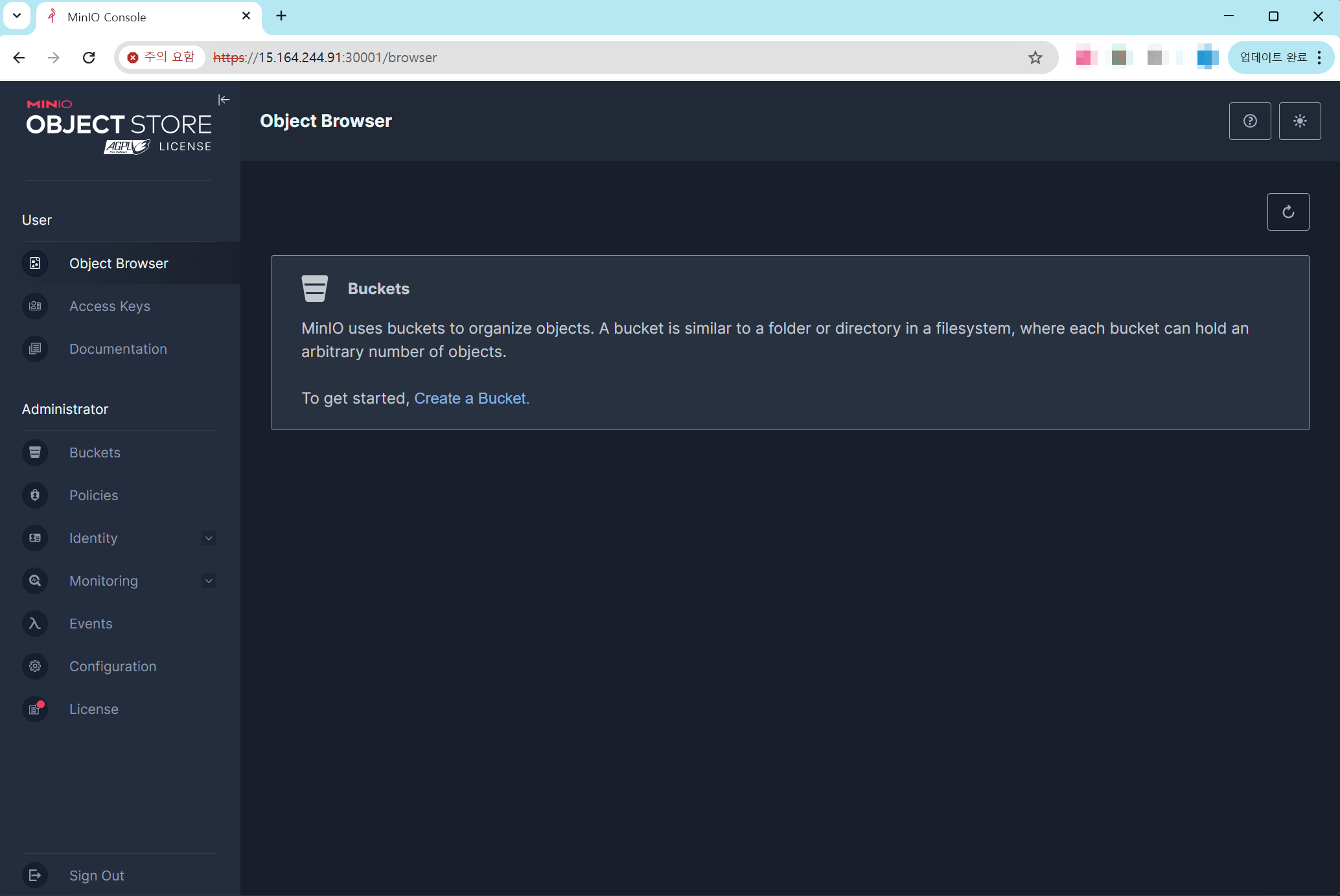
새로고침을 해보면 mybuscket이 생성된 것을 확인할 수 있습니다.

다음으로 DirectPV에서 볼륨 확장을 추가로 테스트 해보겠습니다.
# 현재 정보 (10Gi씩 4개의 볼륨 사용 중)
kubectl get pvc -n tenant1
kubectl directpv list drives
kubectl directpv info

(⎈|default:N/A) root@k3s-s:~# kubectl get pvc -n tenant1
NAME                     STATUS   VOLUME                                     CAPACITY   ACCESS MODES   STORAGECLASS      VOLUMEATTRIBUTESCLASS   AGE
data0-tenant1-pool-0-0   Bound    pvc-e846556e-da9f-4670-8c69-7479a723af37   10Gi       RWO            directpv-min-io   <unset>                 53m
data1-tenant1-pool-0-0   Bound    pvc-08bdde0c-b472-4dfe-8b95-09e59e6aa4d8   10Gi       RWO            directpv-min-io   <unset>                 53m
data2-tenant1-pool-0-0   Bound    pvc-9eba11d7-3331-423c-91d7-2a8f45a08ce3   10Gi       RWO            directpv-min-io   <unset>                 53m
data3-tenant1-pool-0-0   Bound    pvc-88ff8de1-0702-4783-9a24-f63af88dda30   10Gi       RWO            directpv-min-io   <unset>                 53m
(⎈|default:N/A) root@k3s-s:~# kubectl directpv list drives
┌───────┬─────────┬────────────────────────────┬────────┬────────┬─────────┬────────┐
│ NODE  │ NAME    │ MAKE                       │ SIZE   │ FREE   │ VOLUMES │ STATUS │
├───────┼─────────┼────────────────────────────┼────────┼────────┼─────────┼────────┤
│ k3s-s │ nvme1n1 │ Amazon Elastic Block Store │ 30 GiB │ 20 GiB │ 1       │ Ready  │
│ k3s-s │ nvme2n1 │ Amazon Elastic Block Store │ 30 GiB │ 20 GiB │ 1       │ Ready  │
│ k3s-s │ nvme3n1 │ Amazon Elastic Block Store │ 30 GiB │ 20 GiB │ 1       │ Ready  │
│ k3s-s │ nvme4n1 │ Amazon Elastic Block Store │ 30 GiB │ 20 GiB │ 1       │ Ready  │
└───────┴─────────┴────────────────────────────┴────────┴────────┴─────────┴────────┘
(⎈|default:N/A) root@k3s-s:~# kubectl directpv info
┌─────────┬──────────┬───────────┬─────────┬────────┐
│ NODE    │ CAPACITY │ ALLOCATED │ VOLUMES │ DRIVES │
├─────────┼──────────┼───────────┼─────────┼────────┤
│ • k3s-s │ 120 GiB  │ 40 GiB    │ 4       │ 4      │
└─────────┴──────────┴───────────┴─────────┴────────┘

40 GiB/120 GiB used, 4 volumes, 4 drives


# PVC에 patch를 진행해 용량 추가
kubectl patch pvc -n tenant1 data0-tenant1-pool-0-0 -p '{"spec":{"resources":{"requests":{"storage":"20Gi"}}}}'
kubectl patch pvc -n tenant1 data1-tenant1-pool-0-0 -p '{"spec":{"resources":{"requests":{"storage":"20Gi"}}}}'
kubectl patch pvc -n tenant1 data2-tenant1-pool-0-0 -p '{"spec":{"resources":{"requests":{"storage":"20Gi"}}}}'
kubectl patch pvc -n tenant1 data3-tenant1-pool-0-0 -p '{"spec":{"resources":{"requests":{"storage":"20Gi"}}}}'


# 결과 확인
kubectl get pvc -n tenant1
kubectl directpv list drives
kubectl directpv info

(⎈|default:N/A) root@k3s-s:~# kubectl get pvc -n tenant1
NAME                     STATUS   VOLUME                                     CAPACITY   ACCESS MODES   STORAGECLASS      VOLUMEATTRIBUTESCLASS   AGE
data0-tenant1-pool-0-0   Bound    pvc-e846556e-da9f-4670-8c69-7479a723af37   20Gi       RWO            directpv-min-io   <unset>                 55m
data1-tenant1-pool-0-0   Bound    pvc-08bdde0c-b472-4dfe-8b95-09e59e6aa4d8   20Gi       RWO            directpv-min-io   <unset>                 55m
data2-tenant1-pool-0-0   Bound    pvc-9eba11d7-3331-423c-91d7-2a8f45a08ce3   20Gi       RWO            directpv-min-io   <unset>                 55m
data3-tenant1-pool-0-0   Bound    pvc-88ff8de1-0702-4783-9a24-f63af88dda30   20Gi       RWO            directpv-min-io   <unset>                 55m
(⎈|default:N/A) root@k3s-s:~# kubectl directpv list drives
┌───────┬─────────┬────────────────────────────┬────────┬────────┬─────────┬────────┐
│ NODE  │ NAME    │ MAKE                       │ SIZE   │ FREE   │ VOLUMES │ STATUS │
├───────┼─────────┼────────────────────────────┼────────┼────────┼─────────┼────────┤
│ k3s-s │ nvme1n1 │ Amazon Elastic Block Store │ 30 GiB │ 10 GiB │ 1       │ Ready  │
│ k3s-s │ nvme2n1 │ Amazon Elastic Block Store │ 30 GiB │ 10 GiB │ 1       │ Ready  │
│ k3s-s │ nvme3n1 │ Amazon Elastic Block Store │ 30 GiB │ 10 GiB │ 1       │ Ready  │
│ k3s-s │ nvme4n1 │ Amazon Elastic Block Store │ 30 GiB │ 10 GiB │ 1       │ Ready  │
└───────┴─────────┴────────────────────────────┴────────┴────────┴─────────┴────────┘
(⎈|default:N/A) root@k3s-s:~# kubectl directpv info
┌─────────┬──────────┬───────────┬─────────┬────────┐
│ NODE    │ CAPACITY │ ALLOCATED │ VOLUMES │ DRIVES │
├─────────┼──────────┼───────────┼─────────┼────────┤
│ • k3s-s │ 120 GiB  │ 80 GiB    │ 4       │ 4      │
└─────────┴──────────┴───────────┴─────────┴────────┘

80 GiB/120 GiB used, 4 volumes, 4 drives


# 아래 파드 내에서 볼륨 Size 가 20G 로 조금 시간 지나면 자동 확장 반영 된다.
kubectl exec -it -n tenant1 tenant1-pool-0-0 -c minio -- sh -c 'df -hT --type xfs'

(⎈|default:N/A) root@k3s-s:~# kubectl exec -it -n tenant1 tenant1-pool-0-0 -c minio -- sh -c 'df -hT --type xfs'
Filesystem     Type  Size  Used Avail Use% Mounted on
/dev/nvme2n1   xfs    20G   60K   20G   1% /export0
/dev/nvme3n1   xfs    20G   60K   20G   1% /export1
/dev/nvme1n1   xfs    20G   60K   20G   1% /export2
/dev/nvme4n1   xfs    20G   60K   20G   1% /export3
현재 볼륨에서 남은 용량이 있는 경우, PVC를 Patch해서 정상적으로 용량이 추가되는 것으로 확인됩니다.
마지막으로 EC2의 디스크에서 용량이 추가되는 상황도 추가로 테스트 해보겠습니다.
먼저 콘솔에서 각 디스크 용량을 40Gi로 변경했습니다.

이 경우 OS와 DirectPV에서 인식되는지 확인해보겠습니다.
(⎈|default:N/A) root@k3s-s:~# lsblk
NAME         MAJ:MIN RM  SIZE RO TYPE MOUNTPOINTS
loop0          7:0    0 73.9M  1 loop /snap/core22/2111
loop1          7:1    0 27.6M  1 loop /snap/amazon-ssm-agent/11797
loop2          7:2    0 50.8M  1 loop /snap/snapd/25202
loop3          7:3    0   16M  0 loop
nvme1n1      259:0    0   40G  0 disk /var/lib/kubelet/pods/72ee3a1a-4a61-44f0-94b6-a7cc861eb829/volumes/kubernetes.io~csi/pvc-9eba11d7-3331-423c-91d7-2a8f45a08ce3/mount
                                      /var/lib/kubelet/plugins/kubernetes.io/csi/directpv-min-io/f94049e38beb31a7b9cf88a9d48e54c8af90509d141e70ff851eb8cdf87b09f2/globalmount
                                      /var/lib/directpv/mnt/ffd730c8-c056-454a-830f-208b9529104c
nvme0n1      259:1    0   30G  0 disk
├─nvme0n1p1  259:5    0   29G  0 part /
├─nvme0n1p14 259:6    0    4M  0 part
├─nvme0n1p15 259:7    0  106M  0 part /boot/efi
└─nvme0n1p16 259:8    0  913M  0 part /boot
nvme4n1      259:2    0   40G  0 disk /var/lib/kubelet/pods/72ee3a1a-4a61-44f0-94b6-a7cc861eb829/volumes/kubernetes.io~csi/pvc-88ff8de1-0702-4783-9a24-f63af88dda30/mount
                                      /var/lib/kubelet/plugins/kubernetes.io/csi/directpv-min-io/20cd114efbb71cad4c72f66f980b71335e29a50b57ad159a6c18566c3d01eaf9/globalmount
                                      /var/lib/directpv/mnt/7f010ba0-6e36-4bac-8734-8101f5fc86cd
nvme3n1      259:3    0   40G  0 disk /var/lib/kubelet/pods/72ee3a1a-4a61-44f0-94b6-a7cc861eb829/volumes/kubernetes.io~csi/pvc-08bdde0c-b472-4dfe-8b95-09e59e6aa4d8/mount
                                      /var/lib/kubelet/plugins/kubernetes.io/csi/directpv-min-io/3f4d3fabd87e625fc0d887fdf2f9c90a2743b72354a7de4a6ab53ac502d291c6/globalmount
                                      /var/lib/directpv/mnt/ff9fbf17-a2ca-475a-83c3-88b9c4c77140
nvme2n1      259:4    0   40G  0 disk /var/lib/kubelet/pods/72ee3a1a-4a61-44f0-94b6-a7cc861eb829/volumes/kubernetes.io~csi/pvc-e846556e-da9f-4670-8c69-7479a723af37/mount
                                      /var/lib/kubelet/plugins/kubernetes.io/csi/directpv-min-io/28f2fa689cc75aff33f7429c65d5912fb23dfa3394a23dbc6ff22fbaacc112e4/globalmount
                                      /var/lib/directpv/mnt/d29e80c7-dc3b-4a48-9a81-82352886d63f

# 용량이 반영되지 않음
(⎈|default:N/A) root@k3s-s:~# kubectl directpv list drives
┌───────┬─────────┬────────────────────────────┬────────┬────────┬─────────┬────────┐
│ NODE  │ NAME    │ MAKE                       │ SIZE   │ FREE   │ VOLUMES │ STATUS │
├───────┼─────────┼────────────────────────────┼────────┼────────┼─────────┼────────┤
│ k3s-s │ nvme1n1 │ Amazon Elastic Block Store │ 30 GiB │ 10 GiB │ 1       │ Ready  │
│ k3s-s │ nvme2n1 │ Amazon Elastic Block Store │ 30 GiB │ 10 GiB │ 1       │ Ready  │
│ k3s-s │ nvme3n1 │ Amazon Elastic Block Store │ 30 GiB │ 10 GiB │ 1       │ Ready  │
│ k3s-s │ nvme4n1 │ Amazon Elastic Block Store │ 30 GiB │ 10 GiB │ 1       │ Ready  │
└───────┴─────────┴────────────────────────────┴────────┴────────┴─────────┴────────┘
(⎈|default:N/A) root@k3s-s:~# kubectl directpv info
┌─────────┬──────────┬───────────┬─────────┬────────┐
│ NODE    │ CAPACITY │ ALLOCATED │ VOLUMES │ DRIVES │
├─────────┼──────────┼───────────┼─────────┼────────┤
│ • k3s-s │ 120 GiB  │ 80 GiB    │ 4       │ 4      │
└─────────┴──────────┴───────────┴─────────┴────────┘

80 GiB/120 GiB used, 4 volumes, 4 drives
확인해보면 디스크 용량이 추가되어도 실제로 DirectPV에서 인식한 Drive를 확장하는 방법은 없는 것으로 보입니다.
현재 실습 환경은 VM 기반이기 때문에 Disk의 증설이 간단하지만, 실제로 물리 Disk를 사용하는 환경에서는 이런 시나리오가 사실상 불가합니다(또한 DirectPV에서는 LVM이나 다른 기법으로 중간에 스토리지를 확장하는 솔루션을 사용하지 않기를 권장합다)
관련하여 몇가지 이슈를 참고하시기 바랍니다.
https://github.com/minio/minio/issues/14573
https://github.com/minio/minio/issues/4364
실습 환경을 삭제하기 위해서 아래의 명령을 수행합니다.
aws cloudformation delete-stack --stack-name miniolab
마치며
MinIO에서는 Production을 위해서 MNMD(Multi-Node Multi-Drive)를 권장하므로, 각 노드에서 로컬 디스크를 효과적으로 사용하는 방법이 중요합니다. 쿠버네티스 환경에서는 DirectPV라는 방식을 사용할 수 있습니다.
이번 게시물에서는 MinIO의 DirectIO에 대해서 살펴봤습니다. 이를 AWS EC2 환경에서 구성해보고 어떠한 방식으로 동작하는지 살펴봤습니다.
다음 게시물에서는 MinIO의 MNMD를 살펴 보겠습니다.
'MinIO' 카테고리의 다른 글
| [4] MinIO - MNMD 배포 (0) | 2025.09.24 |
|---|---|
| [2] MinIO 사용해보기 (0) | 2025.09.12 |
| [1] MinIO 개요 (0) | 2025.09.12 |


